

Timeline Software - Create timeline rapidly with examples and templates.

Timeline
Timeline is the presentation of a chronological sequence of events along a drawn line that equips a viewer to understand temporal relationships quickly. Timeline is important in understanding history and make scheme. The correct visual representation of events, symptoms or treatments can mean the difference between life and death. Timeline makes it easy for professionals to analyze, plan or layout a series of events in a simple, clear and high quality way. Timeline is also sometimes extended to mean a chronology in tabular, year-by-year paragraphs, or other form.
Automatic Vector-based Timeline Software
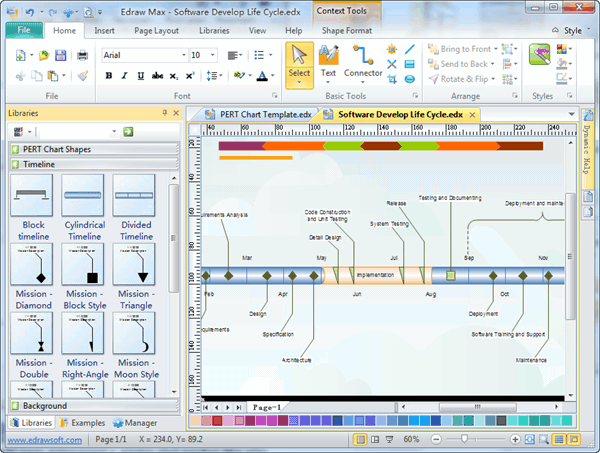
Edraw Max can be applied as an easy vector timeline software with rich examples and templates. It has the tools to make it easy to create a professional-looking timelines, history, schedules, timetables and PERT diagram. Free Timeline is simple yet very powerful - it allows entry of both events and time periods; it scales automatically; it color-codes collapsible timeline groups; it also supports links and images. It can export to PDF, PowerPoint, Word and Graphics.
Please visit the following link to learn how to create a timeline:
Video Tutorial - How to Create a Timeline
Free Download Timeline Diagram Software and View All Examples
System Requirements
Works on Windows 7, 8, 10, XP, Vista and Citrix
Works on 32 and 64 bit Windows
Works on Mac OS X 10.2 or later
Tagged on: Matrix Template
Top Features
- Advanced functionality with automatic functions supported by drag-and-drop interface and point-and-click editor.
- High reliability: Trusted by users around the world. Over 6 million downloads.
- Practical usability: Is to use with predefined elements (hundreds of templates and 8000+ symbols), drag-and-drop interface and dynamic instructions.
- High efficiency: Can generate a timeline in less than 10 minutes. What is more, over 200 types of diagrams are supported.
- Guaranteed maintainability: Offers free technology support and lifelong upgrade chance.
Start to Draw a Timeline
Click here to download Timeline Software. Then you can use the built-in timeline template to create and present your timelines instantly.
Timeline Template
In the start page, you can choose the timeline template in the Project category. Timeline template lets you create great-looking charts quickly using its built-in symbol elements and auto-placement of events.
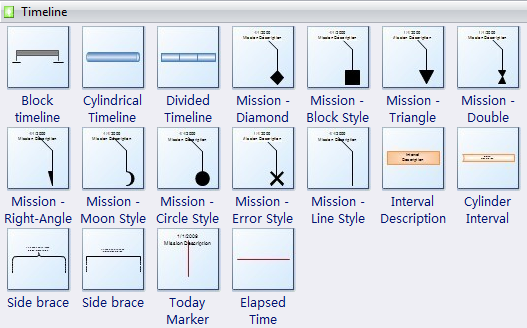
All these symbols are vector and can be recolored and scaled.
Free Timeline Examples
Edraw includes some free examples to help you understand how to draw timeline quickly. The following example shows a simple-to-draw timeline.
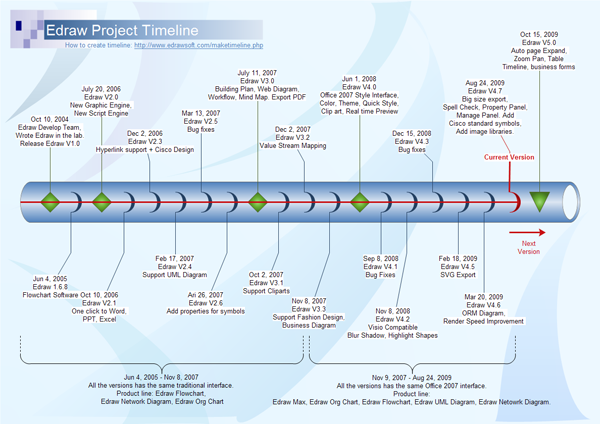
How to draw Timeline
Firstly, drag a timeline bar from the template. There are three basic timeline bar symbols in it. You can choose any one to use as the basic linear timeline axes. Then drag the mission above the axes.
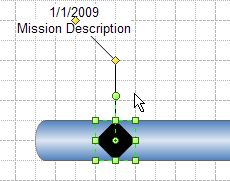
Move the yellow control point to change the position of milestones and interval markers. Double click the text and type the information you want.
You can switch to the Insert menu to add hyperlinks and pictures for the markers. It's easy to change the background. Only drag a background icon from the built-in background template.


