Rack Diagram Complete Guide
Edraw Content Team
Do You Want to Make Your Rack Diagram?
EdrawMax specializes in diagramming and visualizing. Learn from this Rack diagram complete guide to know everything about the Rack diagram. Just try it free now!
When purchasing equipment for your rack, a rack diagram can come in handy. It can help you determine which items to buy and how to organize them. You might be familiar with the word "rack server," especially if you are a professional. But, if you are not, then worry not. A rack server is also known as a rack mount computer, a rack-mounted server, or a server rack. They are mostly found in data centers but can also be found in commercial or small computer companies. Rack servers are essential items in any IT setup. They can be used to hold and organize critical IT systems. In simple terms, rack server mounts are the workhorses of the IT industry that store and protect data processing resources.
Proper organization of a rack server is especially important. It can help prevent problems, make maintenance easy, prevent loss of valuable time trying to trace problems, and save you money. The best way of ensuring this is by using a rack diagram. In this article, we will look at everything you need to know about a rack diagram. We will help you understand what a rack server illustration is, its components, and how you can easily draw one using EdrawMax.
1. What is a Rack Diagram
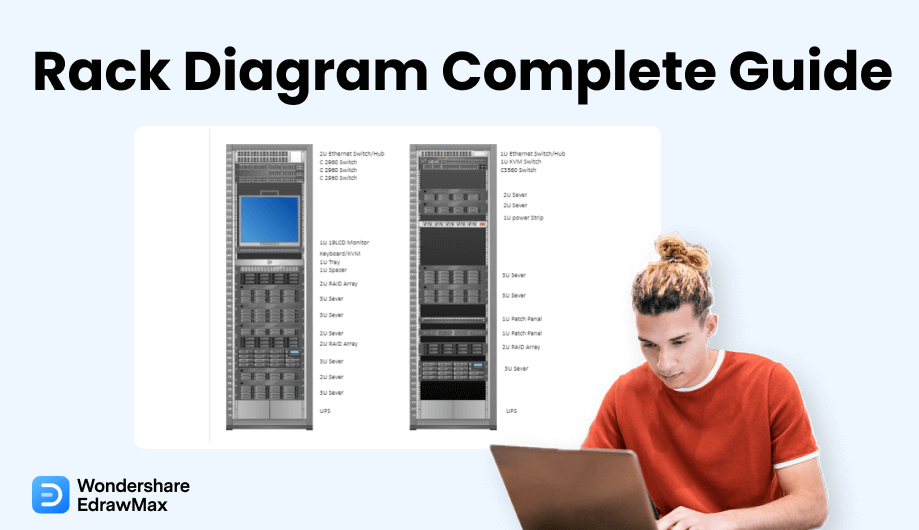
A rack diagram, just as its name implies, is a graphical representation of an organization's rack system. It is commonly used by software developers and software designers to make work easier when documenting and designing rack network equipment.
In short, a rack diagram is simply an illustration that shows the layout of a rack. However, keep in mind that this is not just any of those racks found in the office or at home. Instead, they are those racks that are used to organize and hold servers and other information technology equipment. Creating a rack diagram will help you plan and document your server rack. It will also help reduce errors, save space, help you handle any changes, especially if you will add any equipment, and prevent unnecessary equipment purchases.
A rack diagram is a visual picture representing a rack system commonly used by data centers. Making a server rack diagram is an important part to consider as it will help you organize your rack equipment.
1.1 Components of Server Rack
Components of a server rack includes patch panels, blanking panels, routers, switches, cords and cables, rails, cable management bars and many others. At the point when you're ready to demystify the essential parts or the fundamental design of a server rack, you can all the more effectively recognize the elements you really want and what sort of server will best serve your business.
1.2 What is a Server Rack Used for
Rack servers allow your IT department to organize, safeguard, and preserve your data processing functionality. Whenever you place your system components in a rack console, you build a robust and controllable connection for your business. Most businesses have hundreds, if not thousands, of rack servers, all connected to the very same company's network and trying to keep information processes running smoothly.
Most rack servers are stationary and composed of metal. However, rack servers in military sites are built to be transportable for operating in the field, with transporting cases, dust-proof coverings, mobile cooling equipment, rubberized cushions, and other design aspects that allow them to maintain their server platforms on the move.
2. Preparations Before Starting a Rack Diagram
2.1 Tips on How to Organize Your Server Rack
Proper rack organization should start with selecting the right size of racks and cabinets. The most common type is the 19-inch-wide network rack, however, there is a wide range of depths and heights available in the market. Just keep in mind that the racks should be tall enough for the appropriate power, cooling, and space.
High-performance network servers will require racks that are deep enough to not only accommodate their components, but also ensure airflow and easy access.
Determine which items should be housed in the rack. You can organize them according to multiple small workloads, larger workloads, or the type of workload.
Identify where each component should be installed. For instance, heavier equipment can be placed at the bottom while the lighter ones above. Therefore, a rack diagram is essential since it can help you organize the items well and avoid the trouble of moving the component later.
Ensure there is proper cooling. Keep in mind that some equipment consumes a lot of power, which generates a lot of heat. Therefore, ensure that there is enough space between the items and consider an in-rack cooling system to guarantee adequate cooling.
Plan proper cable management: Keep sure that the cords are neat to avoid any twisting or bending. Also, separate network cables and power cords to prevent electromagnetic interference.
2.2 Drawing Guidelines
Creating a rack diagram can help you determine the correct size of the rack that fits your budget as well as help you decide on the best setup for the rack. And to do it right, then there are several tips that you should consider before starting the rack diagram.
Step #1 Write a List of All the Rack Items
Drawing a rack diagram without considering its items first will create problems. You will find that you do not have enough space for equipment, patch panels, and cables. So, before you get to draw, write a list of all the rack components available and consider if you are planning to purchase other items in the future. This way, you will be able to have the best space for all rack items. Identify their shapes and the number of racks you will need. Also, do not forget to write down a list of other special items such as cables, raceways, and airflow. Make sure that you have also determined the measurements of each item in the list.
Step #2 Know the Size of your Rack
Another important tip you need to consider is the size of the rack. If you are planning to purchase a rack, then do not forget to check on the available space you have. It is only when you have determined the size of the rack that you can be able to draw an effective diagram. A networking rack typically uses a standardized hole spacing, which is known as a rack-mount unit (RMU). Thus, if you are drawing the server rack by hand, then you will need to know the size and convert it to RMU. However, everything can be done much faster and with accuracy when you use EdrawMax.
Step #3 Network Design
Check the network design before drawing the rack illustration. By doing so, you will be able to organize your rack better. Make sure to determine where to place the software and hardware components items in the server rack diagram. It is only when you have prepared enough that you can create a well-organized rack diagram. You can move to the next step once you have checked the tips above.
3. How to Draw a Rack Diagram in EdrawMax
As you have now noticed, creating a rack diagram can be time-consuming and exhausting, especially if you are drawing it on paper. You will need to do a lot of calculations of the measurements as well as draw each item to scale. Besides, designing it on paper will be expensive and you will end up with too many errors. And this may bring up organizing problems.
EdrawMax is well equipped to design a Rack Diagram. There are only a couple of steps that you need to follow in order to easily create it, like:
Step1 Open EdrawMax and Login
The very first step that you need to follow is to install EdrawMax in your system. Go to EdrawMax Download and download the rack diagram software depending upon your operating system. If you need remote collaboration with your office team, head to EdrawMax Online and log in using your registered email address.

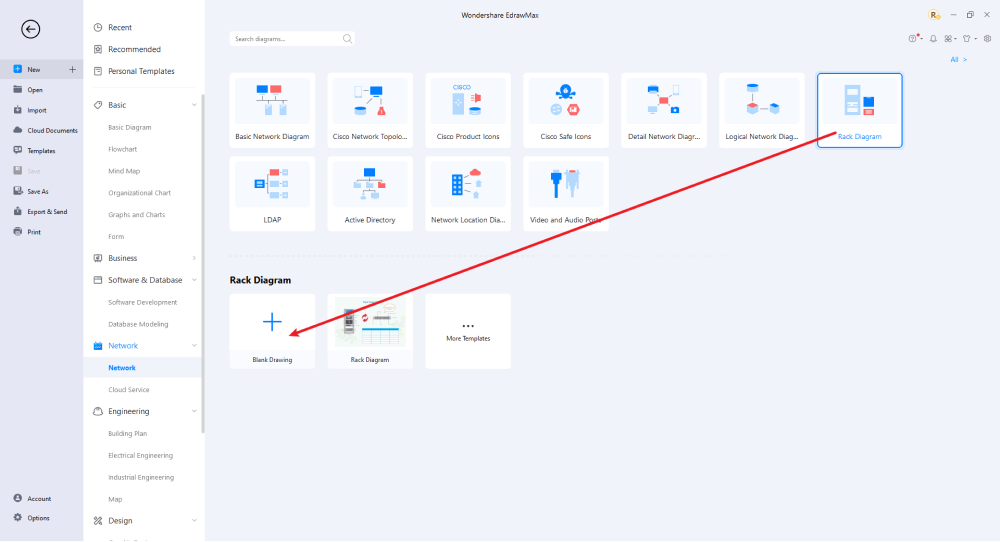
Step2 Select a Template
After launching, the Home screen opens by default. Head to the Template bar and search for Network Diagrams in the search box. In-built templates specific to your search will appear on the screen. EdrawMax features a large library of templates. We have more than 25 million registered users who have produced thorough Templates Community for each design. Select the template you like and click Use Immediately to open it in a new window for customization.

Step3 Create From Scratch
From the EdrawMax homepage, you will find the '+' sign that takes you right to the canvas board, from where you can start designing the rack diagram from scratch. Coupled with your technical expertise, you can use a wide range of symbols to draw a detailed rack diagram.
Step4 Select Symbols
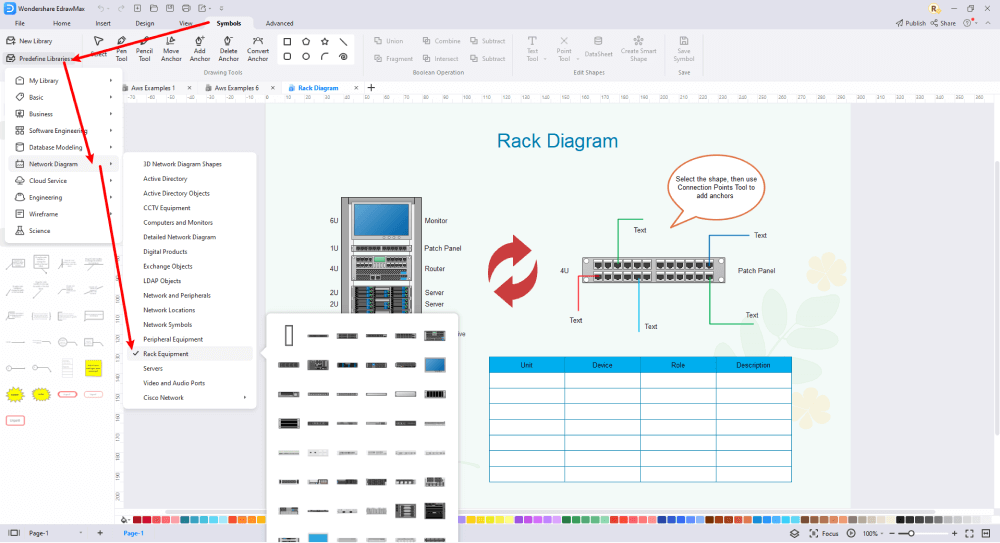
EdrawMax includes a large number of symbol libraries. You may quickly build any type of diagram with over 26,000 vector-enabled symbols. If you can't locate the symbols you need, you can easily import some images/icons or build your own shape and save it as a symbol for later use. Simply go to the 'Symbols' part of EdrawMax and select the 'Predefined Symbol' section from the top toolbar. Hundreds of symbol categories are accessible for you to utilize and incorporate into your rack diagram.
Step5 Add Components
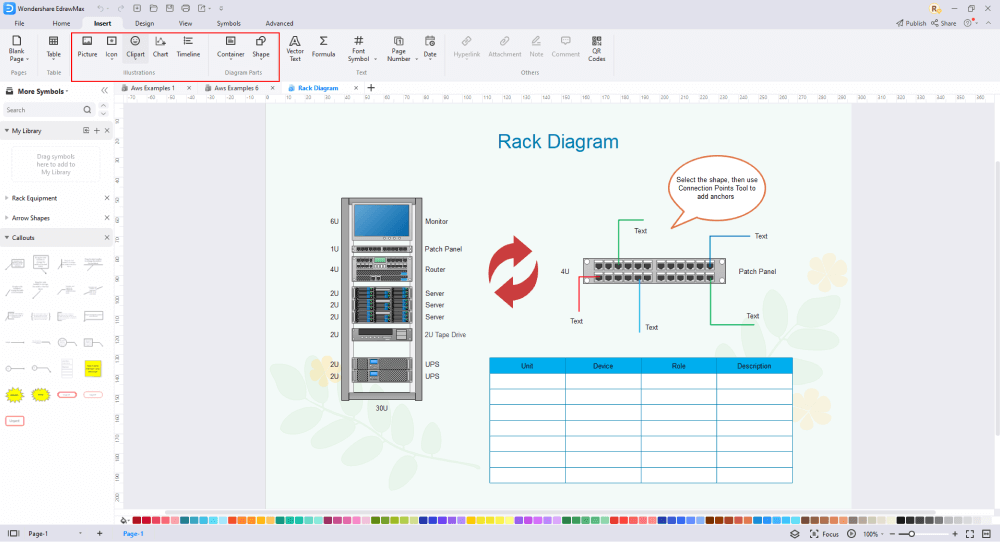
After you have sketched out the basic pieces, you may customize the typefaces, colors, and other details by selecting the right or top menu to make your Rack design more visually appealing. Also, feel free to draw ideas from other layouts on Templates Community and transfer some of the photos or features that you think would go well with your rack design.
Step6 Wrap it up
Once the rack design is complete, you may engage with your workgroup to get their feedback by using our Cloud-based files; for one Rack example, everyone gets free 100M cloud services. EdrawMax supports exporting data into a variety of categories, including Graphics, Microsoft Office, HTML, PDF, Visio, and others. You can also share via social networks or emails. You can also print it or display it to others by utilizing "Presentation Mode."

Basically, it is simple to create a rack diagram in EdrawMax, just grab a template and keep customizing, drag and drop professinal rack diagram symbols to make your plan better. If you are still confusing about how to make a rack diagram in EdrawMax, you can find more tutorial videos from our Youtube
4. Rack Diagram Examples
There are three popular rack diagram templates that you can use in EdrawMax. Simply log in to your account and search for these templates. Double-click on your preferred template and customize it as per your liking. Some of the rack diagram examples available in EdrawMax include:
Example 1: Server Rack Diagram
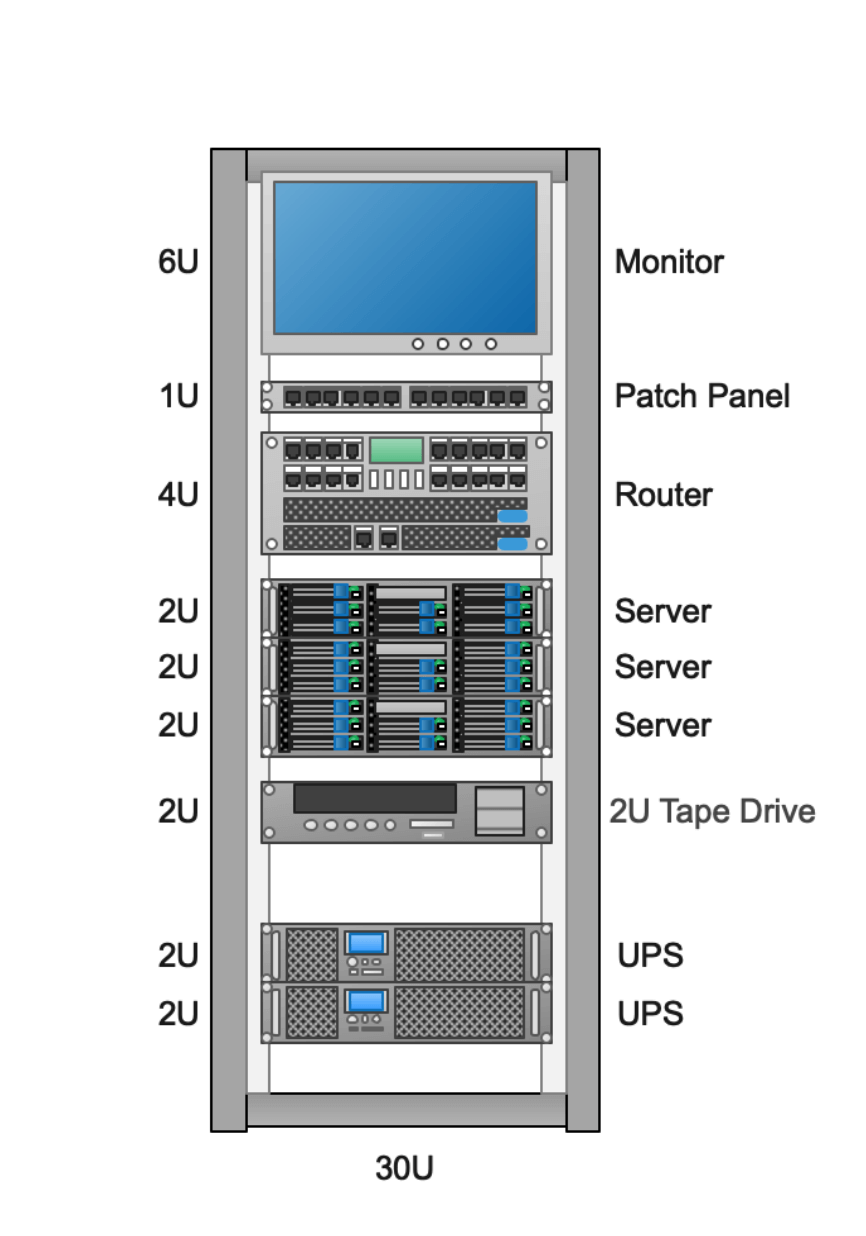
This is an example of a simple server rack diagram. As per the illustration below, you can see all the items included in the rack such as a monitor, patch panel, server, etc. The diagram can be helpful, especially for novices or people who have no idea how to create a rack diagram. It is easy to understand and can be customized. You can change the labels, add symbols, and adjust the icons or items to match your requirements.


Example 2: Rack Elevation Diagram
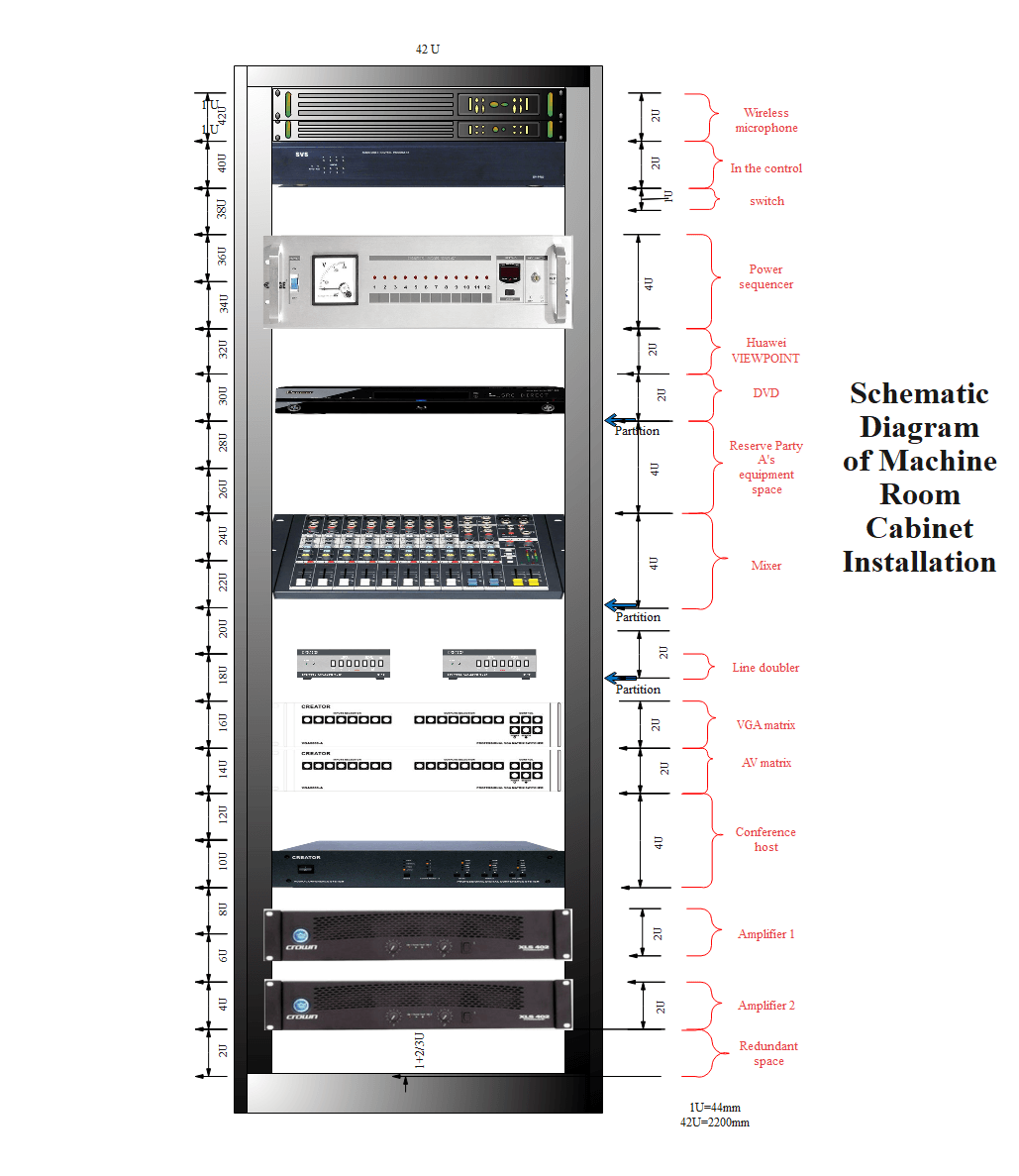
Here is a 42U audio and video rack elevation diagram. It includes equipment like a power amplifier, mixer, and so much more. Use this template for an audio and video rack. The installation interface included in the diagram includes a VGA matrix, AV matrix, DVD, power sequencer, switch, central control, wireless microphone, line multiplier, conference host, and power amplifiers 1 and 2. You can adjust the labels, symbols, and measurements accordingly.
Example 3: Rack Layout Diagram
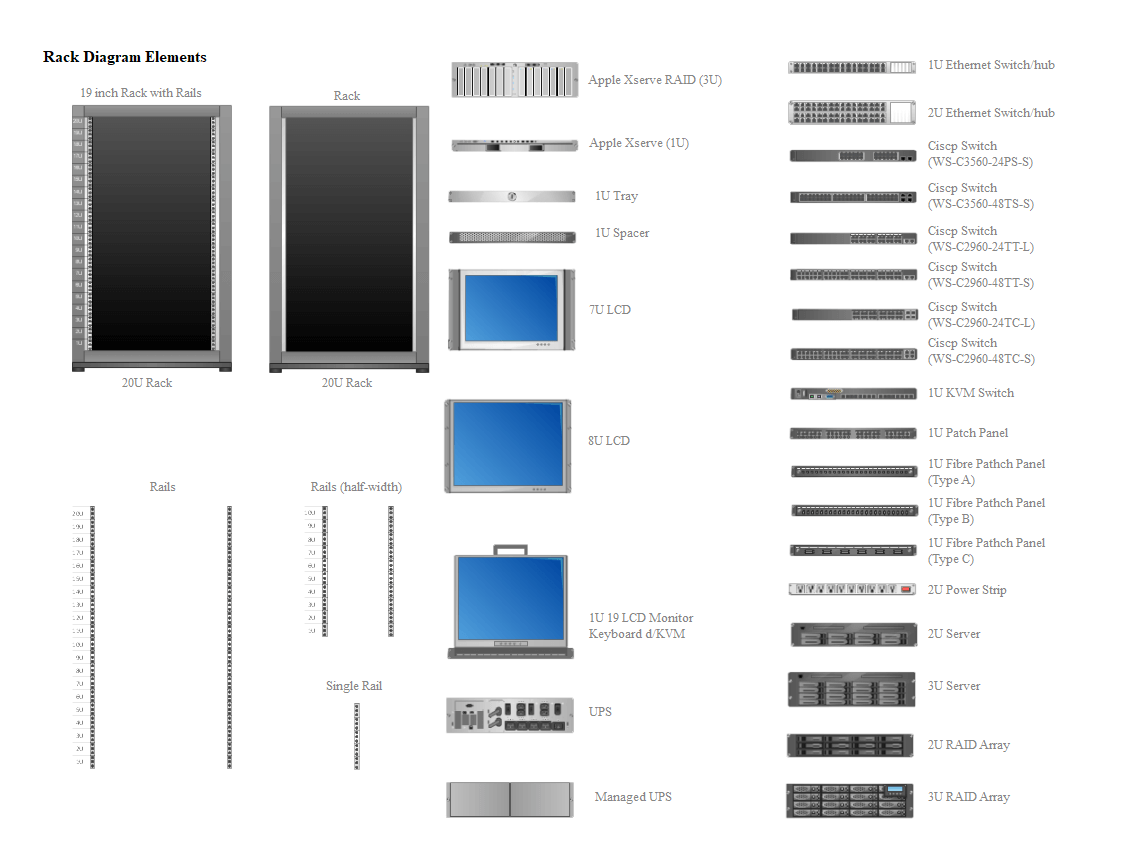
This rack layout diagram can be used to manage and track data center assets. The templates include different items that you can drag to the right and place on the racks. There are two racks as shown on the template including a 19-inch rack with rails. Moreover, this example of a rack diagram has two monitors: 7U LCD and 8U LCD. Other pieces of equipment in the picture include a 2U server, 3U server, switch, power strip, Ethernet switch, Apple Xserve RAID, UPS, single rail, half-width rails, and more. Users can change the labels and insert the items on the racks according to their rack system.
5. Free Rack Diagram Software
Drawing a rack diagram on paper by hand is too complex and exhausting. And so are other online tools, which can also be difficult to use. You might miss some vital details or have too many errors when drawing on paper. That is why it is recommended to use EdrawMax, a professional and free rack diagram software that is user-friendly and easy to use.
EdrawMax is an all-inclusive diagramming tool that you can use to create not only a rack diagram but other graphical illustrations as well. With well-equipped rack symbols, fonts, and so much more, making server rack representations could be as simple as possible. Moreover, with EdrawMax, users can customize their diagrams and save their work in multiple formats.
The best EdrawMax features that can assist you in your Rack diagram:
- EdrawMax rack diagram software is compatible with multiple devices including Windows, Linux, and Mac devices. So, you can access diagrams online anywhere and at any time.
- Over 280 types of diagrams including flowcharts, tree diagrams, mind maps, architectural diagrams, wiring plans, and more.
- Export your work across a wide range of format options such as HTML, document formats like PowerPoint, Word, and PDF, image formats like PNG and JPEG and so much more.
- EdrawMax has a huge library of customizable templates to meet everyone's needs. Professionals always update these templates with creative ideas.
- Advanced user-friendly UI. You will feel right at home even with no experience in design. A complete set of symbols and general art tools to help you to tailor your drawings according to your liking.
- Easy to draw an idea or an illustration. You can use any of the many options available to edit and modify your work endlessly.
 EdrawMax DesktopEdrawMax Online
6. Final Thoughts
As you have seen above, a rack diagram is a representation of a rack system. It can help you organize your rack, decide on the setup, and determine the right size of the rack. That is why you need a rack diagram. EdrawMax is a reputable professional software that you can use to create high-quality server diagrams and other visual representations. Unlike other designing software, EdrawMax is user-friendly and accessible across multiple platforms that can greatly help in designing the best rack diagram!
The moment you start using EdrawMax , you will realize that the tool comes with several amazing features that ease your efforts in creating the Rack diagrams and help you share the designs using the easy sharing option. With EdrawMax, you can export your file into multiple formats, and share your works on different social media platforms, like Facebook, Twitter, LinkedIn, and Pinterest. All in all, EdrawMax is a wonderful tool that caters to all of your designing and drawing needs.

Network Diagram Complete Guide
Check this complete guide to know everything about the network diagram, like network diagram types, network diagram symbols, and how to make a network diagram.
You May Also Like
AWS Architecture Diagram Complete Guide
Knowledge
LAN Diagram Complete Guide
Knowledge
MAN Diagram Complete Guide
Knowledge
GCP Architecture Diagram Complete Guide
Knowledge



