Office OCX - Word OCX, Excel OCX, PowerPoint OCX

With the advent of the Edraw Office Viewer Component, it is simpler than before to create Office applications that can interact with the office automation.
Click Here to Download Office OCX - Support Word, Excel, PowerPoint, Visio and Project
 5 MB
5 MB
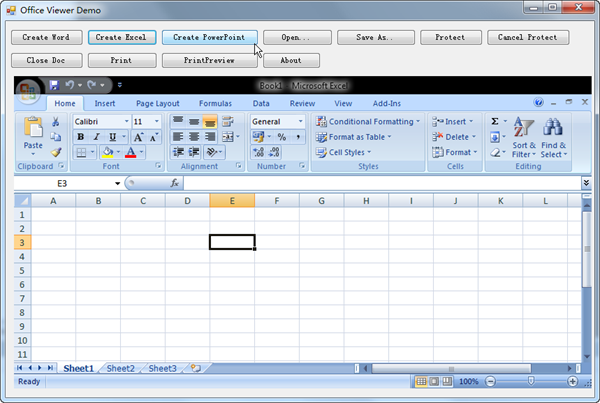
This following codes describe an approach to display MS office window within c# form.
using System;
using System.Collections.Generic;
using System.ComponentModel;
using System.Data;
using System.Drawing;
using System.Text;
using System.Windows.Forms;
namespace edofficedemo
{
public partial class Form1 : Form
{
public Form1()
{
InitializeComponent();
}
private void CreateWord_Click(object sender, EventArgs e)
{
axEDOffice1.CreateNew("Word.Application");
}
private void CreateExcel_Click(object sender, EventArgs e)
{
axEDOffice1.CreateNew("Excel.Application");
}
private void CreatePpt_Click(object sender, EventArgs e)
{
axEDOffice1.CreateNew("PowerPoint.Application");
}
private void Open_Click(object sender, EventArgs e)
{
axEDOffice1.OpenFileDialog();
}
private void SaveAs_Click(object sender, EventArgs e)
{
axEDOffice1.SaveFileDialog();
}
private void Protect_Click(object sender, EventArgs e)
{
if(axEDOffice1.GetCurrentProgID() == "Word.Application")
{
axEDOffice1.ProtectDoc(2);//wdAllowOnlyFormFields
}
else if(axEDOffice1.GetCurrentProgID() == "Excel.Application")
{
axEDOffice1.ProtectDoc(0);//XlProtectTypeNormal
}
}
private void CancelProtect_Click(object sender, EventArgs e)
{
if (axEDOffice1.IsOpened())
{
axEDOffice1.UnProtectDoc();
}
}
private void CloseDoc_Click(object sender, EventArgs e)
{
if(axEDOffice1.IsOpened())
{
axEDOffice1.ExitOfficeApp();
}
}
private void PrintDoc_Click(object sender, EventArgs e)
{
if (axEDOffice1.IsOpened())
{
axEDOffice1.PrintDialog();
}
}
private void PrintPreview_Click(object sender, EventArgs e)
{
if (axEDOffice1.IsOpened())
{
axEDOffice1.PrintPreview();
}
}
private void btnAbout_Click(object sender, EventArgs e)
{
axEDOffice1.AboutBox();
}
private void Form1_Resize(object sender, EventArgs e)
{
Control control = (Control)sender;
axEDOffice1.SetComponentSize(control.Size.Width-32,
control.Size.Height-130);
}
}
}
The Office OCX can be used at any programming language which supports ActiveX Control such as C#, WPF, Delphi, Perl, VB, VB.NET, ASP.NET, PHP, JSP and HTML. The component supports seamless integration with Office 97, Office 2000, Office 2003, Office 2007 and Office 2010.
Embed MS Office in ASP.NET Program




