Embedding Office Word, Excel, PowerPoint in ASP.NET, HTML, ASP or PHP

Office Viewer Component allows developers to embed Word, Excel, PowerPoint in ASP, HTML, ASP.NET or PHP language.
The component supports seamless integration with Office 97, Office 2000, Office
2003, Office 2007 and Office 2010.
Edraw Office Viewer Component support embedding Office documents in your
application by implementing a full featured ActiveX document container. Now you
can create, open, edit, view and save office documents such as *.doc, *.docx, *.xls,
*.xlsx, *.ppt, *.pptx etc in the web page. With Office component
you can have Office run embedded inside your custom solution.
Click Here to Download Office Viewer Component - Support asp.net project for Word, Excel, PowerPoint, Visio and Project
 5 MB
5 MB
Office Viewer Component Online Demo
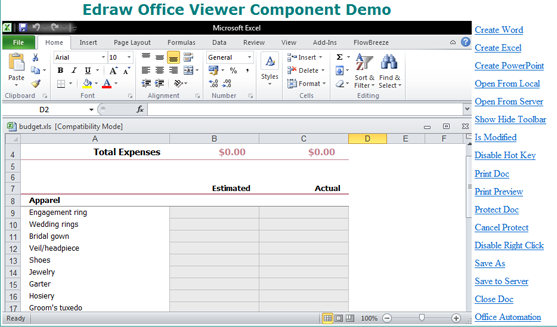
Figure 1: Embedding and Displaying Excel in ASP.NET Page.
Use the officeviewer.cab file
The office control can be used in web application. It is a standard ActiveX Control and run at the client. So the developers need to embed the component at the html Object tag.
<object classid="clsid:
7677E74E-5831-4C9E-A2DD-9B1EF9DF2DB4" id="EDOffice" width="100%" height="100%"
codebase="http://www.yoursite.com/download/officeviewer.cab#7,1,0,168">
</object>
Note: You should put the officeviewer.cab file in your own site and change the codebase url when you distribute the component.
You can view the html samples in the install folder\samples\html folder.
The EDOffice.cab file is available in the install folder. You can create your own cab file.
Why do I fail to download the ActiveX control on the client machine?
The failure of loading ActiveX control has the following possible causes:
1. The security settings of IE on the client machine are incorrect.
Please verify the following security settings of IE to
"Prompt" or "Enabled":
a) Download signed ActiveX controls
b) Run ActiveX Controls and plug-ins
c) Script ActiveX controls marked safe for scripting
The dialog box of the security setting can be launched from menu Tools>Internet
Options. Then select the security tab.
How to add Edraw Office Component to your ASP.NET project
1. Open Visual Studio.
2. Create a new ASP.NET project.
3. Do not attempt to add the Edraw Office Viewer Component to the Toolbox. It is
a client component. You can add it as the HTML Object.
4. Copy all files at the ASP_c#\ to the new project folder. (UploadAction.aspx
UploadAction.aspx.cs Default.aspx.cs Default.aspx Tester.doc)
5. Then add existing items...
6. Modify the Server Port in the Default.aspx.
6. Run.
Use the Javascript to Open, Save, Print Office Document
You can write the javascript or vbscript code in the asp.net, php, html, asp page to call the methods of Edraw Office Viewer Component.
<script ID=clientEventHandlersJS language=javascript>
<!--
function CreateWord()
{
document.all.OA1.CreateNew("Word.Application");
}
function CreateExcel()
{
document.all.OA1.CreateNew("Excel.Application");
}
function CreatePpt()
{
document.all.OA1.CreateNew("PowerPoint.Application");
}
function OpenFromLocal()
{
document.all.OA1.OpenFileDialog();
}
function OpenFromServer()
{
var sPath= window.prompt("Type the file url:", "http://www.ocxt.com/demo/samples/sample.doc");
document.all.OA1.Open(sPath, "Word.Application");
}
function PrintDoc()
{
if(document.all.OA1.IsOpened()){
document.all.OA1.PrintDialog();
}
}
function PrintPreview()
{
if(document.all.OA1.IsOpened()){
document.all.OA1.PrintPreview();
}
}
</script>
Clear the ActiveX CAB File from IE Cache
For IE7 or IE8
1. Open a new Internet Explore.
2. Go to Internet Explorer, and click the "Tools" button in the left of browser, and then click Manage Add-ons.
3. Click Toolbars and Extensions.
4. Double Click the add-on you want to delete. In the pop up message box, you can click the Delete button in the bottom.
For IE6
IE Toolbar > Options > General > Setting > View Object...
Then delete the Edraw Viewer Component for Word.
About the IE Protection Mode
The component can not run at the IE protection mode. So the client needs to add the site in IE trusted site list. The component will pop up the reminder dialog if it run at the IE protection mode.
With the Office Viewer Component, it's easy to host the MS Office in a custom solution and extend the function by the office automation.
Embedding MS Word, Excel, PowerPoint into a WPF Application
Embedded MS Word Document in HTML
Disables MS Word Standard Command




