Floor Plan Symbol
Edraw Content Team
The first thing that comes to our mind when we hear floor plans is a property's blueprint. Floor plans are a visual depiction of everything in a space, interior or exterior. It can be your walls, doors, cabinets, furniture, electrical appliances, and more. Designers and builders use these elements to make sense of the layout and plan it accordingly.
We call them floor plan symbols - the universal language of floor plans accepted worldwide. Let's learn all about these symbols, their meaning, abbreviations, and how they are used.
In this article
What are Floor Plan Symbols?
A typical floor plan is a 2D representation of your property with various structural elements, called the floor plan symbols. Simply put, floor plan symbols represent the size, scale, and location of the things in your house, both interior and exterior.
These industry-standard floor plan symbols help the designers and viewers understand the building layout against the mechanical, interior, and exterior details. Each shape is crafted with meaning, and so is recognized universally.
16 Common Types of Floor Plan Symbols & More
Floor plan symbols are a unique language accepted worldwide. Whether you are designing a residential or commercial space, room, or a section of the room, some floor plan symbols are frequently used. Let's check them out, so next time, you know where and how to start your 2D property design.
Wall Symbols
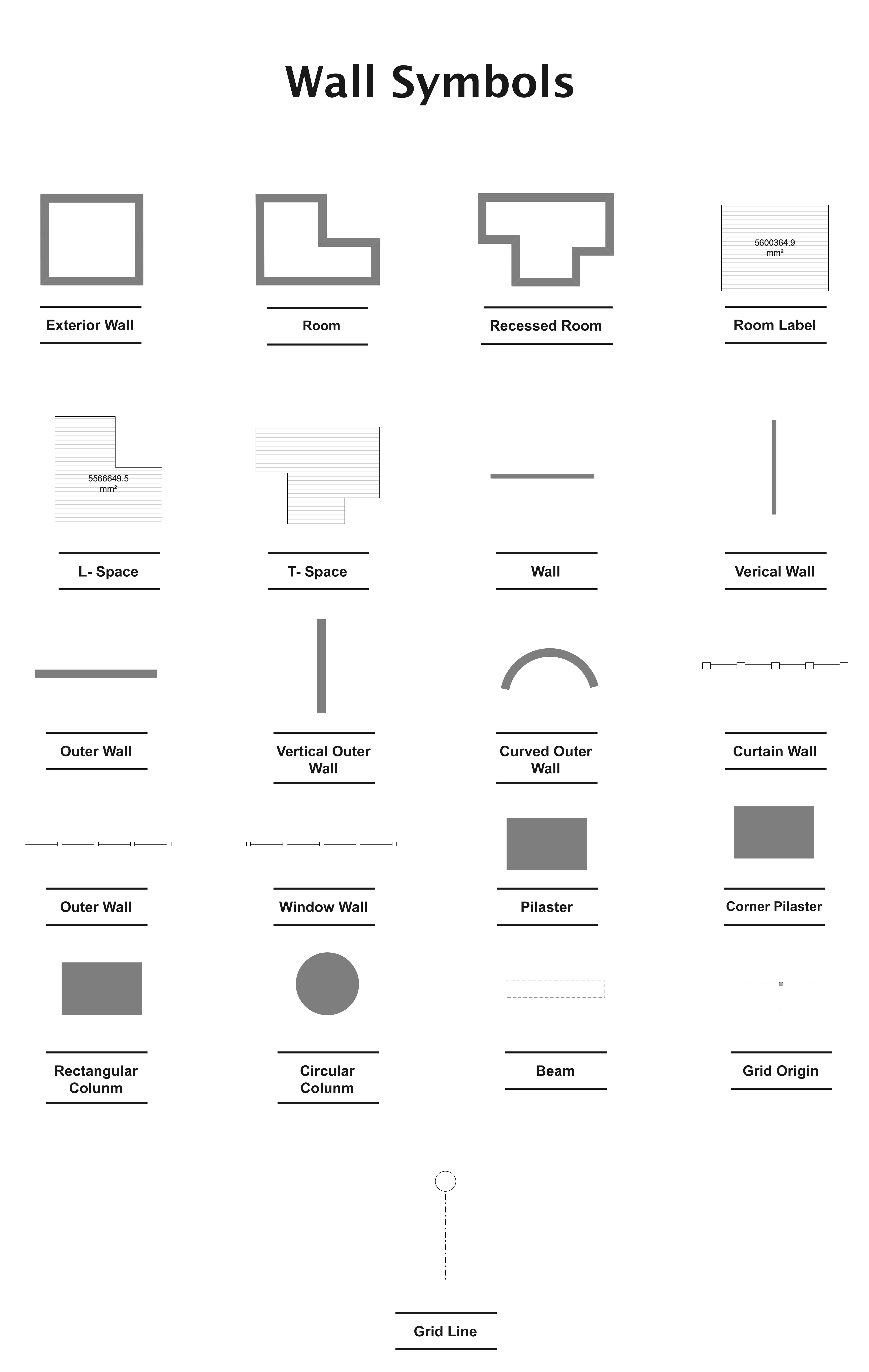
Walls are the foundation of a building's blueprint. In a floor plan, the thick wall symbols are generally used to establish the exterior. Moreover, the thin wall symbols divide the interior (rooms, sections, etc).
But exceptions are always there, depending on pattern, design, and size. Hence, it is best to look at some varying types of wall symbols.
- Structural walls are typically used for the exterior. Aligning these lines is the first step in plotting a floor plan.
- Bearing walls can be external or internal. These essentially support the weight of the building. Their thickness differentiates them from structural walls.
- Partition walls are interior walls separating rooms and different sections of a building.
Door Symbols
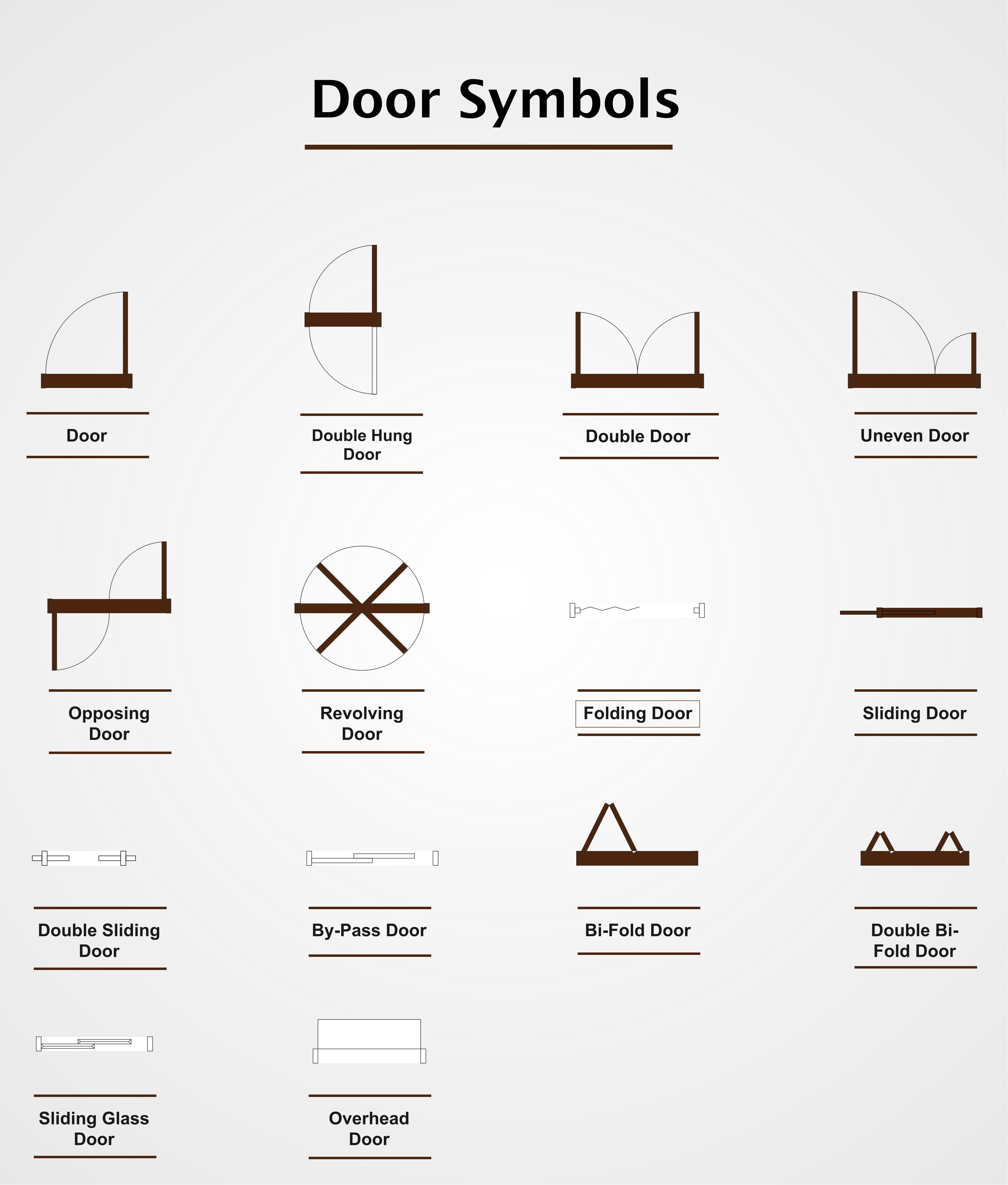
Doors are the opening to a space, a barrier to enter or exit this space. Gaps and small lines between the walls represent the doors in a floor plan. These can be straight and curved lines for sliding and hinged doors, respectively.
There are different types of door symbols, depending on the type, swing, etc. Let's check out a few common examples to get a sense of their purpose.
- Open door symbols: A gap between the walls.
- Sliding door symbols: Two thin lines extending from a black space.
- Pocket door symbols: Sliding doors when they are open. The symbol is similar to the sliding door one, with only one set of lines slipping inside the other.
- Single door symbols: A straight line perpendicular to the wall and a curved line in the direction of the door opening.
- Double doors: Two curved lines joining in the center. It looks like the letter M.
Window Symbols
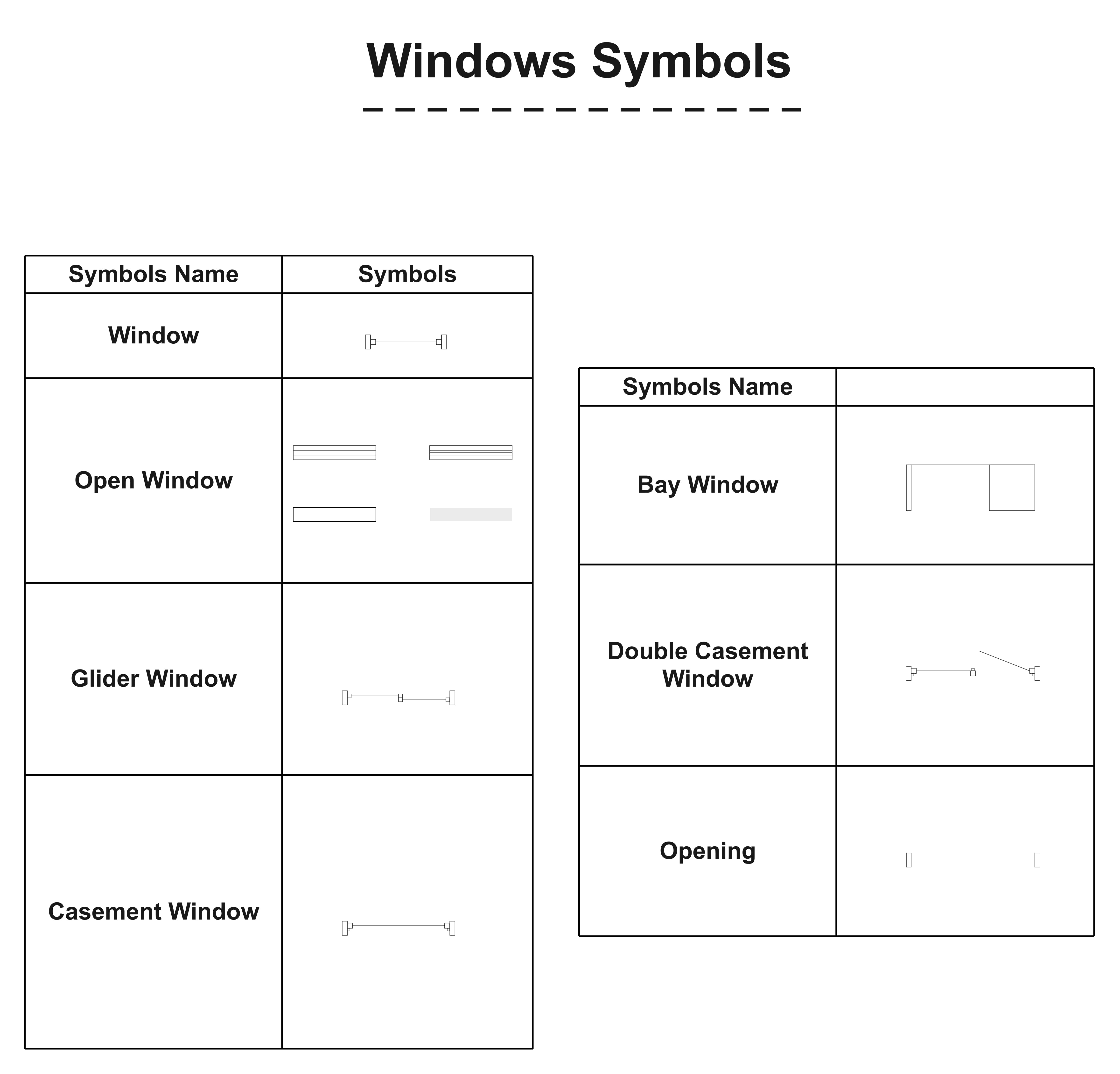
Often used for decoration, a window is an opening in a wall or a roof for air and light. Windows in a floor plan symbol guide are easy to identify. Just spot a break in the wall, connected by a series of three thin lines. Here are some popular window-floor plan symbols.
- Standard fixed window symbols: Straight line within a rectangle.
- Sliding glass window symbols: Three parallel lines within a wall.
- Casement window symbols: arcs within walls to identify their opening.
Plumbing and Piping Symbols
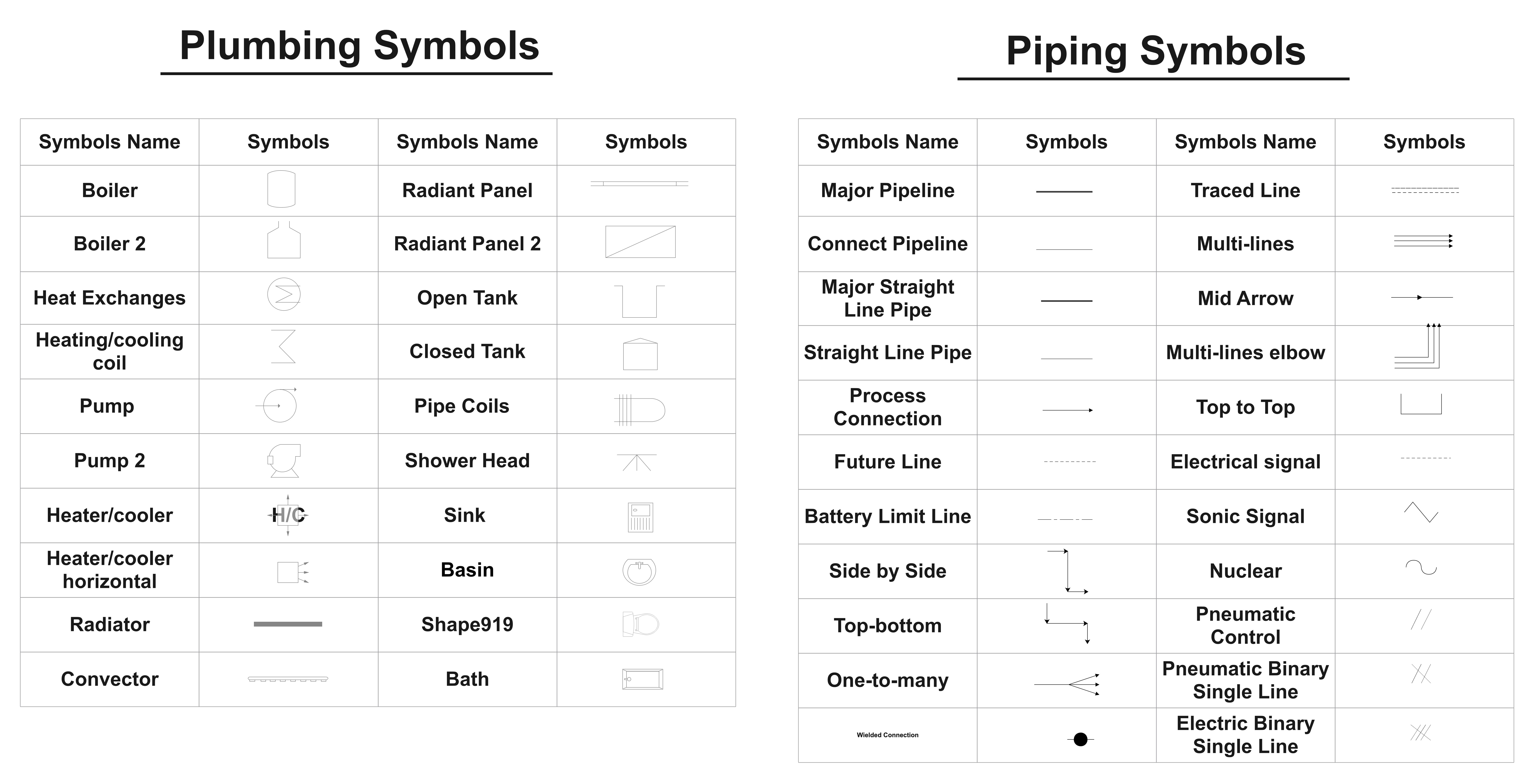
As the name suggests, plumbing tells us about the water flow through pipes in a house or a building. Hence, the floor plan symbols used for plumbing include pipes, valves, fixtures, tanks, etc. Such symbols are often further categorized into piping and plumbing symbols.
- Plumbing symbols typically plot plumbing elements, such as boilers, pumps, heaters, heat exchanges, etc.
- Piping symbols indicate the piping infrastructure of the plan. Examples include major pipelines, battery limit lines, heat trace, etc.
HVAC Symbols
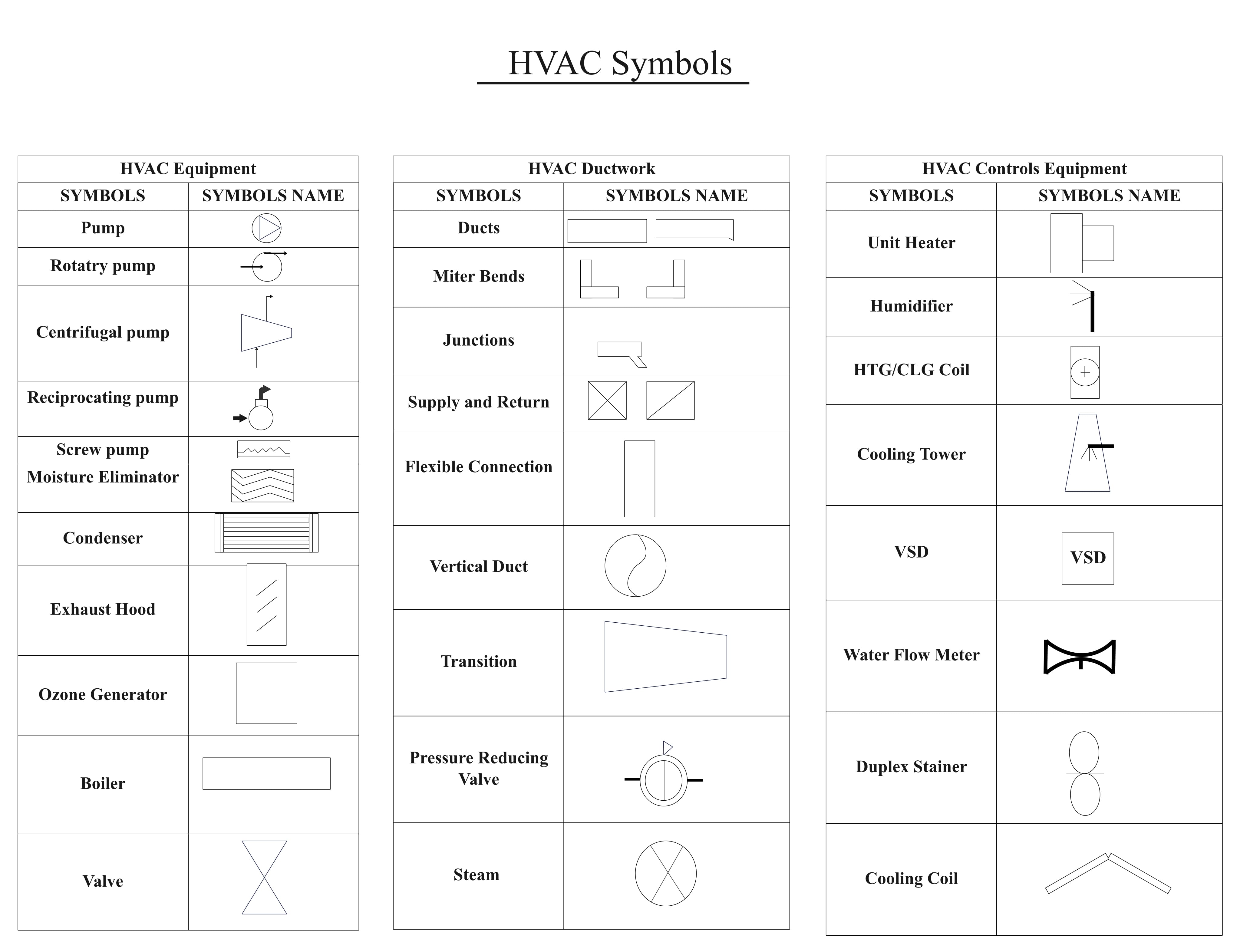
HVAC stands for Heating, Ventilation, and Air Conditioning. In a schematic and circuit floor plan, symbols are used to depict the layout of HVAC. The selection of HVAC symbols depends solely on the house configuration and the owner's desire.
Typically, HVAC symbols come in the following categories.
- HVAC equipment symbols showcase the electrical equipment and products in the HVAC setup. Common equipment icons include fans, air filters, DX units, drivers, etc.
- HVAC ductwork symbols illustrate the ducts and VAV boxes within the plan. Typically, rectangles with varying structures describe these ducts.
- HVAC control and equipment symbols depict the control features of the system, such as supply ducts, propeller fans, speed regulators, etc.
Seating Chart Symbols
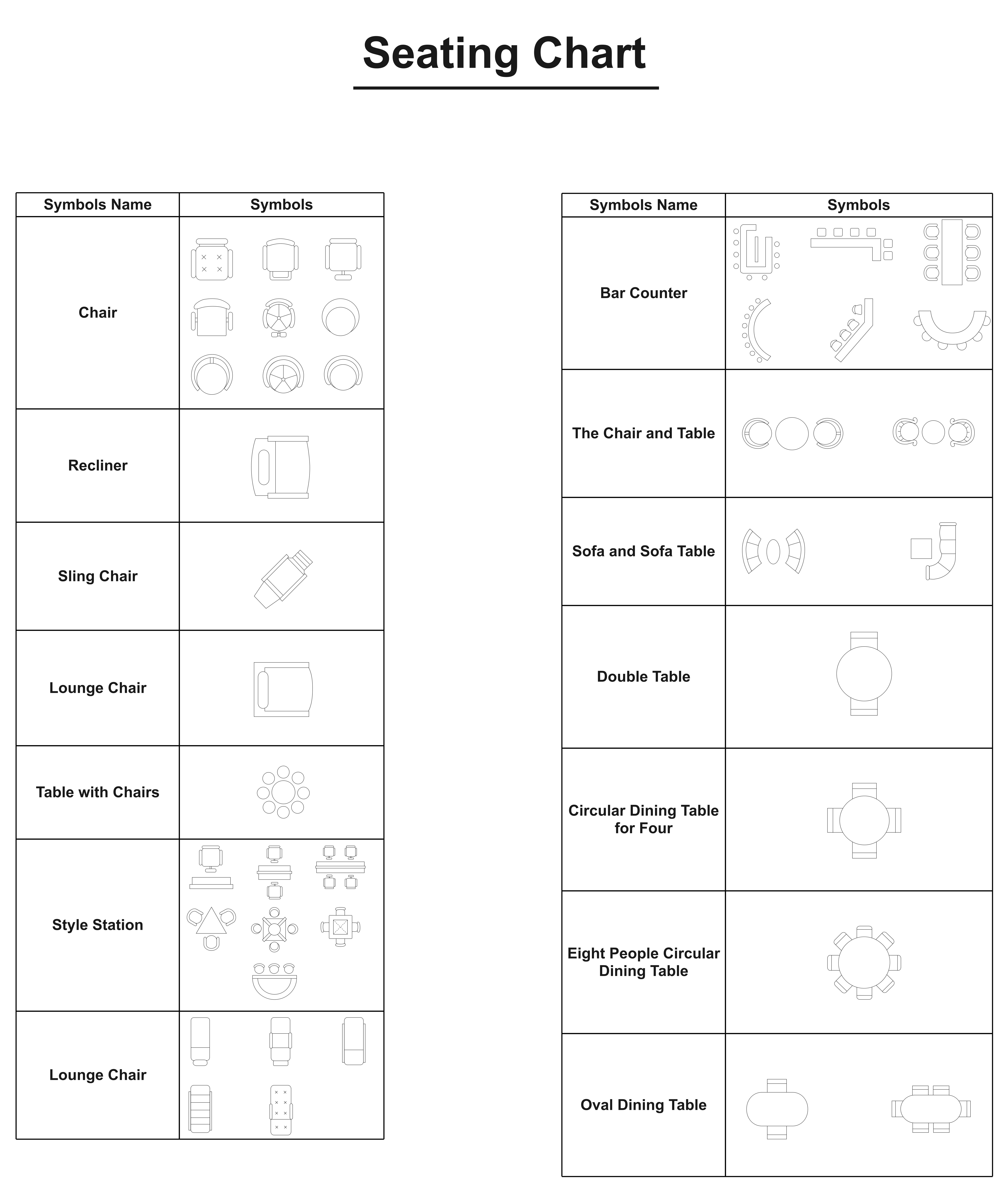
Seating chart symbols allow for plotting a seating arrangement, such as sofas, chairs, and loungers. Designers can use variations of these symbols to indicate a furniture piece for a specific number of people. A combination of seating symbols is used in different settings, like a classroom, a cinema hall, or an afternoon tea party.
- Chair and table symbols can plot a space for a range of activities, such as writing, eating, office work, etc.
- Sofa symbols mainly create a seating chart for in-house events and the living room.
Fire and Emergency Symbols
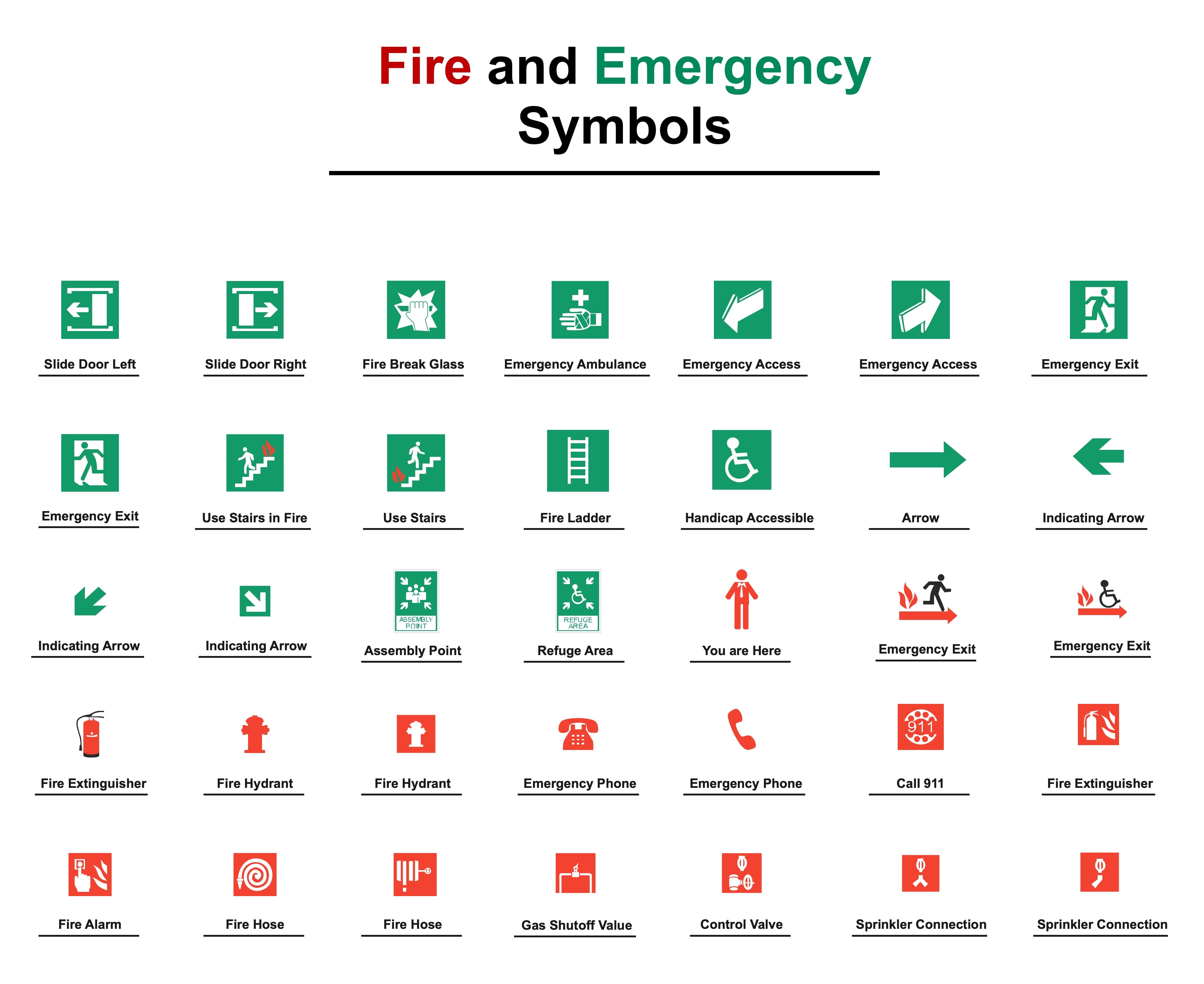
Safety is inarguably one of the most significant elements of a floor plan. Hence, fire and emergency symbols are your call to help builders identify security features within the design. Such symbols also warn you about hazards in a space.
- Access and exit icons: Symbols widely used in evacuation plans for emergencies. These symbols help you navigate safety routes and access points. Examples include emergency access, escape stairs, etc.
- Emergency warning icons: Symbols used to describe dangerous materials and locations to alert individuals. Some common examples include radiation symbols, no smoking, electric current, etc.
- Fire evacuation icons: Symbols widely used to establish an escape strategy during fire hazards. These include smoke detectors (circle labelled SD with a wavy line), fire extinguisher (rectangle labeled FE), and emergency exit (door symbol with an arrow, labelled EXIT).
Security Plan Symbols

Security symbols are yet another type of floor plan symbols, helping individuals with the security system of a house. Making a security access plan can help save work during scaling. Typically, security cameras and video surveillance systems are used in such plans.
- Security camera symbols: Bullet cameras, CCTV cameras, dome cameras, etc.
- Video surveillance symbols: Motion detector, glass break sensor, screening device, monitor, recorder.
Electrical and Lighting Symbols

Lighting symbols in the floor plan are used to convey information about your space's electricity. It will tell you where the outlets, switches, and ceiling fixtures are located. Usually, electricians use them for laying out a proper space for lighting while ensuring safety.
Some popular electrical floor plan symbols include,
- Power outlet: A small circle or square with two lines (parallel).
- Light switch: A simple S label.
- Ceiling light: A circle with lines emitting from the center.
Dimension and Scale Symbols
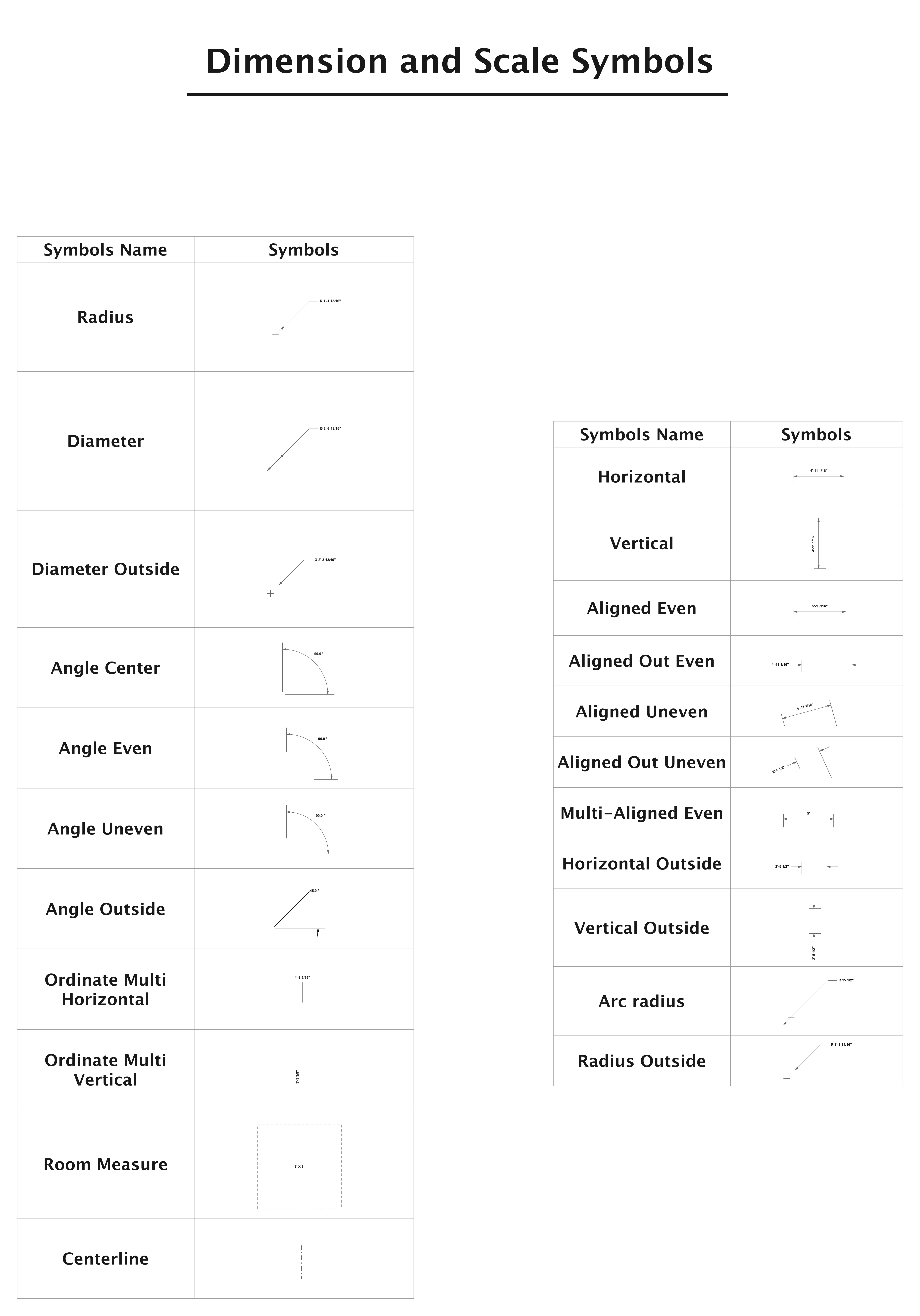
Compass symbols or dimension symbols tell you the scale of the blueprint. These symbols use the metric system to measure the exterior and interior details of the design. With these dimensions, it is easier to scale the diagram and locate elements within the plan.
EdrawMax lets you apply desired measurement scales and dimensions to individual elements of the floor plan from the canvas.
Landscaping Symbols
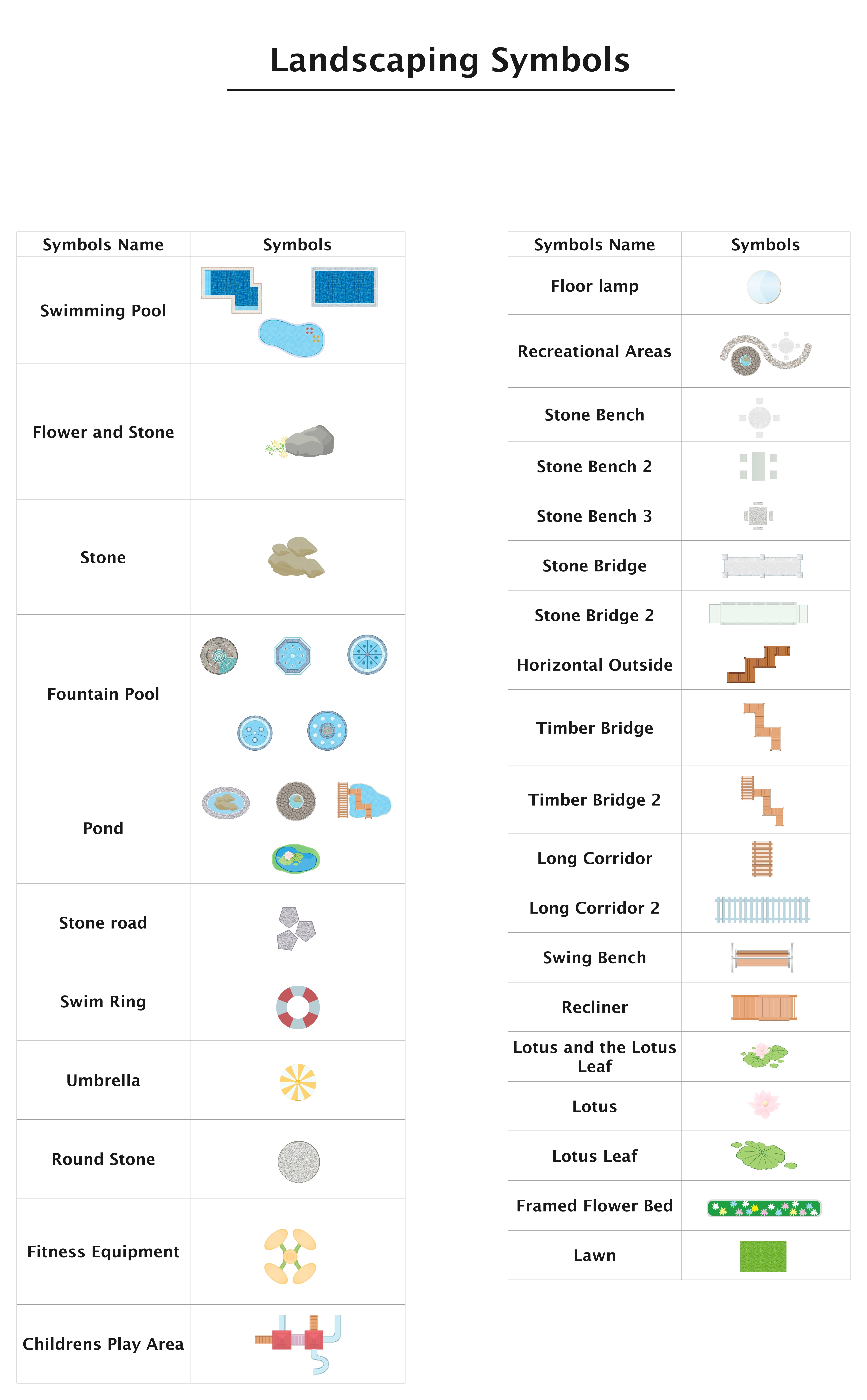
Landscaping or garden symbols in a floor plan are used to represent outdoor features or natural beauty. These symbols help you figure out the aesthetic appeal and functionality of a space. Some common landscaping floor plan symbols include tables, chairs, rocks, ponds, etc.
Typically, garden symbols are further divided into two categories.
- Garden plant symbols: Plants make for an essential part of landscaping symbols. With these symbols, you can maximize a smooth flow of air and help people feel relaxed.
- Garden equipment symbols: With functionality, a garden also requires aesthetic appeal. This is what garden equipment symbols are. Such symbols help designers outline where to place visual details like tables/ chairs, bridges, etc.
Appliances Symbols

Appliances are equipment used to perform certain tasks. In-house floor plans that usually include bathrooms, kitchens, and laundry rooms, you'll typically see appliance symbols. Some common examples of such symbols include dryers, washers, refrigerators, etc.
Pro Tip: In most blueprints, appliances are next to plumbing symbols like drains, sinks, pipes, and so on.
Elevation Symbols
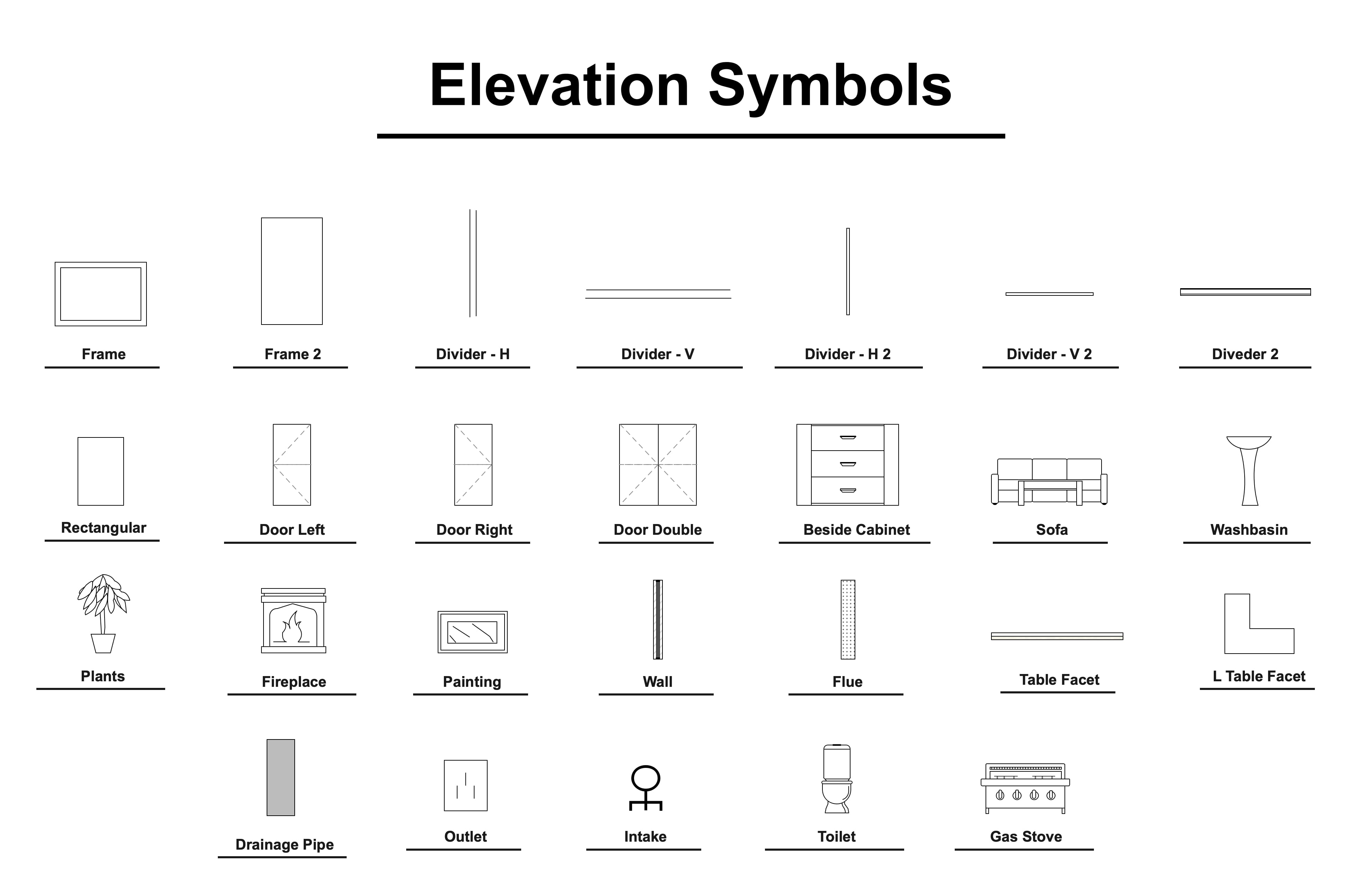
An elevation is a clear depiction of a space after all the details are completed. Symbols used for elevation are basic and easily understandable for everyone, irrespective of their design skills. Some basic elevation symbols include,
- Divider: A horizontal or vertical line dividing a section from another.
- Frame: A square-like structure that carries something like a picture, window, etc.
- Drawer: A box-like storage box without a lid. It should slide horizontally in and out of a furniture piece.
- Lattice: A diamond-like fence made by crossing metal and wood strips together.
- Hooks: A hard metal curved at an angle for holding something.
Elevation symbols are often used for kitchen and wardrobe elevation plans. Some common symbols used for these plans include a refrigerator, range hood, gas cooker, hangers, towels, drawers, quilts, etc.
Furniture Symbols
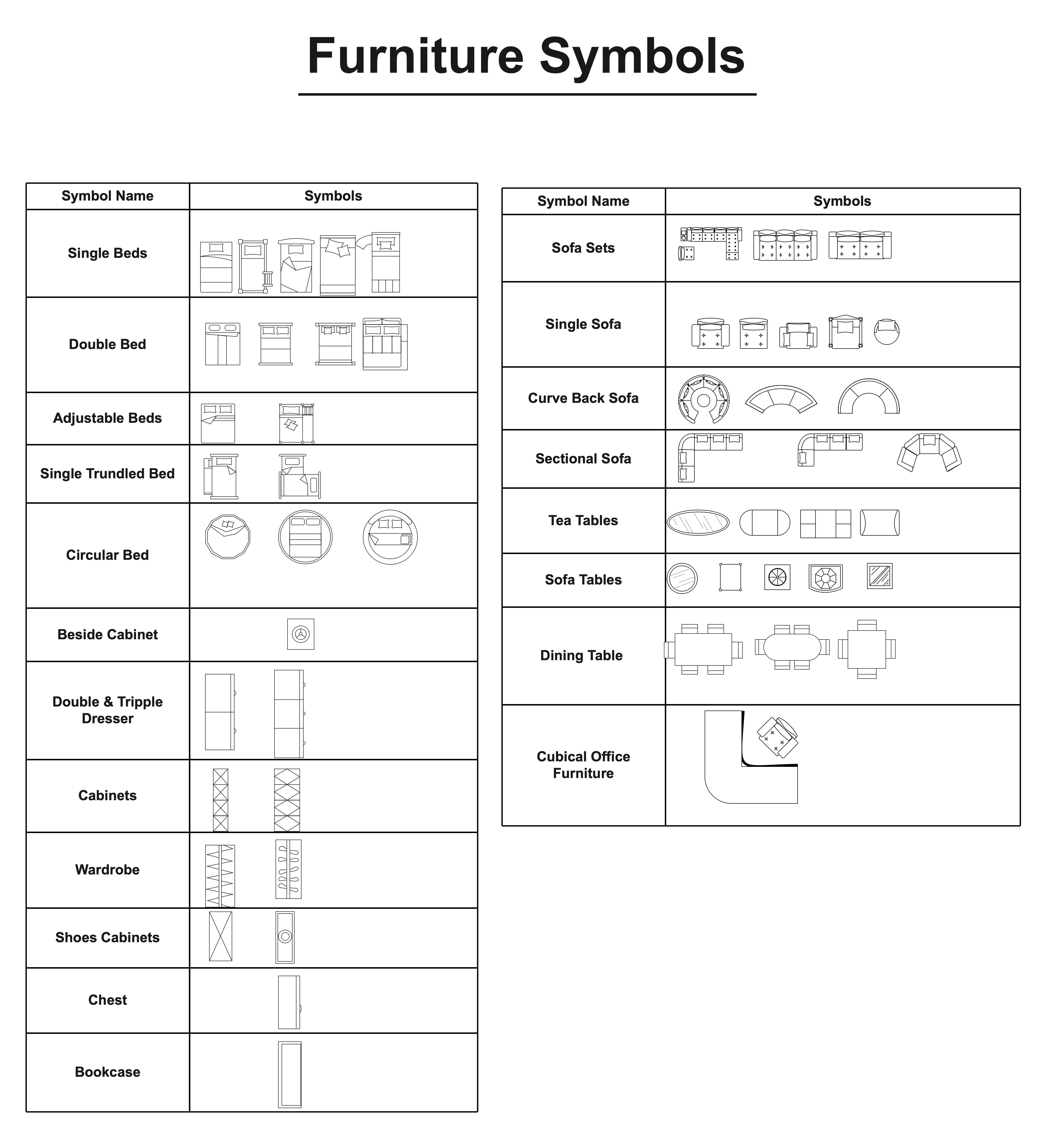
Furniture might not always be a part of your floor plan, but adding it to your designs can help clients envision their space effectively. It includes symbols like sofas, chairs, beds, etc. EdrawMax has a wide variety of furniture symbols to suit your client's preferences.
Kitchen and Dining Room Symbols

As the name suggests, kitchen and dining symbols are the elements found in these spaces. For instance, to cook in the kitchen, you will need crockery, a refrigerator, an oven, ventilators, dishwashers, gas cookers, etc. On the other hand, dining room symbols include things like dining table, chairs, tables, windows, interior decor, etc.
Office Symbol
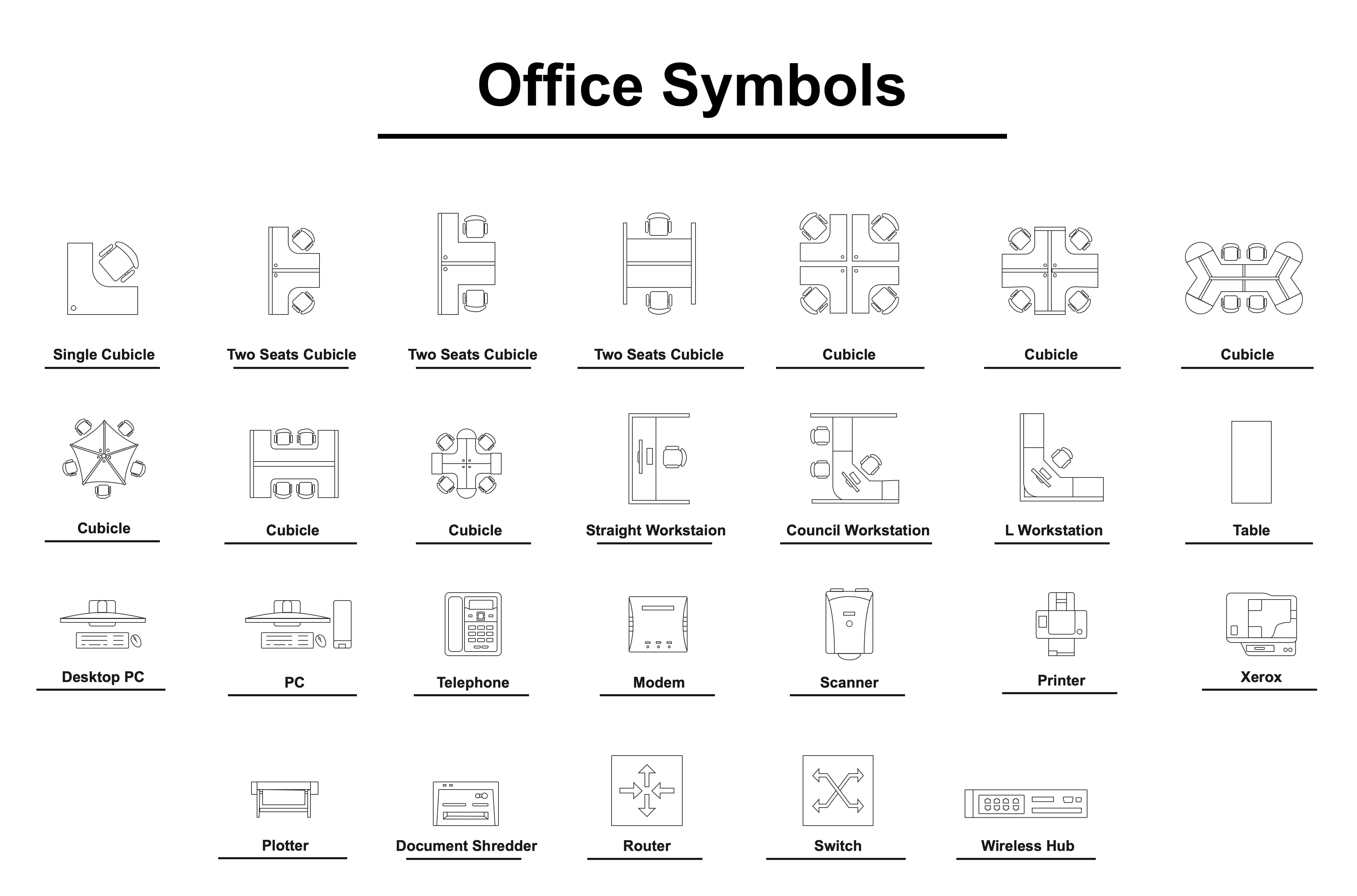
Office in a floor plan language means a space for professional, corporate, or bureaucratic work. Symbols used to design such a place include equipment and furniture.
- Office equipment symbols include everything employees use for communication, data storage, recording, etc. Some examples include computer monitors, laptops, fax machines, etc.
- Office furniture symbols indicate everything related to furniture, such as chairs, tables, cabinets, doors, etc.
Other Floor Plan Symbols
- Athletic ground symbols: These symbols are specifically crafted sports courts, such as cricket, basketball, football, etc. Designers use these symbols to map sports grounds in commercial areas, public spaces, and more.
- Bathroom symbols: Bathroom symbols include toilets, showers, bathtubs, and more among the basic toiletries. You can use them for specific bathroom projects.
- Bedroom symbols: Bedroom symbols are the furniture you will mostly find in bedrooms, such as beds, carpets, pillows, dressing tables, curtains, windows, etc.
- Building core symbols is the standard set of geographical symbols every designer uses in construction diagrams. Companies may readjust them (size, dimension, etc) for branding to their preferences.
- Cabinet symbols are the foundation of wardrobe designs. These symbols are further divided into partial overlays, full overlays, and insets.
- Bookcase symbols in a floor plan show the display of books. Designers can customize these symbols to the book's number and the pace of the room. Some common examples include standard, corner, leaning, modular, etc.
- Carpet symbols, as the name suggests, represent carpet flooring made of thick woven fabric.
Where to Find Floor Plan Symbols?
Plotting a floor plan means you must have all the symbols accessible on the canvas. Thankfully, EdrawMax helps you with this. It has a massive symbol library featuring thousands of icons, including floor plans. What's better is that these floor plan symbols are categorized, depending on the purpose (kitchen, bedroom, furniture, etc).
Plus, all these symbols are editable and have a drag-and-drop interface. You can change their color, dimensions, thickness, and more with an easily accessible floating menu. Simply search for a category in the library's search box and add it to your personal collection for later use.
EdrawMax: An Intelligent Floor Plan Creator
Creating a floor plan requires a lot of focus, skills, and design assistance. Managing the scales of individual symbols while balancing the arrangement is almost impossible without quality software. EdrawMax is an intelligent floor plan software with resizable symbols, design elements, and an intuitive drag-and-drop interface.
Let's see why designers prefer using EdrawMax for architectural drawings.
- A massive community where designers and architects upload their work. All EdrawMax registered users can edit these templates on the canvas.
- A huge collection of built-in editable vector symbols with a drag-and-drop interface and editable. Users can create their own symbols using a drawing toolkit.
- It supports over ten export formats, including PNG, JPG, PDF, Visio, and more. Users can also import their unfinished floor plan projects from Visio and CAD to EdrawMax.
- Precision tools to customize the dimensions of the diagram. It helps with the future scaling of the floor plan.
- Get help from AI research assistance for figuring out the alignment, sequence of the interior, and more.
How to Use Floor Plan Symbols on EdrawMax?
Now that you have access to the floor plan symbols on EdrawMax, you must be wondering how to use them and plot a diagram. Let's have a look at that.
How to Use the Floor Plan Symbols in EdrawMax?
Here is how you can use the available symbols to plot a floor plan on the EdrawMax canvas.
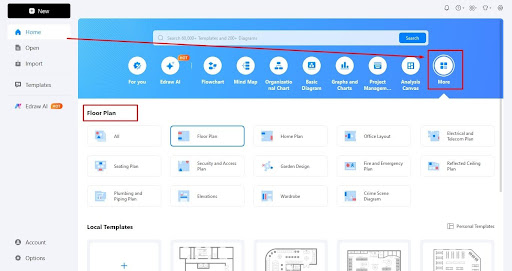
- Step 1: Open a Floor Plan Canvas
Download and install EdrawMax desktop version and log in to your Wondershare account.
Visit the EdrawMax dashboard and click Home > More > Floor Plan.
Choose a blank canvas from the options below.
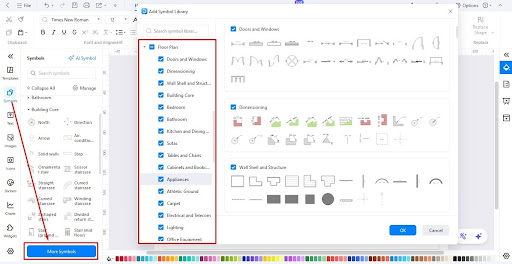
- Step 2: Locate the Symbol Library
Locate the Symbol library on the left side of the canvas.
Click More Symbols and scroll to find the Floor Plan section from the pop-up menu.
Select the categories of symbols you want to display in the symbol library.
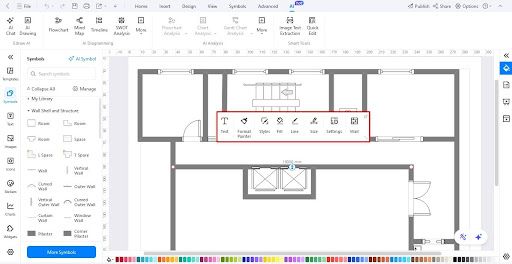
- Step 3: Drag and Drop Symbols to Plot a Plan
Drag and drop a combination of symbols on the canvas to build a structure.
It's always better to start with the exterior (walls, doors, windows) and make your way to the interior details (appliances, equipment, etc).
You can also adjust the scale, style, and color of the symbols directly from the on-screen prompt.
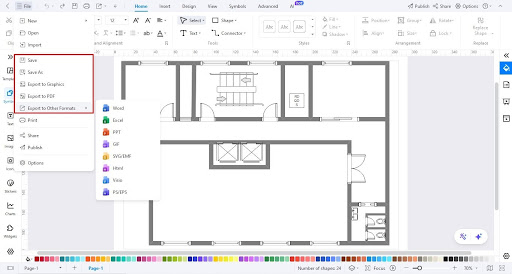
- Step 4: Download Your Diagram
Satisfied with the outcome? Download the floor plan.
Visit the File menu from the top-left corner.
Export your diagram in a desired format (PNG, JPG, Visio, and more).
How to Make New Floor Plan Symbols in EdrawMax?
Your style preferences matter a lot when it comes to floor plans. Couldn't find the desired symbol on the canvas? No worries. EdrawMax lets you create one for yourself from scratch. Here is how it goes.
- Step 1: Locate the Symbol Tool
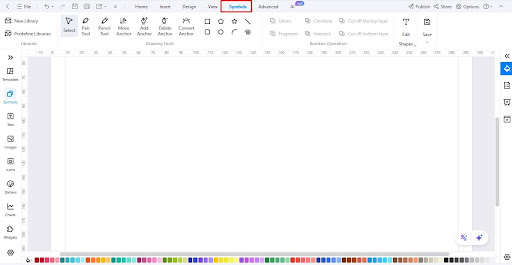
Locate the Symbols tab on the top.
You will see various tools (Pencil, Pen, Anchor, etc). Decide which tool to use for the symbol.
- Step 2: Draw the Symbol
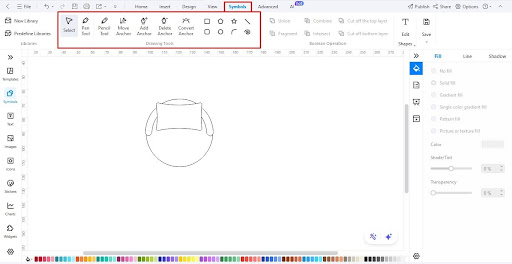
Use your desired tool to make a shape.
Start by plotting a shape like a square.
Use the pencil tool to draw details within this shape.
A pen tool can help you create circular anchors. These anchors are convertible.
Make sure your symbol's size, design, and other attributes are in sync with other symbols in the library using measurement tools from the right-side customization panel.
Visit our symbol library guide to learn how to effectively use these tools to draw personalized symbols.
- Step 3: Save the Symbol
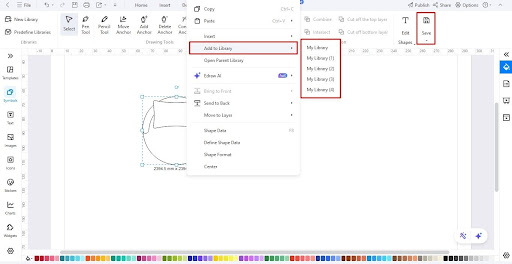
Click Save > Save Symbol to export the symbols for later use.
Alternatively, left-click the symbol, click Add to Library, and choose one of your personal libraries. This will make the symbol accessible for the next time.
Start Your Designing Today!
A floor plan is a detailed elaboration of your space on paper. It helps you understand the layout of the property and design it accordingly. Throughout the process, floor plan symbols make the most of your drawing, be it placement, scaling, or interior details. Now that you have a fair understanding of floor plan symbols, turn to EdrawMax canvas and start designing.
You May Also Like
Plumbing and Piping Symbols
Symbols
Elevation Symbols
Symbols
Wardrobe Floor Plan Symbols
Symbols
Bathroom Floor Plan Symbols
Symbols
IDEF Symbols
Symbols
Home Plan Symbol
Symbols




