Family Tree Templates, Free, How to Use Family Tree Templates

Even a person who has never designed before will find it easy to design with our family tree software. In addition to the variety of family tree templates including hundreds of built-in family tree shapes, EdrawMax gives novice and business professionals the ability to design organizational charts, business diagrams and presentations.
A family tree template, sometimes called family history template or genealogy tree template, can make the job easier. Often it is a blank family tree sample which can be filled in all the members of each generation.
Simple Family Tree Template
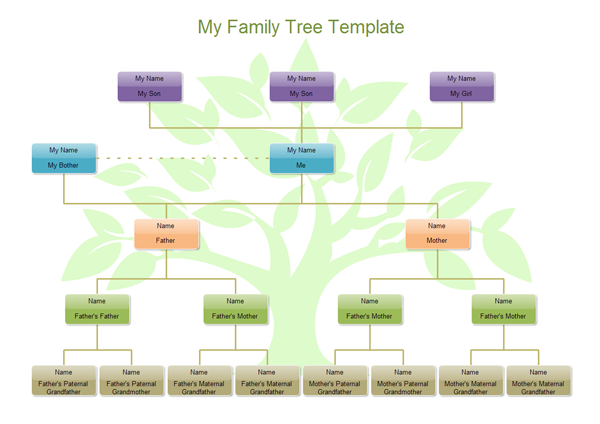
The following family tree template is a very simple one to report the information for a solitary person. It records the ancestors from whom you directly descend in a traditional family tree format, suitable for sharing or even framing. A transparent tree in the background and embellished boxes give it a bit of an old-fashioned feel. This free family tree chart makes it easy to track the family generation relatives. This free family tree chart includes room for 5 generations in the familiar standard format. Each box includes enough room for the name, date, introduction, and birth place. The format is free, so you can choose the info you want to include. You can move, add or delete any box in the template.
An all-in-one platform for 210+ diagrams.
・ Simple alternative to Visio
・ 26k+ symbols
・ 10K+ free templates
・ 10+ AI diagram generators


Photo Family Tree Template
Our family tree templates are very flexible, because Edraw Max is a drag and drop vector program. It is very easy to change the theme style and shape format. The family tree shapes are quick and smart. You can add photo, embed data and link information in it. You can also replace the basic shapes with one click in the whole family tree template.
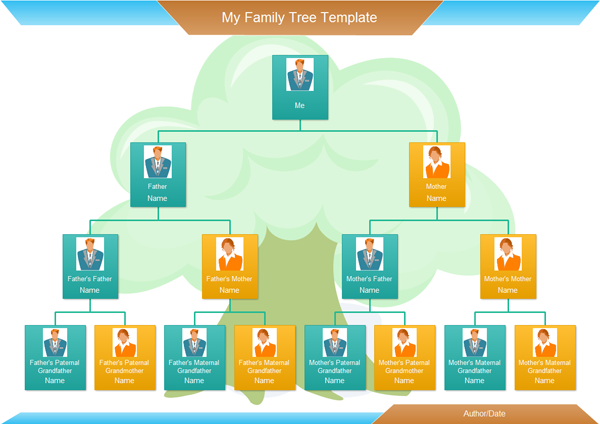
Add Photo in Family Tree Template
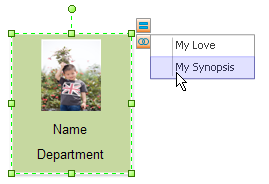
How to Use Family Tree Templates? You can select one family member then click the action button above the shape.
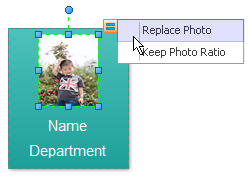
In the pop up dialog, you can choose the family member's photo.
Recolor the Family Tree Template
The family tree templates are vector so you can change its color, style and shadow. You can select one shape then use the fill, line color, quick style tool to recolor it. Or you can use the theme to change the whole effect one time.
Smart Family Tree Template
In a family tree, a box represents family member. Under the shape, you can write down the name of the person and simple information like birth. Because one family tree template has a lot of family members in common, the box can't be too big. How to add more information in one box?
There are two methods to do it appropriately and accurately with our family tree software.
Use the Property Feature
Right click one family member, then choose the Property item. In the pop up dialog, you can define the member's synopsis, important things and hobbies. A nice family tree template can keep track and revert details of the ancestors who you descend from. It is a good chart to show your progression.

Use the Hyperlink Function
You can create a new page for one family member, then add a hyperlink for the family member and link to the new page. So every thing seems so quick and simple. Keep the information organized and start with drawing the excellent family tree.
Effective Family Tree Template
Our family tree templates are flexible and can be changed as needed at anytime. The template is free and is included in the Edraw max software. There are many built-in shapes and drawing tools available. You can save your family tree as a project file and modify it later easily. The software can export as HTML format and SVG. Keeping dates on your family tree template helps you organize the information easily.
How to Draw an Organizational Chart
Linux Family Tree Software - Track Your Family History Better




