Family Tree Tutorial

What is a Family Tree?
A family tree is a hierarchical chart that visually shows all the people in a family and their ancestors over many generations. It also shows their relationship with one another. It is a type of organizational chart, however, with a different purpose.
It is critical to maintain an organized and accurate family chart to maintain the record of ancestors and history related to one's family. It is essential for both family and family historians. Gone are the days when people created family trees on paper by hand and preserved it. These days you will most probably use a professional family tree maker to create and save your family tree.
Purpose and Benefit
Family trees or genealogy charts are basically for record-keeping. When you are using family tree software, it may make it easy to record people, their relationships, and places and important events. It then becomes a visual record and a family heirloom containing memories and cherished moments.
There are many benefits of genealogy charts, for example;
- You and your kids may learn about your family history and ancestors along with their achievements.
- You can proudly connect to your heritage.
- Sometimes people use it to track the chances of health problems and do their best to avoid specific heredity diseases.
- You can instill a love for family history and pride of lineage in your kids.
- Last but not least, you might be a history geek and find genealogy charts interesting. It can be a fun project for your family, especially kids, to research the past and see who their ancestors are.
What to Do before Creating a Family Tree
If you have failed to plan, you are planning to fail. It is true in this case too. So planning is the first step before creating your genealogy charts.
- Gather Family Information
A well-organized and accurate information base means you will save time and effort while creating your tree. This way, you will have a fewer number of revisions and a more accurate lineup.
- Decide the Type
You may need a family tree with only names and relationships of people. In some cases, you might want more detailed accounts related to your ancestors' events and achievements. Deciding the kind and depth of information helps too.
How to Make a Family Tree in EdrawMax
EdrawMax is the recommended software program for creating family trees because;
- It is simple to use.
- Allows export of the diagram in many formats.
- Allows hyperlink for detailed information.
- You can even import data to automate the process of creating genealogy charts.
- It has several layouts for professional-looking results.
You will follow the following steps for making genealogy trees in EdrawMax.
Step1: Draw an Outline
It is like creating a skeleton for your tree. Here you will decide which ancestor you will take as the pivot point and start expanding. Also, decide the structure of each leaf. You may have a leaf with photos and information, or with information only, etc. You can even use a different color of relationship line for different relations, for example, parent, spouse, child, etc.
Also, choose different presentation details like tree type, box type, and information details to finalize the tree's visual look.
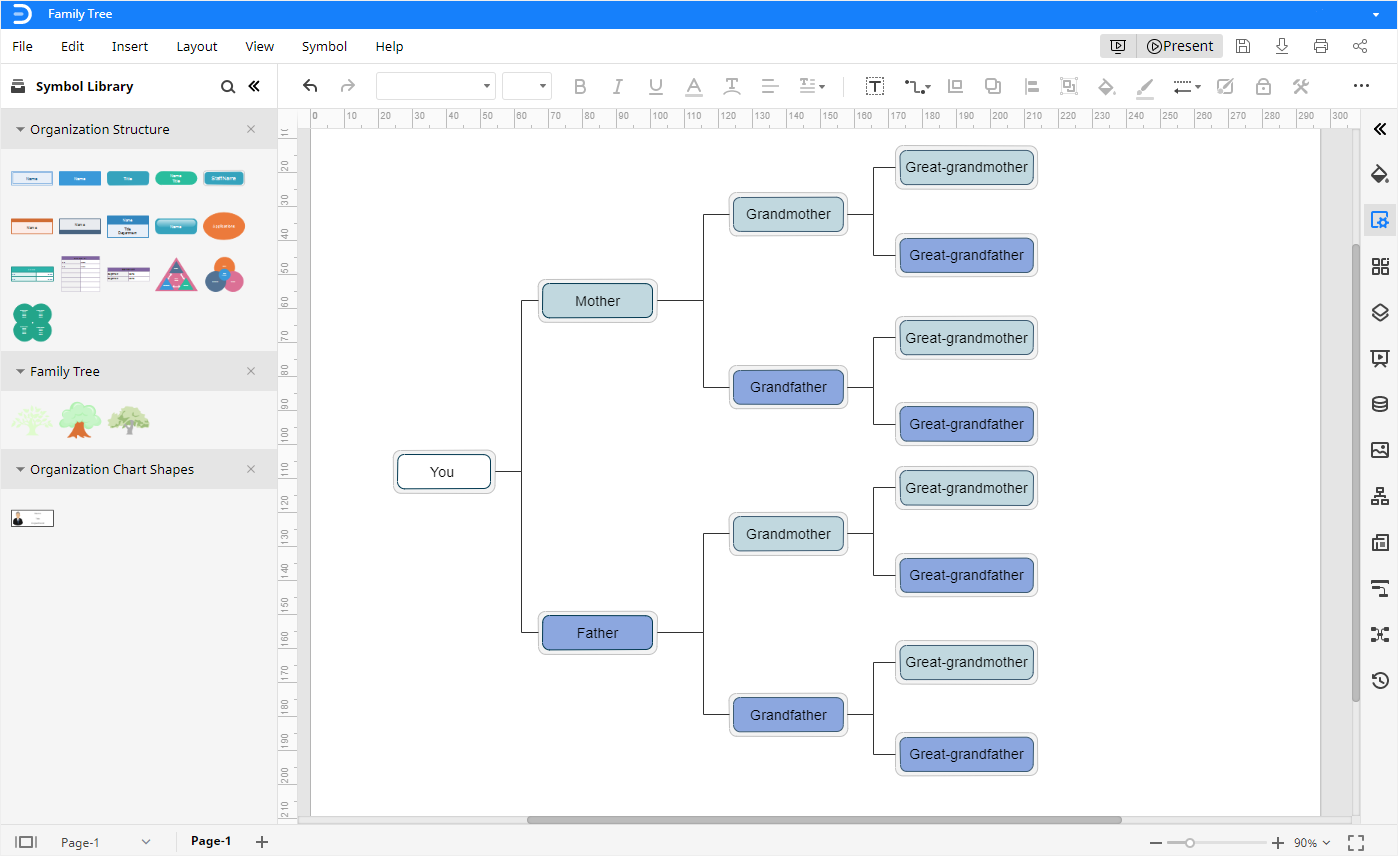
Step 2: Fill in Detail in each Leaf
Once you have the basic outline, you can fill up the information in each leaf. You can insert a picture of the member using the org chart shape as the leaf.
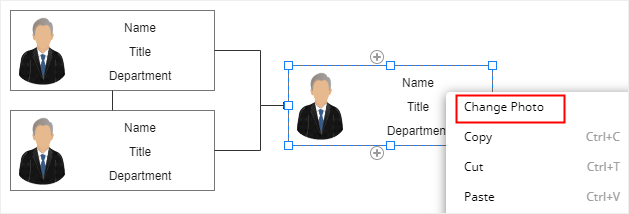
Step 3: Save and Export
You can now save all your information. You can export the resulting tree in many different formats, including but not limited to PDF, Word, SVG, Graphic, etc.
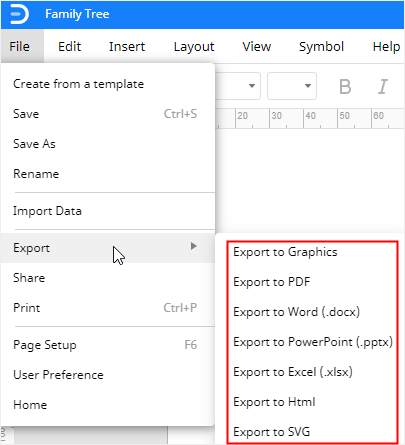
In other cases, you can share your historical lineage family tree with your family members and others by clicking the share button in the upper right corner.
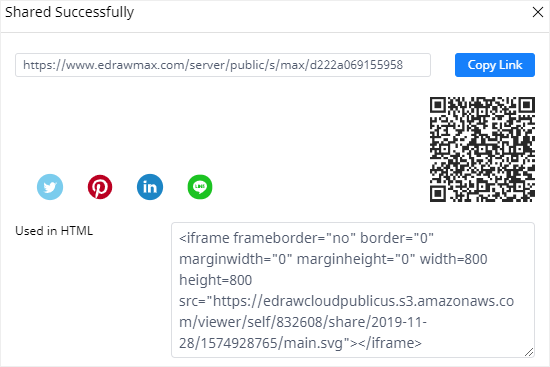
Tips for Making a Family Tree
- Be selective. Though it might be tempting to go in the past as far as you can go, it can be a very time-consuming process. Considering that the number of connections doubles with each generation, going to the third, fourth, or fifth generation in the past means many people and connections.
- Look for the records about your family in the library. Researching everything from scratch can be a real daunting task. To make it easier, you may want to search in the library for other people's family tree books and records; this is about people who share the same ancestors with you. Also, if your forefathers have achieved anything significant in their times, you may get biographical records about them in the books about particular events involving them.
- Question everything. Accuracy is critical in family records. Whenever collecting information either from books or from people, make sure you are sure of the narrator's credibility. Finding more than one source to countercheck is always a good idea.
- Organize. We will advise you to keep a journal of everything you learn through your journey. Make it an organized account to keep on track and to save time.
Family Tree Example
This is an example of a family tree drawn using EdrawMax. You can see the information about each individual and the relationships among each other.
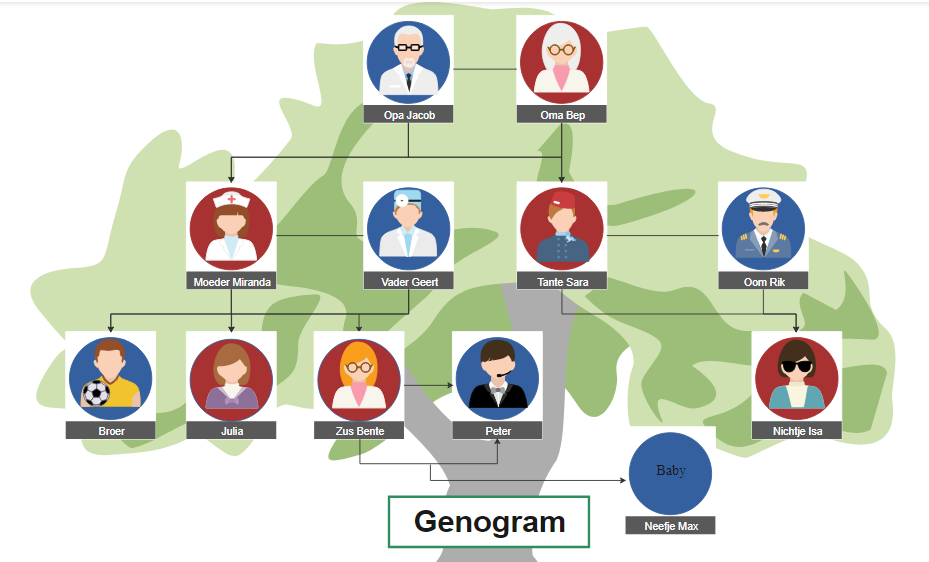
The horizontal lines depict connection by marriage, while the vertical lines show the parent/child relationship. On close inspection, you can see that professional icons are used for the photos. These professional icons show what professional this person belongs to; for example, Miranda is a healthcare worker, and Broer is a sportsman.
Family trees can be a handy aid in learning about history and preserving our family's achievements. This is also important for kids to see how their ancestors have performed and what legacy they carry. An accurate and well-maintained family tree is a treasure for sure.
EdrawMax makes creating family trees straightforward and supports saving the result in multiple formats according to your preferences. Create and share your family tree to keep the legacy going on.




