EPC Diagram Software

Event-Driven Process Chain (EPC diagrams)
EPC diagrams illustrate business process work flows, and are an important component of the SAP R/3 modeling concepts for business engineering. EPC diagrams use graphical symbols to show the control flow structure of a business process as a chain of events and functions.
Using the EPC Diagram template in Edraw, you can quickly and easily create a high-level, visually striking model of your business process.
|
Easy to create Event-driven Process Chain (EPC) diagrams to document business processes through Edraw. Document SAP processes. It can also make flow charts, organizational charts, business process, workflows, program structures, network diagrams, chart and graphics, mind map, directional maps and database diagrams. With the pre-drawn libraries and more than 4600 vector symbols, drawing has become super easy! |
Create professional-looking Event-Driven Process Chain from examples and templates with Edraw. Click here to download EPC Diagram Software. Then you can use the built-in EPC Diagram templates to create and present your business process in minutes.
Free Download EPC Diagram Software and View All Examples
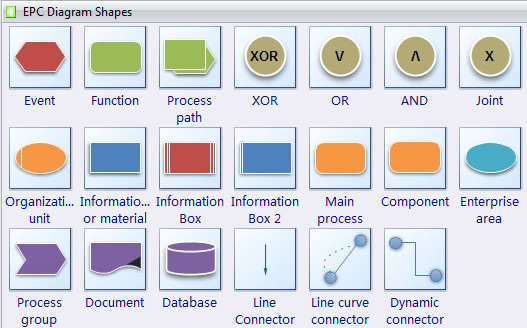
The building blocks used in EPC diagrams are:
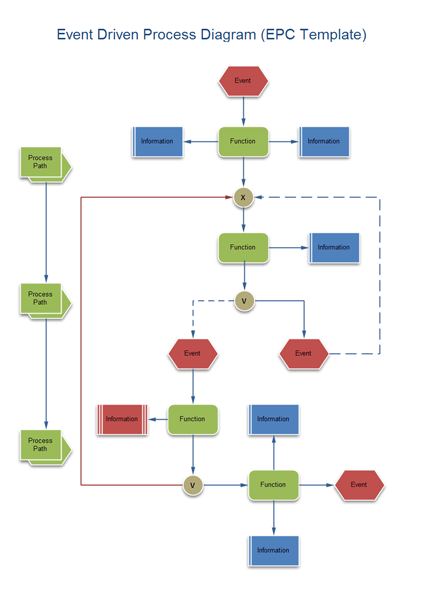
- Functions, which are the basic building blocks of the diagram. Each function corresponds to an executed activity.
- Events, which occur before and/or after a function is executed. Functions are linked with events.
- Connectors, which associate activities and events. There are three types of connectors: AND, OR, and exclusive OR (XOR).
Once completed, you can use the EPC diagram as a reference for modeling the SAP R/3 system.
EPC Diagram Templates
Event-Driven Process Diagram Examples
How to Draw EPC Diagram
Edraw Flowchart Software provides some examples and templates of EPC diagrams. You can draw EPC diagram based on the templates. It's easy to use and simple to learn.
- On the File menu, point to New, point to Business Process, and then click EPC Diagram.
- From EPC Diagram Shapes, drag the shapes you want to represent your business process onto the drawing page.
- Use the Connector tool to connect the shapes.
-
To add text to a shape, select it, and then type. When you are
finished typing, click outside the text block.
Note: To edit text, double-click the shape, place the cursor where you want to change the text, and then type.
EPC Diagram
Edraw symbols were designed for the EPC, too. An EPC can be used in process analysis for more complex structures and is more suitable for bigger enterprises. An EPC can be used in cases when we describe a process model with no need for further analysis of events and functions. Therefore, a complex process structure is possible. EPC represents a core-procedure of a process and is most suitable for describing a complex process structure of a big enterprise. An EPC model, presents not only core functions of process but also give us possibility to represent who and which organizational unit executes a function, which input data are necessary, which output data have been created by the function. EPC is missing all those insights about the business processes. Therefore, an EPC can be used in a business process model regarding the information flow, thus, it is very difficult to recognize media interruptions because this presentation focuses on events and functions. Therefore, an EPC is very suitable for describing information and events/function business analysis in enterprise.




