

Edraw 서포트 센터
Edraw 서포트센터에서 제품 사용법과 FAQ에 대한 해답을 만나보세요.
Select/Move Topics
Select Topics
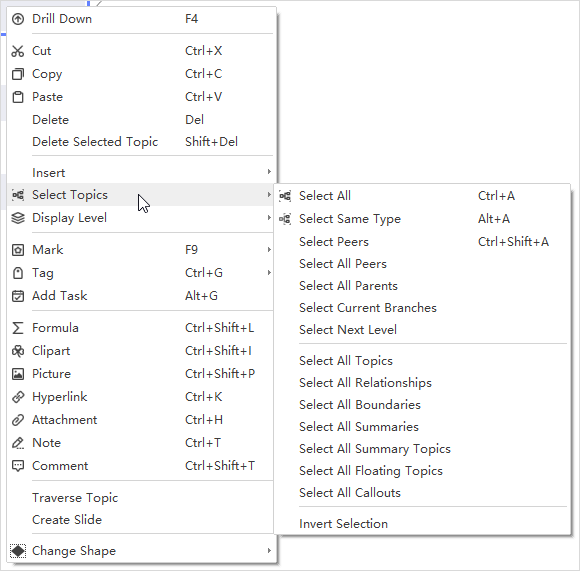
Right-click on any topic of your mind map. On the contextual menu, as you can see in the below picture, you can select topics according to their types or levels.
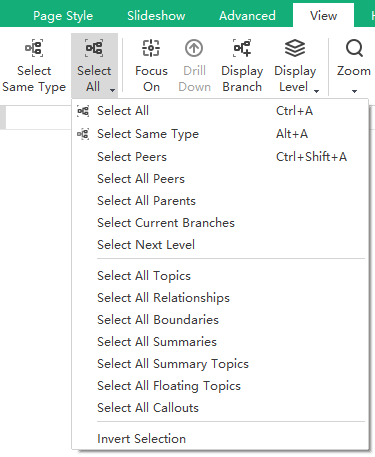
Alternatively, go to the View tab, click Select All, and there shows a drop-down menu of selection commands.
Move Topics
To move a topic, you can drag and drop it to the targeted position or use the shortcut keys to move the topic up, down, left, or right within the same level.
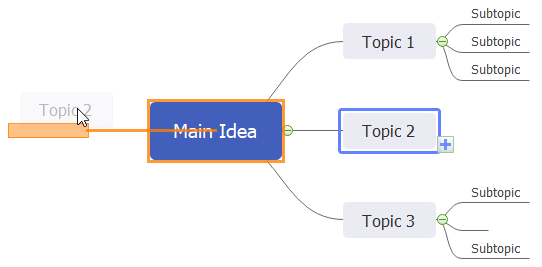
When you move a topic by selecting and dragging it to the new position, a visual sign will show when the topic is moved. Any of your topics (except Main Idea) and the branches can be rearranged and moved among different levels.
Below are shortcut keys for moving topics:
| Action | Shortcut(s) |
|---|---|
| Move up | Ctrl + Shift + Up Arrow |
| Move down | Ctrl + Shift + Down Arrow |
| Move to beginning | Ctrl + Shift + Home |
| Move to end | Ctrl + Shift + End |
| Move to left | Ctrl + Shift + Left Arrow |
| Move to right | Ctrl + Shift + Right Arrow |