

Edraw 서포트 센터
Edraw 서포트센터에서 제품 사용법과 FAQ에 대한 해답을 만나보세요.
Freeform Connector
(Ctrl + Shift + 5)
Draw a Freeform Curve
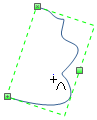
On Home tab, in Basic Tools group, click the arrow on Connector button, and then click Freeform Connector. Drag in various directions to draw a freeform curve.
Reshape a Freeform Curve
On Symbols tab, click Move Anchor, and then select the freeform curve. You can drag the square selection handles on the curve to change the shape of the freeform curve.
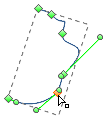
Or you can select the freeform curve by using Select tool, and then resize the curve with the selection handles on its outline.