

Edraw Centre de Soutien
Obtenez des réponses rapides et des instructions étape par étape.
Keyboard Shortcuts
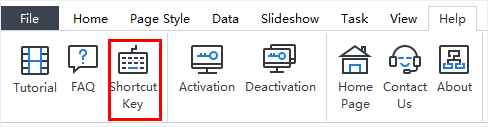
You can find the list of keyboard shortcuts any time on the ribbon’s Help tab by clicking the Shortcut Key icon.
Documents
| Function | Shortcuts |
|---|---|
| Create a new chart | Ctrl + N |
| Open a chart | Ctrl + O |
| Save the current chart | Ctrl + S |
| Save all charts | Ctrl + Shift + S |
| Close current chart | Ctrl + W |
| Close all charts | Ctrl + Shift + W |
| Print the current chart | Ctrl + P |
Navigating
| Function | Shortcuts |
|---|---|
| Select box (above, below, left and right) | Arrow keys |
| Select next box / previous box | Tab / Shift + Tab |
| Save the current chart | Ctrl + S |
Window
| Function | Shortcuts |
|---|---|
| Zoom in | Ctrl + + (plus) |
| Zoom out | Ctrl + - (minus) |
| Fit chart to screen | Ctrl + F5 |
| Fit chart to 100% zoom | Ctrl + 0 |
| Whole Page | F3 |
| Page Width | Shift + F3 |
View
| Function | Shortcuts |
|---|---|
| Ruler | Ctrl + Shift + U |
| Gridlines | Ctrl + Shift + G |
| Status Bar | Shift + B |
| Action Button | Ctrl + Shift + A |
Interface
| Function | Shortcuts |
|---|---|
| Show / Hide Display | F6 |
| Show / Hide Views | F9 |
| Show / Hide Tree | F10 |
| Show / Hide Data | F8 |
| Show / Hide Search | Ctrl + Shift + F |
| Spelling check | F7 |
| Find | Ctrl + F |
| Preview | F11 |
Slideshow
| Function | Shortcuts |
|---|---|
| Play slideshow | Ctrl + Shift + F5 |
| Traverse boxes | F5 |
| Traverse branches | Shift + F5 |
| Full Screen | Ctrl + F5 |
| Exit Full Screen Mode or Stop Slideshow | Esc |
Adding Box and Elements
| Function | Shortcuts |
|---|---|
| Add first box | Enter |
| Add Subordinate | Insert / Ctrl + Enter |
| Add Colleague | Enter |
| Add Manager | Shift + Enter |
| Add Assistant | Alt + Enter |
| Add attachment | Ctrl + H |
| Insert picture | Ctrl + Shift + P |
| Add hyperlink | Ctrl + K |
| Add comment | Ctrl + Shift + T |
| Add note | Ctrl + T |
| Optimize Layout | Ctrl + Shift + O |
Data
| Function | Shortcuts |
|---|---|
| Refresh data | Shift + R |
| Associate data | Ctrl + Shift + R |
| Define field | Ctrl + D |
| Quick export | Ctrl + Shift + Q |
| Import | Ctrl + Shift + I |
| Export wizard | Ctrl + Shift + E |
Editing and Selecting
| Function | Shortcuts |
|---|---|
| Undo the last action | Ctrl + Z / Alt + Backspace |
| Redo the last action | Ctrl + Y |
| Select all boxes and elements | Ctrl + A |
| Select all branches | Ctrl + Shift + B |
Cut, Copy, Paste and Delete
| Function | Shortcuts |
|---|---|
| Cut | Ctrl + C |
| Copy to the clipboard | Ctrl + C / Ctrl + Insert |
| Format Painter | Ctrl + Shift + C |
| Paste | Ctrl + V |
| Selected Paste | Ctrl + Alt + V |
| Delete current object | Delete |
| Delete Current Branch | Shift + Delete |
Commands in Box Text Edit and Find Mode
| Function | Shortcuts |
|---|---|
| Enter line break in box | Shift + Enter / Ctrl + Enter |
| Move to beginning of line | Home |
| Move to end of box text | Ctrl + Home |
| Cancel editing box | ESC |
| Find | Ctrl + F |
| Edit box text | F2 |
| Find next | Enter |
| Spelling check | F7 |
Formatting
| Function | Shortcuts |
|---|---|
| Toggle to bold and back | Ctrl + B |
| Toggle to italics and back | Ctrl + I |
| Toggle to underline and back | Ctrl + U |
| Increase font size | Ctrl + Shift + > |
| Decrease font size | Ctrl + Shift + < |
| Edit text | F2 |
| End Formatting | Esc |
Layout
| Function | Shortcuts |
|---|---|
| Toggle up | Ctrl + Shift + F4 |
| Toggle right | Ctrl + F4 |
| Toggle down | F4 |
| Toggle left | Shift + F4 |
| Move to left | Ctrl + Left Arrow |
| Move to right | Ctrl + Right Arrow |
General Windows Commands
| Function | Shortcuts |
|---|---|
| Close a menu or dialogue box | Esc |
| Cancel an operation | Esc |
| Exit OrgCharting | Alt + F4 |
| Export to graphics | Ctrl + G |
| Show help | F1 |


