

Edraw 서포트 센터
Edraw 서포트센터에서 제품 사용법과 FAQ에 대한 해답을 만나보세요.
Tasks
Add or Remove Tasks
(F10)
Tasks can be allocated to each topic of a mind map. You can add different task information to a topic such as start and end time, priority, progress, resources, tags, etc. And task information will be shown at the bottom of the topic.
- Select a topic you intend to assign tasks.
- Open Task Panel on the right sidebar or on View tab.
- Click Add task info button
 to add a new task to a topic, or click the Add all task info
  button to add tasks for all topics.
 - Click Delete task info
 button to remove the task from a topic, or click the Delete all task info
  button to delete tasks from all topics.
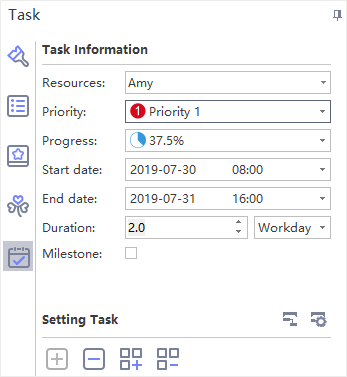
Edit Task Information
On Task Panel, you can edit task information with the provided task info options.
- Click the drop-down Resource list and select resources.
- Select task priority level in the drop-down Priority list.
- Select a progress icon in the drop-down Progress list.
- Set project start and end date by selecting dates in the drop-down calendar.
- Duration will be generated automatically and unit of duration can be adjusted in the drop-down Duration list.
- Tick Milestone to denote a milestone task.