

Edraw 서포트 센터
Edraw 서포트센터에서 제품 사용법과 FAQ에 대한 해답을 만나보세요.
Change Connector Styles
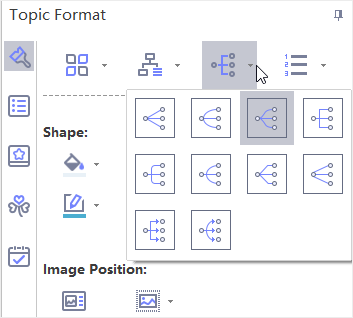
MindMaster has several different connector styles and you can change all connector’s styles at one time, or connector styles for certain topics or branches.
Change All Connectors’ Styles
If you don’t select anything, changes of the connector style will only apply to the first level of topics. To change all connectors’ style, you need to press Ctrl + A to select the whole map first.
- Press Ctrl + A to select the whole map.
- Click Connector Style button on Topic Format panel.
- Select your desired connector style in the drop-down list.
Change Connectors’ Styles of Certain Topics
- Select the parent topic which you want to change connector styles.
- Click Connector Style button on Topic Format panel.
- Select your desired connector style in the drop-down list.
Change Connectors’ Styles of Certain Branch
- Select the whole branch which you want to change connector styles.
- Click Connector Style button on Topic Format panel.
- Select your desired connector style in the drop-down list.