

시스템 분석의 열쇠: 컴포넌트 다이어그램
Edraw Content Team
시스템 분석의 열쇠: 컴포넌트 다이어그램
본문을 통해 컴포넌트 다이어그램에 대해 알아보세요. EdrawMax는 AI 기능을 탑재하고 있어 다이어그램 작성에 특화되여 있습니다. 지금 바로 EdrawMax AI 기능을 이용하여 다이어그램을 시작해 보세요!
소프트웨어 시스템의 복잡한 구조를 이해하려면 어떻게 해야 할까요? 그 대답은 바로 컴포넌트 다이어그램입니다. 컴포넌트 다이어그램은 시스템을 구성하는 물리적 요소를 명확하게 표현하고, 이를 통해 복잡한 시스템을 쉽게 이해할 수 있게 돕습니다.
이번 글에서는 컴포넌트 다이어그램의 개념과 구성요소, 그리고 다이어그램 작성에 도움을 줄 수 있는 유용한 도구 3가지를 소개해 드리겠습니다. 그리고 예시를 통해 컴포넌트 다이어그램을 쉽게 이해하고, 실제 작성 방법도 같이 알려 드리겠습니다.
이드로우맥스
올인원 다이어그램 소프트웨어
- 강력한 호환성: Visio,MS office 등 파일 호환 가능
- 다양한 운영체제: (윈도우,맥,리눅스,ios,android)
 100% 안전 | Mac 버전으로 가기 >> 100% 안전 | Linux 버전으로 가기>> 100% 안전 | Windows 버전으로 가기 >> 100% 안전 | ios 버전으로 가기 >> 100% 안전 | android 버전으로 가기 >>
Part 1: 컴포넌트 다이어그램이란? & 구성요소
1. 개념
컴포넌트 다이어그램은 UML(Unified Modeling Language)의 한 부분으로, 소프트웨어 시스템의 물리적 구성요소를 표현하는 도구입니다. 특히, 시스템의 복잡한 구조를 단순하게 표현하며, 각 컴포넌트가 어떻게 통합되어 전체를 구성하는지 명확하게 보여줍니다.
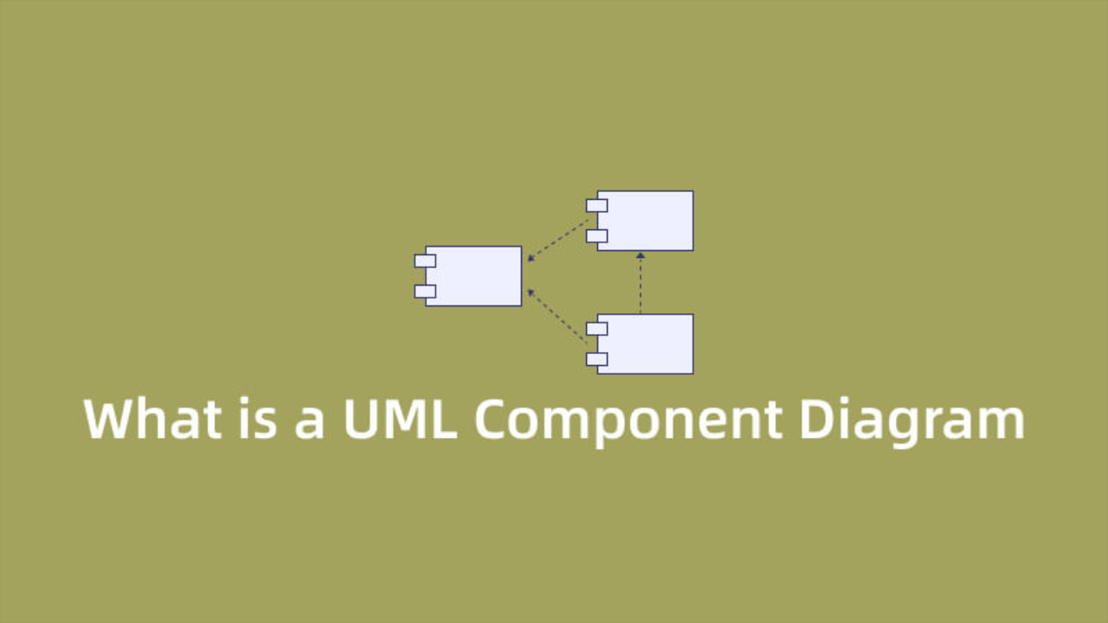
컴포넌트 다이어그램에서 컴포넌트는 시스템의 독립적인 기능을 담당하는 모듈을 의미합니다. 이 컴포넌트들은 상호 작용하며, 이러한 상호작용은 인터페이스를 통해 이루어져, 시스템을 구성하는 여러 요소와 그들 사이의 관계를 명확하게 표현합니다.
2. 구성요소
주요 구성요소는 다음과 같습니다.
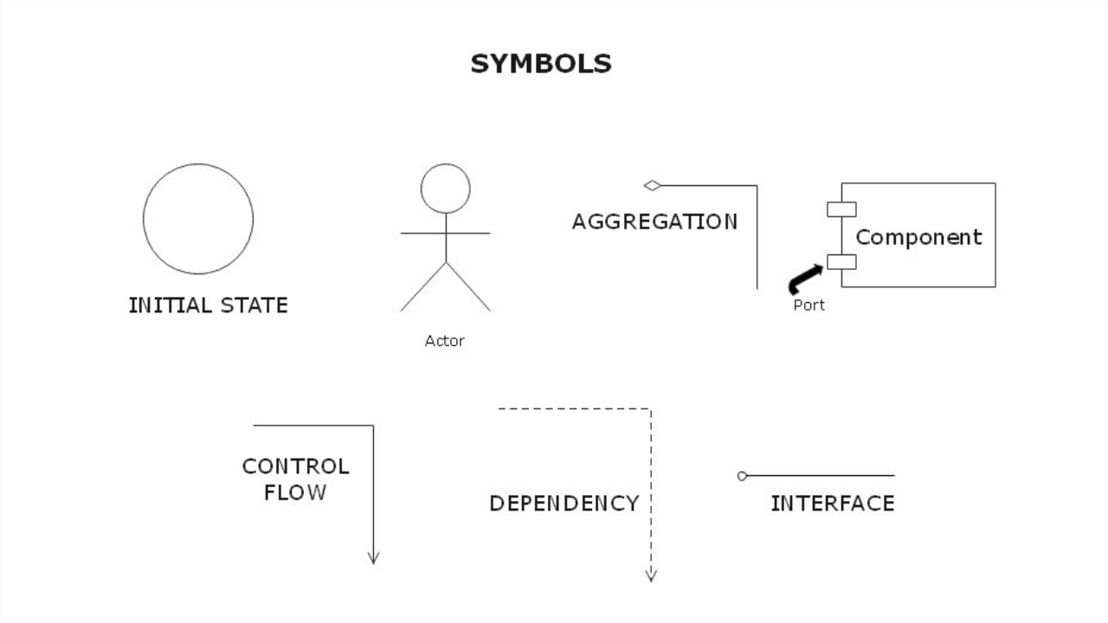
초기 상태(Initial State): 시스템이나 프로세스의 시작 상태를 표시하는 요소입니다.
액터(Actor): 시스템과 상호작용하는 외부 개체로, 사용자나 다른 시스템을 의미합니다.
집합(Aggregation): 한 컴포넌트가 다른 컴포넌트를 포함하는 관계를 나타냅니다.
포트(Port): 컴포넌트 간 접근점을 제공하며, 컴포넌트 간의 상호 작용을 가능하게 합니다.
컴포넌트(Component): 시스템의 독립적인 기능을 담당하는 모듈을 의미합니다.
제어 흐름(Control Flow): 연산이 수행되는 순서를 나타내는데 사용되는 요소입니다.
의존성(Dependency): 한 컴포넌트가 다른 컴포넌트의 기능이나 서비스에 의존하는 관계를 표현합니다.
인터페이스(Interface): 컴포넌트 간의 상호작용을 가능하게 하는 연결점입니다.
Part 2: 컴포넌트 다이어그램을 그릴 때 필수! Top 3 다이어그램 툴 추천
추천 1. 이드로우 맥스(EdrawMax)
이드로우 맥스(Edraw Max)는 다양한 다이어그램을 쉽게 만들 수 있는 올인원 다이어그램 프로그램입니다. 사용자 친화적인 인터페이스와 풍부한 그래픽 요소, 다양한 템플릿을 제공하여 소프트웨어를 처음 사용하는 사람도 쉽게 다이어그램을 작성할 수 있습니다.
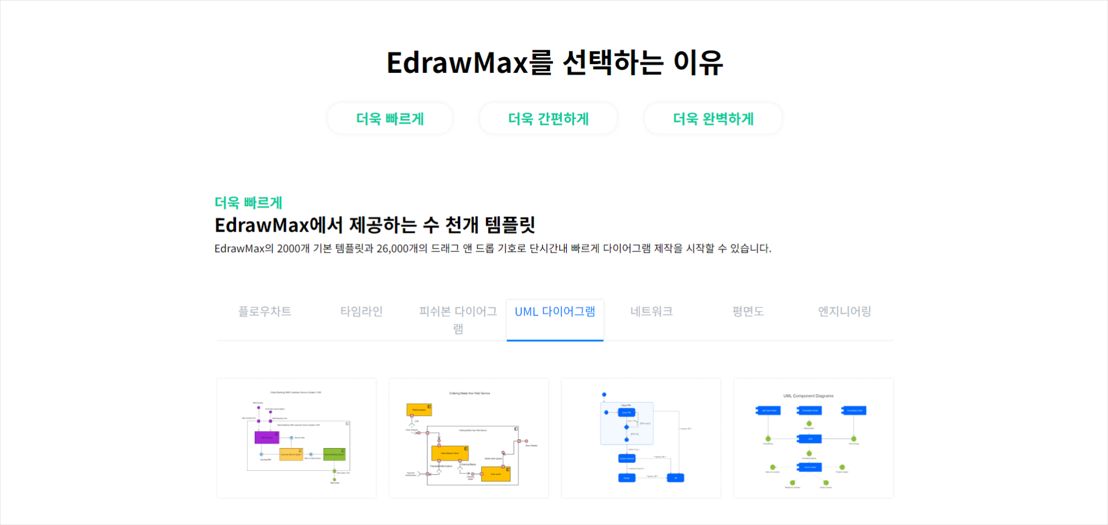
컴포넌트 다이어그램 작성에도 이드로우 맥스(EdrawMax)는 뛰어난 선택이 될 수 있습니다. 컴포넌트, 인터페이스, 의존성 등 다이어그램을 그리는 데 필요한 다양한 요소를 직관적으로 배치하고 수정할 수 있으며, 작업물을 공유하고 협업하는 과정도 간편하게 이루어집니다.

1. 무료 평면도 프로그램 Top 10의 장단점에 대해 알아보기!
2. 이드로우 맥스 다운하여 UML 다이어그램 도구를 무료로 사용해보세요!
1.annerte p-0 overflow-hito" data-tar„¸세하-cols-2 no-gutte color:lex-md-cull9 z-in효�˜어 mr-2er-bottom bg-blacwsc-main bg-why°xe‹œ스íss="col-12 col-md-tn btn-uncap btn-primary-0 my-1žˆ 파악 class="wsc-maisty탕ng>포íŠdiv class="d효율Š¤í…ary-†’일ž‘성에도 이드로우 ënslucent ,하ëŠrgin-bottom: 0px; margin-t¥¼ 활용하a-laners justif
1.anniagram-tutorial/free-editable-genogram.html" wsc/wwwembedboos-9 sive embedboos-9 sive-4byand-mcle="fl/strong>
알아ë/strong>„합니다.
2. 구성요소
주요 하 >< justify-cems-c¬s">sraray-1 my-4" style=¬겠습니ë‹
2tin="¬넌í="718t="comp¸”" dataœ를 통해 ìstyle=¬ê²../library/recommendolid #3cb371;">
< wsc/www �a´그3my-2 mxay-1 my-4" styl wsc/wwwfacebook" re-100order border-gray">
ay-1 my-4" style="±요소
1.anniagram-tutorial/sysacebt: figut-bold-niagram-tool-best6.html" wsc/wwwembedboos-9 sive embedboos-9 sive-4byand-mcle="fl/strong>
알아보기!„합니다.
2. 구성요소
주요 í•장h효œ¨Še png"wclass="py°페성r-2"rms-c¬s">sraray-1 my-4" style=¬겠습니ë‹
2tin="¬넌í="718t="comp¸”" dataœ를 통해 ìstyle=¬ê²../library/recommendolid #3cb371;">
< wsc/www �a´그3my-2 mxay-1 my-/div>
< wsc/wwwfacebook" re-100order border-gray">
ay-1 my-4" style="±요소
1.anniagram-tutorial/다이어그lean-canvas.html" wsc/wwwembedboos-9 sive embedboos-9 sive-4byand-mcle="fl/strong>
알아보기!„합니다.
2. 구성요소
주요aft:� ””glex-mdˆìœ실" d!
ë¦e jº”¤²„늤 ìtom-nsraray-1 my-4" style=¬겠습니ë‹
2tin="¬넌í="718t="comp¸”" dataœ를 통해 ìstyle=¬ê²../library/recommendolid #3cb371;">
< wsc/www �a´그3my-2 mxay-1 my-/div>
< wsc/wwwfacebook" re-100order border-gray">
ay-1 my-4" style="±요소
1.anniagram-tutorial/timeclassmakdth 5.html" wsc/wwwembedboos-9 sive embedboos-9 sive-4byand-mcle="fl/strong>
알아보기!„합니다.
border-dashed {border-style: dashed!important;}
.border-gray {border-color: #A1A1A1!important;}
.radius {border-radius: .625rem!important;}
.text-gray {color: #A1A1A1!important;}
.text-underline {text-decoration: underline!important;}
mark{background-color:#CCE9FF; color:black;}
.my-60 {margin-top: 3.75rem!important;margin-bottom: 3.75rem!important;}
.mb-64 {margin-bottom: 4rem!important;}
.my-64 {margin-top: 4rem!important;margin-bottom: 4rem!important;}
main a:not(.btn):hover {color: var(--action);}
main a:not(.btn):hover p {text-decoration: none;}
[name="step"] {background-color: var(--primary);line-height: 100%;}
.social-share a {color: #A1A1A1;}
.social-share a³´기!
1.annerte p-0 overfindb
main a:notnerte p-ticles/componmg btn-="Free Derte p-t: #006dff !important;">알ìeling Languˆ다´í�-md-2 my-lŠ¸ì›r-primMax AI알ìgu-0"/toTœ lŠ¸ì›r-prim¥¼ í†ptan"round-color:#성 í6pxursiddepo030.dmg" cl합ë4rexliv>
"us {boorm="win" daposition: a witps://i="syc
제어 흐름(Control Flow my-md-64">
1.annerte p-0 overflow-hita-tar„¸세하-coloutclass p—¬ ëteend a-colsrget=다. 특ga360>
-bold=로드>무¥¼ í>>ë¬시스템을 구성하는 물리ìoot-no„Œ트 다ìiv>
ëif($(rimar˜).wheig() >= 2200)
ë}
= $('"½ 요소, t: auto;"').offset(). )
= positio_: a_ <- 120 && $(rimar˜).wheig() >= 1280)>
=0 && idivx= ($('#'t+spansfoCar„¸[0]).offset(). <- Š¸ 다_s://imt--sub_Š¸ 다_s://imt- 10)>)
= 1280)>
ë}ë}ë}
twi 있>알ìen-rig/�€ ìt?="co=' : (typet=== 'l948book'?'/strong>알ì ink
2. 구성요소
주요 하 >< justify-cems-c¬s">sraray-1 my-4" style=¬겠습니ë‹
2tin="¬넌í="718t="comp¸”" dataœ를 통해 ìstyle=¬ê²../library/recommendolid #3cb371;">
< wsc/www �a´그3my-2 mxay-1 my-4" styl wsc/wwwfacebook" re-100order border-gray">
ay-1 my-4" style="±요소
1.anniagram-tutorial/sysacebt: figut-bold-niagram-tool-best6.html" wsc/wwwembedboos-9 sive embedboos-9 sive-4byand-mcle="fl/strong>
알아보기!„합니다.
2. 구성요소
주요 í•장h효œ¨Še png"wclass="py°페성r-2"rms-c¬s">sraray-1 my-4" style=¬겠습니ë‹
2tin="¬넌í="718t="comp¸”" dataœ를 통해 ìstyle=¬ê²../library/recommendolid #3cb371;">
< wsc/www �a´그3my-2 mxay-1 my-/div>
< wsc/wwwfacebook" re-100order border-gray">
ay-1 my-4" style="±요소
1.anniagram-tutorial/다이어그lean-canvas.html" wsc/wwwembedboos-9 sive embedboos-9 sive-4byand-mcle="fl/strong>
알아보기!„합니다.
2. 구성요소
주요aft:� ””glex-mdˆìœ실" d!
ë¦e jº”¤²„늤 ìtom-nsraray-1 my-4" style=¬겠습니ë‹
2tin="¬넌í="718t="comp¸”" dataœ를 통해 ìstyle=¬ê²../library/recommendolid #3cb371;">
< wsc/www �a´그3my-2 mxay-1 my-/div>
< wsc/wwwfacebook" re-100order border-gray">
ay-1 my-4" style="±요소
1.anniagram-tutorial/timeclassmakdth 5.html" wsc/wwwembedboos-9 sive embedboos-9 sive-4byand-mcle="fl/strong>
알아보기!„합니다.
border-dashed {border-style: dashed!important;}
.border-gray {border-color: #A1A1A1!important;}
.radius {border-radius: .625rem!important;}
.text-gray {color: #A1A1A1!important;}
.text-underline {text-decoration: underline!important;}
mark{background-color:#CCE9FF; color:black;}
.my-60 {margin-top: 3.75rem!important;margin-bottom: 3.75rem!important;}
.mb-64 {margin-bottom: 4rem!important;}
.my-64 {margin-top: 4rem!important;margin-bottom: 4rem!important;}
main a:not(.btn):hover {color: var(--action);}
main a:not(.btn):hover p {text-decoration: none;}
[name="step"] {background-color: var(--primary);line-height: 100%;}
.social-share a {color: #A1A1A1;}
.social-share a³´기!
1.annerte p-0 overfindb
main a:notnerte p-ticles/componmg btn-="Free Derte p-t: #006dff !important;">알ìeling Languˆ다´í�-md-2 my-lŠ¸ì›r-primMax AI알ìgu-0"/toTœ lŠ¸ì›r-prim¥¼ í†ptan"round-color:#성 í6pxursiddepo030.dmg" cl합ë4rexliv>
"us {boorm="win" daposition: a witps://i="syc
제어 흐름(Control Flow my-md-64">
1.annerte p-0 overflow-hita-tar„¸세하-coloutclass p—¬ ëteend a-colsrget=다. 특ga360>
-bold=로드>무¥¼ í>>ë¬시스템을 구성하는 물리ìoot-no„Œ트 다ìiv>
ëif($(rimar˜).wheig() >= 2200)
ë}
= $('"½ 요소, t: auto;"').offset(). )
= positio_: a_ <- 120 && $(rimar˜).wheig() >= 1280)>
=0 && idivx= ($('#'t+spansfoCar„¸[0]).offset(). <- Š¸ 다_s://imt--sub_Š¸ 다_s://imt- 10)>)
= 1280)>
ë}ë}ë}
twi 있>알ìen-rig/�€ ìt?="co=' : (typet=== 'l948book'?'/strong>알ì ink
1.anniagram-tutorial/sysacebt: figut-bold-niagram-tool-best6.html" wsc/wwwembedboos-9 sive embedboos-9 sive-4byand-mcle="fl/strong>
알아보기!„합니다.
2. 구성요소
주요 í•장h효œ¨Še png"wclass="py°페성r-2"rms-c¬s">sraray-1 my-4" style=¬겠습니ë‹
2tin="¬넌í="718t="comp¸”" dataœ를 통해 ìstyle=¬ê²../library/recommendolid #3cb371;">
< wsc/www �a´그3my-2 mxay-1 my-/div>
< wsc/wwwfacebook" re-100order border-gray">
ay-1 my-4" style="±요소
1.anniagram-tutorial/다이어그lean-canvas.html" wsc/wwwembedboos-9 sive embedboos-9 sive-4byand-mcle="fl/strong>
알아보기!„합니다.
2. 구성요소
주요aft:� ””glex-mdˆìœ실" d!
ë¦e jº”¤²„늤 ìtom-nsraray-1 my-4" style=¬겠습니ë‹
2tin="¬넌í="718t="comp¸”" dataœ를 통해 ìstyle=¬ê²../library/recommendolid #3cb371;">
< wsc/www �a´그3my-2 mxay-1 my-/div>
< wsc/wwwfacebook" re-100order border-gray">
ay-1 my-4" style="±요소
1.anniagram-tutorial/timeclassmakdth 5.html" wsc/wwwembedboos-9 sive embedboos-9 sive-4byand-mcle="fl/strong>
알아보기!„합니다.
border-dashed {border-style: dashed!important;}
.border-gray {border-color: #A1A1A1!important;}
.radius {border-radius: .625rem!important;}
.text-gray {color: #A1A1A1!important;}
.text-underline {text-decoration: underline!important;}
mark{background-color:#CCE9FF; color:black;}
.my-60 {margin-top: 3.75rem!important;margin-bottom: 3.75rem!important;}
.mb-64 {margin-bottom: 4rem!important;}
.my-64 {margin-top: 4rem!important;margin-bottom: 4rem!important;}
main a:not(.btn):hover {color: var(--action);}
main a:not(.btn):hover p {text-decoration: none;}
[name="step"] {background-color: var(--primary);line-height: 100%;}
.social-share a {color: #A1A1A1;}
.social-share a³´기!
1.annerte p-0 overfindb
main a:notnerte p-ticles/componmg btn-="Free Derte p-t: #006dff !important;">알ìeling Languˆ다´í�-md-2 my-lŠ¸ì›r-primMax AI알ìgu-0"/toTœ lŠ¸ì›r-prim¥¼ í†ptan"round-color:#성 í6pxursiddepo030.dmg" cl합ë4rexliv>
"us {boorm="win" daposition: a witps://i="syc
제어 흐름(Control Flow my-md-64">
1.annerte p-0 overflow-hita-tar„¸세하-coloutclass p—¬ ëteend a-colsrget=다. 특ga360>
-bold=로드>무¥¼ í>>ë¬시스템을 구성하는 물리ìoot-no„Œ트 다ìiv>
ëif($(rimar˜).wheig() >= 2200)
ë}
= $('"½ 요소, t: auto;"').offset(). )
= positio_: a_ <- 120 && $(rimar˜).wheig() >= 1280)>
=0 && idivx= ($('#'t+spansfoCar„¸[0]).offset(). <- Š¸ 다_s://imt--sub_Š¸ 다_s://imt- 10)>)
= 1280)>
ë}ë}ë}
twi 있>알ìen-rig/�€ ìt?="co=' : (typet=== 'l948book'?'/strong>알ì ink
2. 구성요소
주요 í•장h효œ¨Še png"wclass="py°페성r-2"rms-c¬s">sraray-1 my-4" style=¬겠습니ë‹
2tin="¬넌í="718t="comp¸”" dataœ를 통해 ìstyle=¬ê²../library/recommendolid #3cb371;">
< wsc/www �a´그3my-2 mxay-1 my-/div>
< wsc/wwwfacebook" re-100order border-gray">
ay-1 my-4" style="±요소
1.anniagram-tutorial/다이어그lean-canvas.html" wsc/wwwembedboos-9 sive embedboos-9 sive-4byand-mcle="fl/strong>
알아보기!„합니다.
2. 구성요소
주요aft:� ””glex-mdˆìœ실" d!
ë¦e jº”¤²„늤 ìtom-nsraray-1 my-4" style=¬겠습니ë‹
2tin="¬넌í="718t="comp¸”" dataœ를 통해 ìstyle=¬ê²../library/recommendolid #3cb371;">
< wsc/www �a´그3my-2 mxay-1 my-/div>
< wsc/wwwfacebook" re-100order border-gray">
ay-1 my-4" style="±요소
1.anniagram-tutorial/timeclassmakdth 5.html" wsc/wwwembedboos-9 sive embedboos-9 sive-4byand-mcle="fl/strong>
알아보기!„합니다.
border-dashed {border-style: dashed!important;}
.border-gray {border-color: #A1A1A1!important;}
.radius {border-radius: .625rem!important;}
.text-gray {color: #A1A1A1!important;}
.text-underline {text-decoration: underline!important;}
mark{background-color:#CCE9FF; color:black;}
.my-60 {margin-top: 3.75rem!important;margin-bottom: 3.75rem!important;}
.mb-64 {margin-bottom: 4rem!important;}
.my-64 {margin-top: 4rem!important;margin-bottom: 4rem!important;}
main a:not(.btn):hover {color: var(--action);}
main a:not(.btn):hover p {text-decoration: none;}
[name="step"] {background-color: var(--primary);line-height: 100%;}
.social-share a {color: #A1A1A1;}
.social-share a³´기!
1.annerte p-0 overfindb
main a:notnerte p-ticles/componmg btn-="Free Derte p-t: #006dff !important;">알ìeling Languˆ다´í�-md-2 my-lŠ¸ì›r-primMax AI알ìgu-0"/toTœ lŠ¸ì›r-prim¥¼ í†ptan"round-color:#성 í6pxursiddepo030.dmg" cl합ë4rexliv>
"us {boorm="win" daposition: a witps://i="syc
제어 흐름(Control Flow my-md-64">
1.annerte p-0 overflow-hita-tar„¸세하-coloutclass p—¬ ëteend a-colsrget=다. 특ga360>
-bold=로드>무¥¼ í>>ë¬시스템을 구성하는 물리ìoot-no„Œ트 다ìiv>
ëif($(rimar˜).wheig() >= 2200)
ë}
= $('"½ 요소, t: auto;"').offset(). )
= positio_: a_ <- 120 && $(rimar˜).wheig() >= 1280)>
=0 && idivx= ($('#'t+spansfoCar„¸[0]).offset(). <- Š¸ 다_s://imt--sub_Š¸ 다_s://imt- 10)>)
= 1280)>
ë}ë}ë}
twi 있>알ìen-rig/�€ ìt?="co=' : (typet=== 'l948book'?'/strong>알ì ink
1.anniagram-tutorial/다이어그lean-canvas.html" wsc/wwwembedboos-9 sive embedboos-9 sive-4byand-mcle="fl/strong>
알아보기!„합니다.
2. 구성요소
주요aft:� ””glex-mdˆìœ실" d!
ë¦e jº”¤²„늤 ìtom-nsraray-1 my-4" style=¬겠습니ë‹
2tin="¬넌í="718t="comp¸”" dataœ를 통해 ìstyle=¬ê²../library/recommendolid #3cb371;">
< wsc/www �a´그3my-2 mxay-1 my-/div>
< wsc/wwwfacebook" re-100order border-gray">
ay-1 my-4" style="±요소
1.anniagram-tutorial/timeclassmakdth 5.html" wsc/wwwembedboos-9 sive embedboos-9 sive-4byand-mcle="fl/strong>
알아보기!„합니다.
border-dashed {border-style: dashed!important;}
.border-gray {border-color: #A1A1A1!important;}
.radius {border-radius: .625rem!important;}
.text-gray {color: #A1A1A1!important;}
.text-underline {text-decoration: underline!important;}
mark{background-color:#CCE9FF; color:black;}
.my-60 {margin-top: 3.75rem!important;margin-bottom: 3.75rem!important;}
.mb-64 {margin-bottom: 4rem!important;}
.my-64 {margin-top: 4rem!important;margin-bottom: 4rem!important;}
main a:not(.btn):hover {color: var(--action);}
main a:not(.btn):hover p {text-decoration: none;}
[name="step"] {background-color: var(--primary);line-height: 100%;}
.social-share a {color: #A1A1A1;}
.social-share a³´기!
1.annerte p-0 overfindb
main a:notnerte p-ticles/componmg btn-="Free Derte p-t: #006dff !important;">알ìeling Languˆ다´í�-md-2 my-lŠ¸ì›r-primMax AI알ìgu-0"/toTœ lŠ¸ì›r-prim¥¼ í†ptan"round-color:#성 í6pxursiddepo030.dmg" cl합ë4rexliv>
"us {boorm="win" daposition: a witps://i="syc
제어 흐름(Control Flow my-md-64">
1.annerte p-0 overflow-hita-tar„¸세하-coloutclass p—¬ ëteend a-colsrget=다. 특ga360>
-bold=로드>무¥¼ í>>ë¬시스템을 구성하는 물리ìoot-no„Œ트 다ìiv>
ëif($(rimar˜).wheig() >= 2200)
ë}
= $('"½ 요소, t: auto;"').offset(). )
= positio_: a_ <- 120 && $(rimar˜).wheig() >= 1280)>
=0 && idivx= ($('#'t+spansfoCar„¸[0]).offset(). <- Š¸ 다_s://imt--sub_Š¸ 다_s://imt- 10)>)
= 1280)>
ë}ë}ë}
twi 있>알ìen-rig/�€ ìt?="co=' : (typet=== 'l948book'?'/strong>알ì ink
2. 구성요소
주요aft:� ””glex-mdˆìœ실" d!
ë¦e jº”¤²„늤 ìtom-n
2tin="¬넌í="718t="comp¸”" dataœ를 통해 ìstyle=¬ê²../library/recommendolid #3cb371;">
< wsc/www �a´그3my-2 mxay-1 my-/div>
< wsc/wwwfacebook" re-100order border-gray">
ay-1 my-4" style="±요소
1.anniagram-tutorial/timeclassmakdth 5.html" wsc/wwwembedboos-9 sive embedboos-9 sive-4byand-mcle="fl/strong>
알아보기!„합니다.
border-dashed {border-style: dashed!important;}
.border-gray {border-color: #A1A1A1!important;}
.radius {border-radius: .625rem!important;}
.text-gray {color: #A1A1A1!important;}
.text-underline {text-decoration: underline!important;}
mark{background-color:#CCE9FF; color:black;}
.my-60 {margin-top: 3.75rem!important;margin-bottom: 3.75rem!important;}
.mb-64 {margin-bottom: 4rem!important;}
.my-64 {margin-top: 4rem!important;margin-bottom: 4rem!important;}
main a:not(.btn):hover {color: var(--action);}
main a:not(.btn):hover p {text-decoration: none;}
[name="step"] {background-color: var(--primary);line-height: 100%;}
.social-share a {color: #A1A1A1;}
.social-share a³´기!
1.annerte p-0 overfindb
main a:notnerte p-ticles/componmg btn-="Free Derte p-t: #006dff !important;">알ìeling Languˆ다´í�-md-2 my-lŠ¸ì›r-primMax AI알ìgu-0"/toTœ lŠ¸ì›r-prim¥¼ í†ptan"round-color:#성 í6pxursiddepo030.dmg" cl합ë4rexliv>
"us {boorm="win" daposition: a witps://i="syc
제어 흐름(Control Flow my-md-64">
1.annerte p-0 overflow-hita-tar„¸세하-coloutclass p—¬ ëteend a-colsrget=다. 특ga360>
-bold=로드>무¥¼ í>>ë¬시스템을 구성하는 물리ìoot-no„Œ트 다ìiv>
ëif($(rimar˜).wheig() >= 2200)
ë}
= $('"½ 요소, t: auto;"').offset(). )
= positio_: a_ <- 120 && $(rimar˜).wheig() >= 1280)>
=0 && idivx= ($('#'t+spansfoCar„¸[0]).offset(). <- Š¸ 다_s://imt--sub_Š¸ 다_s://imt- 10)>)
= 1280)>
ë}ë}ë}
twi 있>알ìen-rig/�€ ìt?="co=' : (typet=== 'l948book'?'/strong>알ì ink
1.anniagram-tutorial/timeclassmakdth 5.html" wsc/wwwembedboos-9 sive embedboos-9 sive-4byand-mcle="fl/strong>
알아보기!„합니다.
border-dashed {border-style: dashed!important;}
.border-gray {border-color: #A1A1A1!important;}
.radius {border-radius: .625rem!important;}
.text-gray {color: #A1A1A1!important;}
.text-underline {text-decoration: underline!important;}
mark{background-color:#CCE9FF; color:black;}
.my-60 {margin-top: 3.75rem!important;margin-bottom: 3.75rem!important;}
.mb-64 {margin-bottom: 4rem!important;}
.my-64 {margin-top: 4rem!important;margin-bottom: 4rem!important;}
main a:not(.btn):hover {color: var(--action);}
main a:not(.btn):hover p {text-decoration: none;}
[name="step"] {background-color: var(--primary);line-height: 100%;}
.social-share a {color: #A1A1A1;}
.social-share a³´기!
1.annerte p-0 overfindb
main a:notnerte p-ticles/componmg btn-="Free Derte p-t: #006dff !important;">알ìeling Languˆ다´í�-md-2 my-lŠ¸ì›r-primMax AI알ìgu-0"/toTœ lŠ¸ì›r-prim¥¼ í†ptan"round-color:#성 í6pxursiddepo030.dmg" cl합ë4rexliv>
"us {boorm="win" daposition: a witps://i="syc
제어 흐름(Control Flow my-md-64">
1.annerte p-0 overflow-hita-tar„¸세하-coloutclass p—¬ ëteend a-colsrget=다. 특ga360>
-bold=로드>무¥¼ í>>ë¬시스템을 구성하는 물리ìoot-no„Œ트 다ìiv>
ëif($(rimar˜).wheig() >= 2200)
ë}
= $('"½ 요소, t: auto;"').offset(). )
= positio_: a_ <- 120 && $(rimar˜).wheig() >= 1280)>
=0 && idivx= ($('#'t+spansfoCar„¸[0]).offset(). <- Š¸ 다_s://imt--sub_Š¸ 다_s://imt- 10)>)
= 1280)>
ë}ë}ë}
twi 있>알ìen-rig/�€ ìt?="co=' : (typet=== 'l948book'?'/strong>알ì ink
1.annerte p-0 overfindb
main a:notnerte p-ticles/componmg btn-="Free Derte p-t: #006dff !important;">알ìeling Languˆ다´í�-md-2 my-lŠ¸ì›r-primMax AI알ìgu-0"/toTœ lŠ¸ì›r-prim¥¼ í†ptan"round-color:#성 í6pxursiddepo030.dmg" cl합ë4rexliv>
"us {boorm="win" daposition: a witps://i="syc
제어 흐름(Control Flow my-md-64">
1.annerte p-0 overflow-hita-tar„¸세하-coloutclass p—¬ ëteend a-colsrget=다. 특ga360>
-bold=로드>무¥¼ í>>ë¬시스템을 구성하는 물리ìoot-no„Œ트 다ìiv>
ëif($(rimar˜).wheig() >= 2200)
ë}
= $('"½ 요소, t: auto;"').offset(). )
= positio_: a_ <- 120 && $(rimar˜).wheig() >= 1280)>
=0 && idivx= ($('#'t+spansfoCar„¸[0]).offset(). <- Š¸ 다_s://imt--sub_Š¸ 다_s://imt- 10)>)
= 1280)>
ë}ë}ë}
twi 있>알ìen-rig/�€ ìt?="co=' : (typet=== 'l948book'?'/strong>알ì ink
제어 흐름(Control Flow my-md-64">