Visio® for Mac
EdrawMax is a solid Visio alternative for Mac to quickly create flowcharts, mind maps,
org charts, engineering diagrams, etc. Easily open, view, or make changes of Visio .vsdx and .vsd files.
Download for Windows 10/8/7/XP/Vista
Download for macOS X 10.10 and later
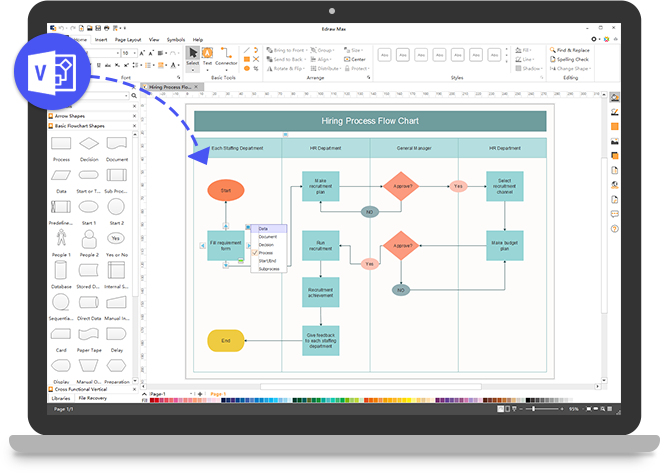
What Makes EdrawMax A superior Microsoft® Visio® alternative Solution?

For Windows, Mac, Linux and Online

Easy to Use & Professional

50000 Templates & Symbols

Compatible with Visio Files

Familiar User Interface

Dedicated 24 Hours Support

Real-time collaboration

Affordable Price
Draw out the exact concept on your mind
grasp your inspiration with minimal effort

It's an alternative to Visio® for Mac
If you are a Mac user and want to make diagrams with Microsoft Visio? You're out of luck, it only works on Windows. EdrawMax is a powerful and all-in-one diagramming solution for those looking for a Visio® alternative on a Mac.
It's easy to use, and even more powerful than Visio®. It offers much more high quality templates and symbols which allows you to create more than 280 types of diagrams.
Download for Windows 10/8/7/XP/Vista
Download for macOS X 10.10 and later
Create Beautiful Diagrams with More Templates & Symbols.
With 260 types of diagram templates and more than 50000 vector symbols, creating an exclusive and stunning diagram with Edraw has never been so much easier before.
However, Microsoft Visio® only offers 80 types of templates, which the number of template types for Edraw is three times as much as that for Visio®.
Download for Windows 10/8/7/XP/Vista
Download for macOS X 10.10 and later


Compatible with Visio® and Other File Formats
Seamlessly import Visio® files and do further modifications. Bring your old Visio® files back to life again.
Meanwhile, Edraw files can be exported to other files for free, such as MS Visio, MS Word, MS Excel, MS PowerPoint, SVG, Html, PDF, GIF, JPG, TIFF, etc.
However, with Visio®, only convert Visio files to quite a few file formats, even more, it's not free because you have to buy Microsoft 365 before converting files.
Download for Windows 10/8/7/XP/Vista
Download for macOS X 10.10 and later
Affordable Price for More Features.
The price of Visio is almost as twice as that of Edraw.
Edraw's competitive price can help customers save a lot of money. Why not select a software with more features and lower price instead of Visio?
Annual License
Download for Windows 10/8/7/XP/Vista
Download for macOS X 10.10 and later

Access to the Cloud
No more need to transfer files onto USBs or email files to yourself! With Personal Cloud, you can access your files anytime, anywhere, on any device. You can also import and export your files from/to Team Cloud, collaboration on your files with your coworkers is no longer a pain.

Download for Windows 10/8/7/XP/Vista
Download for macOS X 10.10 and later
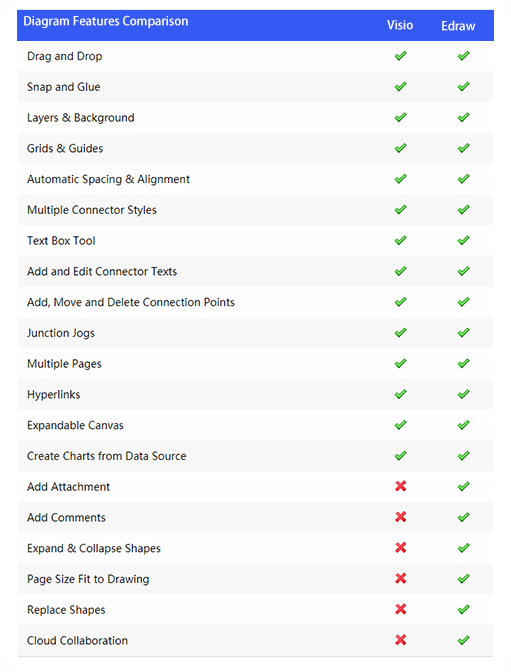
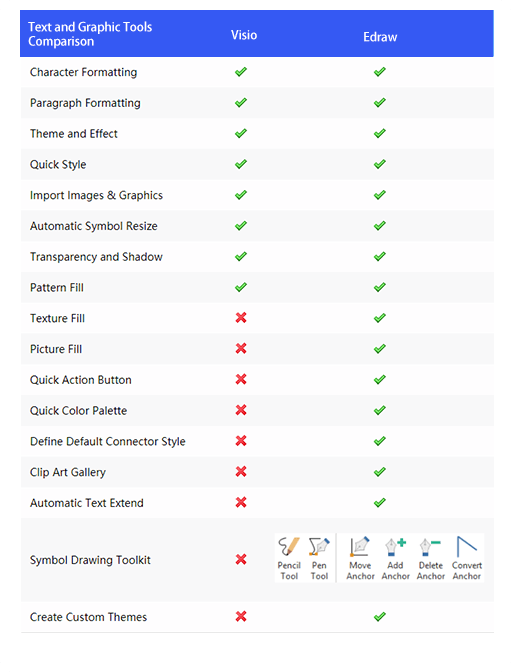
Main Features Comparison with Visio®
Edraw Max not only contains the features Visio® has, but also includes some features Visio® doesn't have. For example, the floating buttons make it more straightforward to diagram, and the vector sketching tools let users design new symbols fast and easily.
Download for Windows 10/8/7/XP/Vista
Download for macOS X 10.10 and later
FAQs about our Visio for Mac:
Over 15 Million Users Worldwide