EdrawMax Version 13.0.0 - Nov 23, 2023
New Feature:
- Revamped Homepage: We have given the homepage a fresh new look with a simpler, clearer, and more visually appealing interface.
- AI Homepage: You can now access all AI features swiftly and effortlessly on our new AI homepage, making your diagramming experience even more efficient.
- Insert Templates: Now, you can add new templates directly to an existing drawing page using the "Insert Template" function. This allows for greater flexibility and convenience.
- Personalize Diagram Types: Customize commonly used diagram types according to your preferences. Tailor them to suit your specific needs and streamline your diagramming process.
- Enhanced "New" Menu: The improved "New" menu offers a wider range of options for quickly starting a new drawing. Find the perfect starting point for your project with ease.
- One-Click Cloud Upload: We have made it even more convenient for you to upload local files to the cloud. With just one click, effortlessly store and access your diagrams anywhere, anytime.
EdrawMax V12.6.1 - Oct 10, 2023
1.
New Feature:
- Users can turn off the auto-routing mode for a connector, so that the connector won't reroute when it's relocated or zoomed in/out.
- Support bulk configuration of page sizes for a multi-page document all at once.
- The image inserted in a note can be zoomed in and out.
- Users can set the shortcuts for switching file tabs and file pages.
2.
Improvement:
- The minimum zoom-in value has been adjusted from 5%to 1% in order to be compatible with large CAD files.
- Add the ability to edit X-axis information for Echarts.
- Improved the compatibility with .vsd files.
- Improved other features and fixed some bugs.
EdrawMax V12.6 - Aug 31, 2023
1.
AI Diagram Maker:
- Timeline: Ask AI to generate a timeline based on your prompt.
- Lean Canvas: Generate a lean canvas based on your prompt.
- PEST analysis: Generate a PEST analysis diagram based on your prompt.
- SWOT Analysis: Generate a SWOT analysis diagram based on your prompt.
- User Profile: Generate a user profile based on your prompt.
- User Story: Generate a user story based on your prompt.
- Flowchart Optimization: Optimize a flowchart through continuous dialogue with AI.
2.
AI Analysis:
- Flowchart Analysis: Use AI to describe, analyze, and optimize flowcharts.
- Gantt Chart Analysis: Get an overview of the project, learn about project progress, identify risks, and sum up lessons you can learn.
- Chart Analysis: Compare data, identify anomalies, sum up data, and predict trends.
- Organizational Chart Analysis: Describe and analyze an organization chart.
3.
AI Chatbot:
- Continuous dialogue: AI will save chat history if the continuous dialogue mode is on.
- AI Diagramming: Create a diagram based on an answer of AI with a simple click.
4.
AI Drawing:
- AI Drawing: Convert text into a drawing with various styles to choose from.
- Drawing Style Change: Change the style of an existing drawing with AI.
EdrawMax V12.5 - May 24, 2023
1.
Edraw AI 2.0: Access the
Edraw AI through Edraw AI in the Top Menu, Quickly Tap the Space Bar Twice, and
AI Floating Ball in the Lower Right Corner of the Canvas.
- AI Q&A: Generate answers and explanations in response to questions;
- AI Drawing: Generate flowcharts, mind maps, lists, and tables with simple commands;
- AI Writing: Assist with expanding and shortening paragraphs, polishing and breaking text, changing tones, and translation.
2.
[New Feature] One-Click Edit:
- One-Click Unified Settings: Unify settings for style, fonts, colors, and paragraphs in diagrams with one click;
- Smart Analysis: Detect possible design problems and provide automatic optimization for font, alignment, color, image size, and other issues in drawings with one click.
EdrawMax V12.0.7 - February 16, 2023
1. Support freezing swim lanes.
When swimlanes are long, use the Freeze Pane feature to lock the swimlane header row/column so that other sections are visible while scrolling.
2. Support adjusting the spacing of each milestone on the timeline axis.
When the mouse hovers over the milestone dots on the timeline, the dots will become larger so that you can freely drag the dots to adjust the distance between each milestone.
3. Support displaying link address after expanding the hyperlink menu after inserting a hyperlink.
4. Support adding and opening a hyperlink in the slide show view.
5. Fixed the problem that the font of the inserted comment was inconsistent with the font set by the system.
6. Fixed the problem of fitting text in a text box when adjusting the text box.
7. Fixed the problem that the mini toolbar covered the shape when drawing.
8. Fixed the problem that the layout preview of the organization chart did not match the actual display.
9. Fixed the problem that the today red line of the Gantt chart displayed abnormally.
EdrawMax V12.0.6 - December 26, 2022
1. Now you can see values and text on pie charts.
2. You can export slides with an aspect ratio of 4:3 and 16:9.
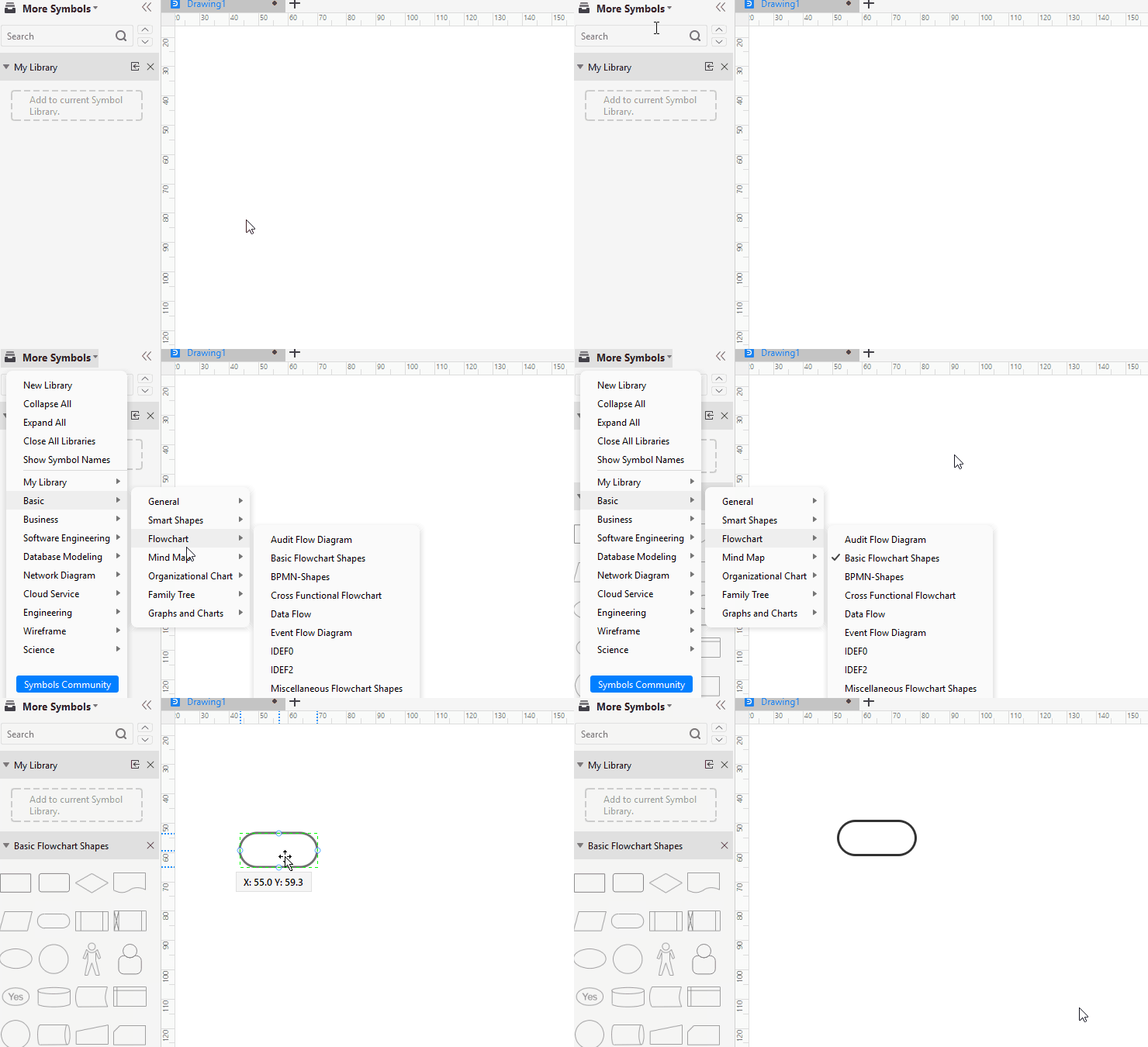
3. Update the UI of the symbol libraries.
-
3.1 Now you can create new libraries, expand, collapse, and close libraries here.
-
3.2 You can see which symbols have been selected on the panel.
4. Support displaying the angle of the fan shape when adjusting the shape.
5. Delete infrequently-used shortcuts on the menu.
6. Fixed the problem of pages in the wrong order after importing external documents.
7. Fixed the problem that some symbols were lost when exporting PDF.
EdrawMax V12.0.5 - November 15, 2022
1. Now you can select a page at the bottom of the canvas and right-click to choose to move the page to other documents for a quick copy.
2. You can choose to save a single page as a new document in the case of a file with multiple pages.
3. Fixed the problems of the formula editor, Gantt chart, and organization chart according to user feedback.
EdrawMax V12.0.4 - October 26, 2022
1. Go to File > Options > Default Settings and now you can set default measurement units and accuracy for drawing pages.
2. The ones with yellow diamond cursor are adjustable variable symbols, and now you can drag the cursor to change the shape freely.
3. Add a video tutorial of UML timing diagram in EdrawMax.
4. Reorganize the newbie guide and help center.
5. Redesign font library UI.
6. Add keyword matching search function for searching fonts.
EdrawMax V12.0.3 - September 22, 2022
1. New Feature: Right-click on the canvas and you will see the page break option on the right-click menu. EdrawMax supports inserting page breaks now!
2. Add and optimize symbols in the libraries.
3. Fixed some other known issues.
EdrawMax V12.0.2 - August 26, 2022
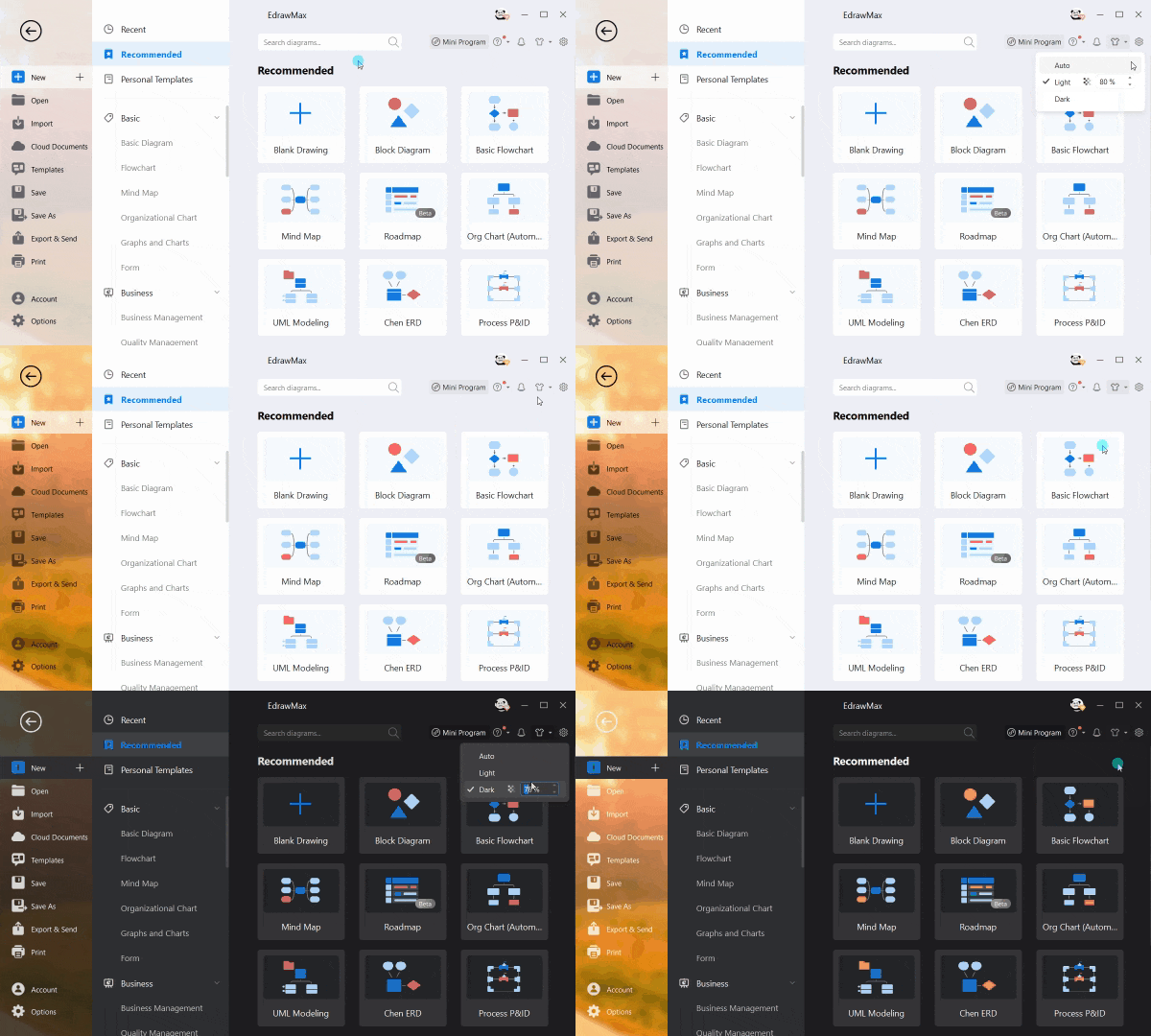
1. New Skin: support frosted glass effect now. The transparency can be adjustable.
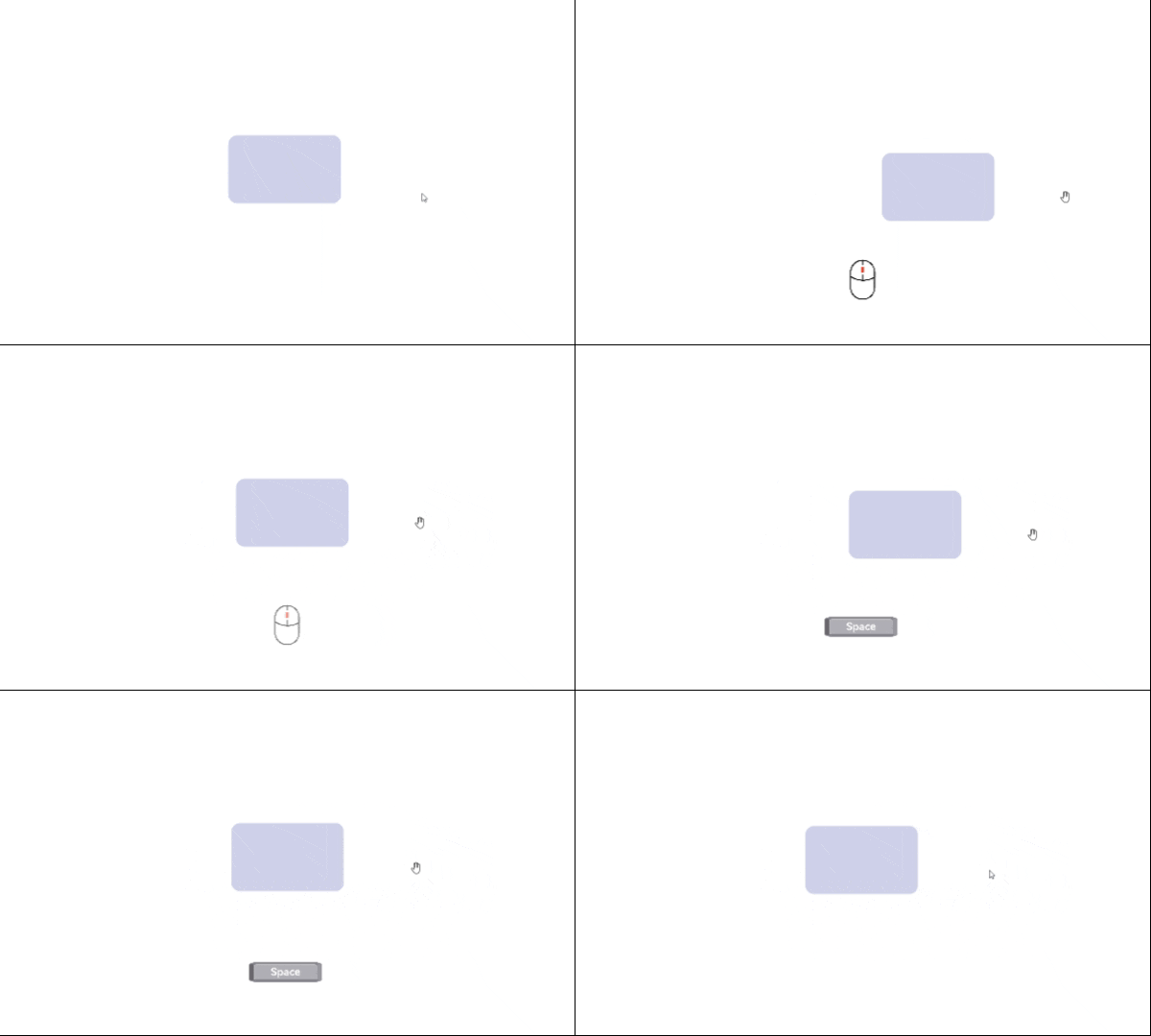
2. New Feature: Press the spacebar or middle mouse button to drag the canvas directly after zooming in the canvas.
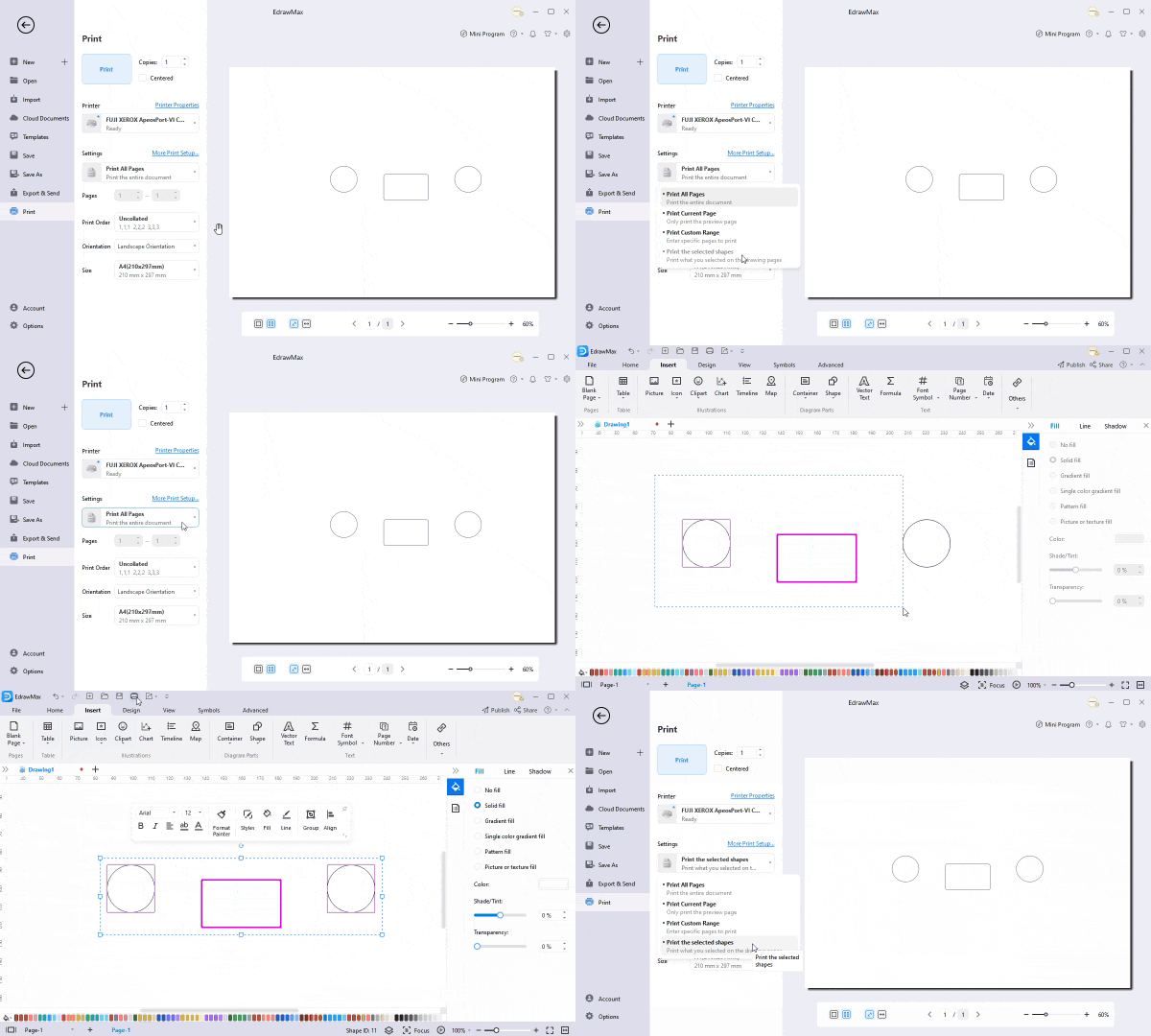
3. New Feature: select the target shape before printing, and you can custom print the chosen shape.
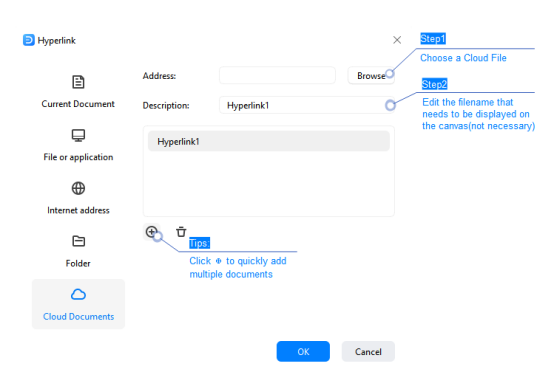
4. New Feature: You can add a hyperlink that links to your personal cloud document.
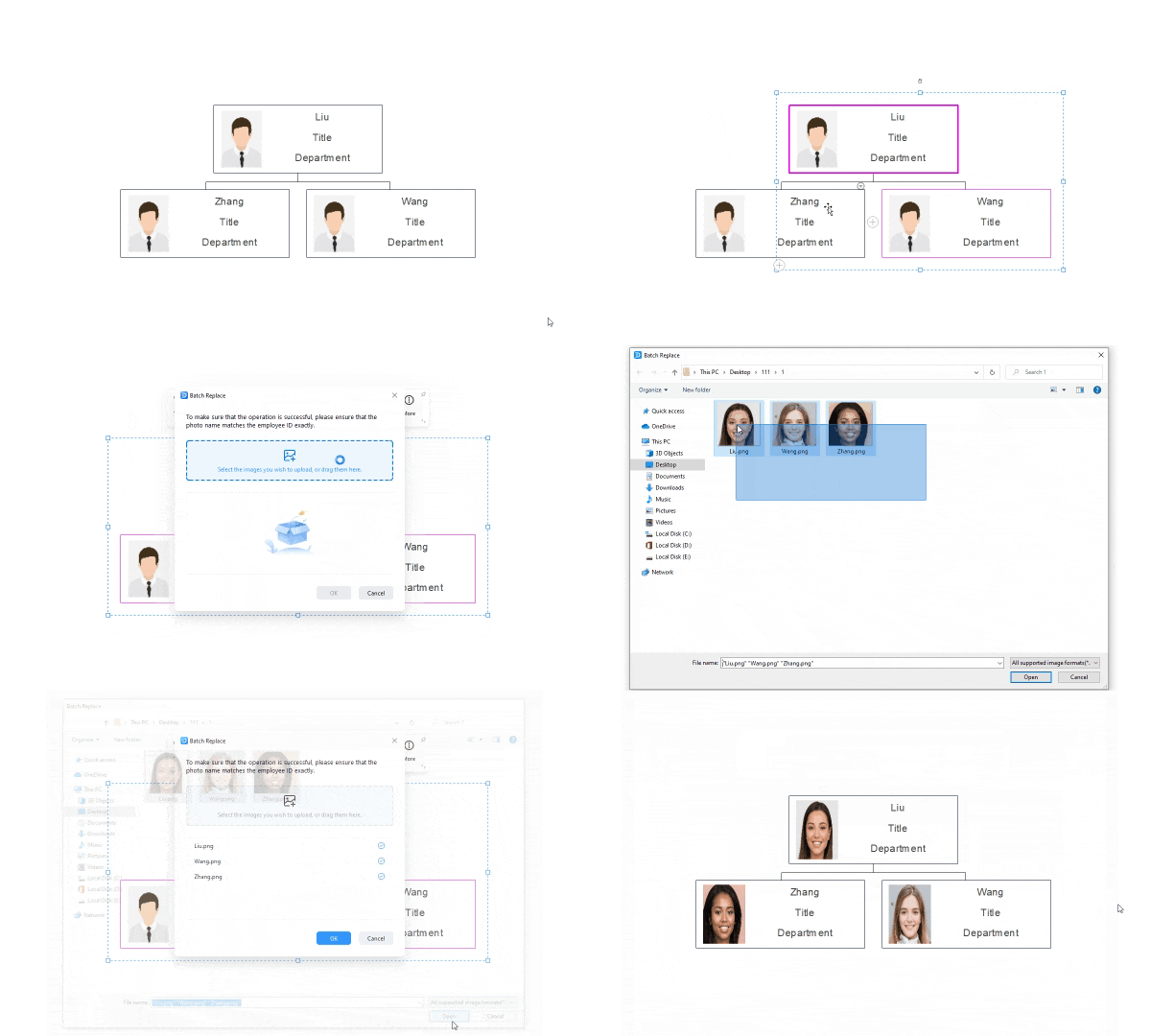
5. New Feature: support replacing photos by dragging and uploading files all in one click in organizational charts.
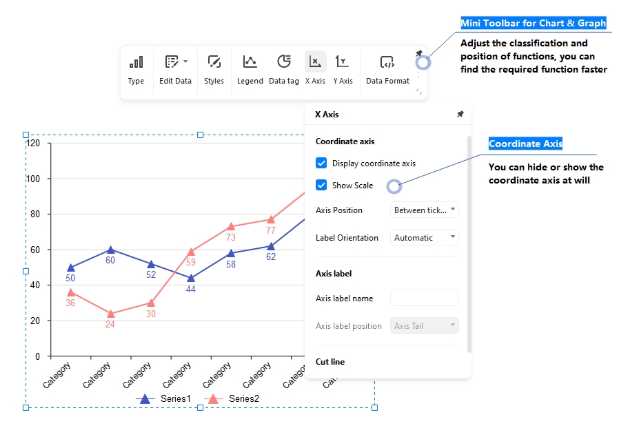
6. Mini Toolbar for Chart & Graph Updated:
-
Adjust the classification and position of functions.
-
Support hiding or showing the coordinate axis at will.
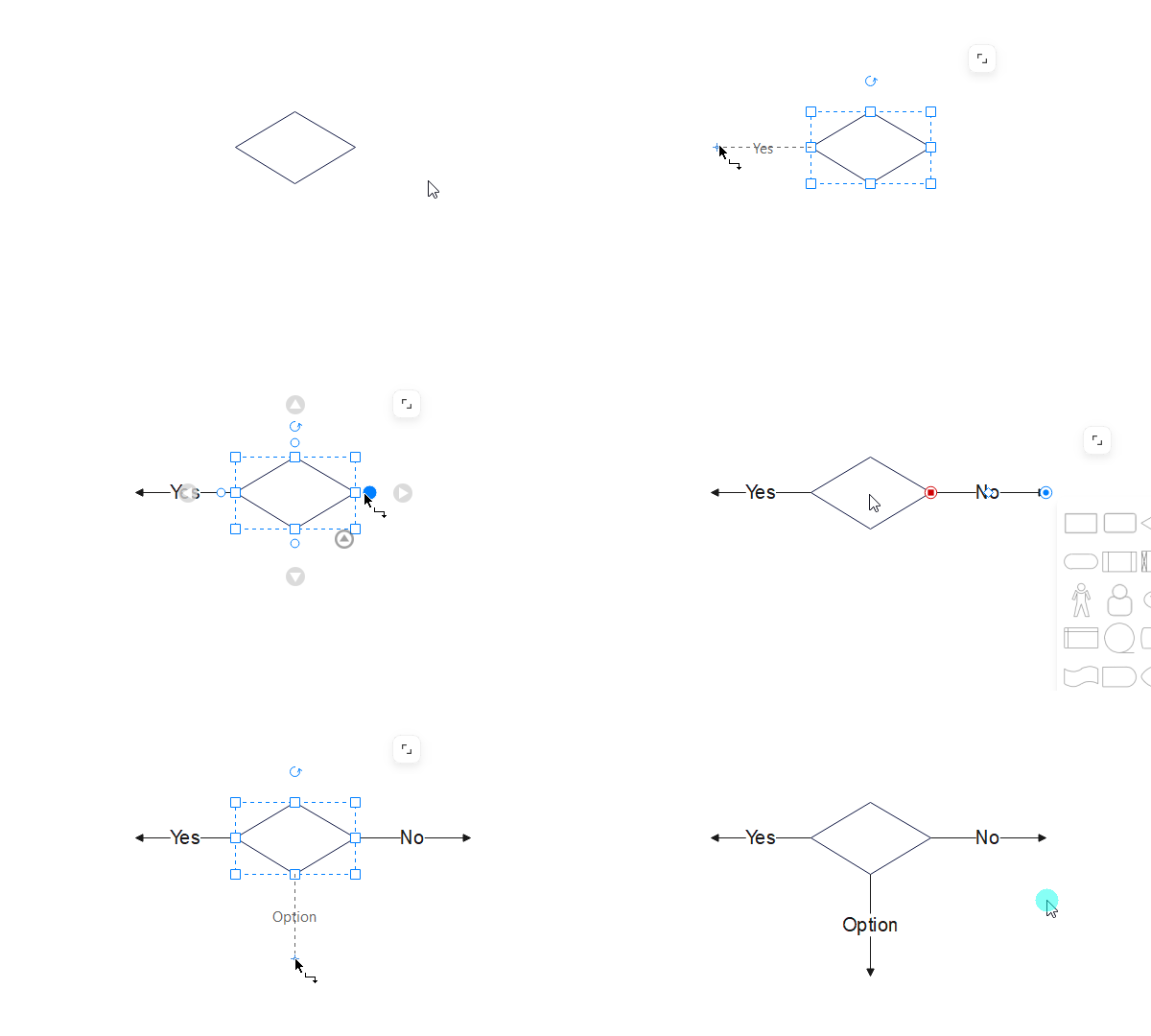
7. When using a decision symbol in flowchart, the connection line will automatically show the result.
8. Support saving custom symbol libraries and personal templates to the private cloud now.
EdrawMax V12.0.1 - July 28, 2022
1. Support selecting all text or other objects on the mini toolbars when multi-selecting shapes.
2. Newly add the format painter on the mini toolbars.
3. Newly add data source templates and support hiding photos on organizational charts.
4. Add and optimize symbols in the libraries.
5. Improvements in importing VSDX, DOCX, SVG, and other file formats.
6. Fixed some other known issues.
EdrawMax V12.0.0 - June 23, 2022
1. EdrawMax V12.0 comes with a new user interface, start menu, and lots more.
Try it Free Now2. New Feature: easily format shapes with pop-up menus that can be easily pinned, dragged and collapsed.
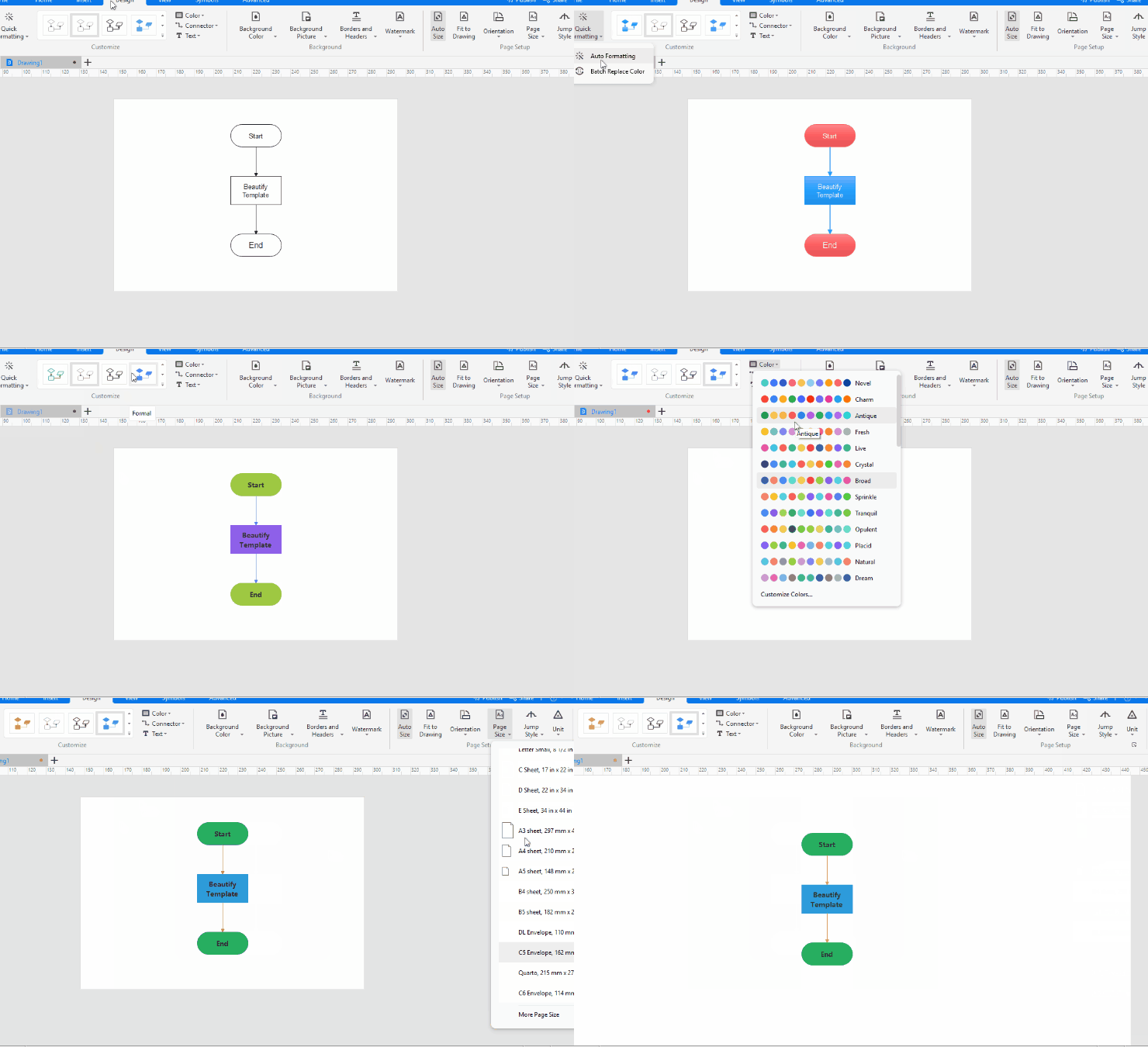
3. Newly add the "Design" tab that contains commands like auto-formatting, preset themes, and page setup.
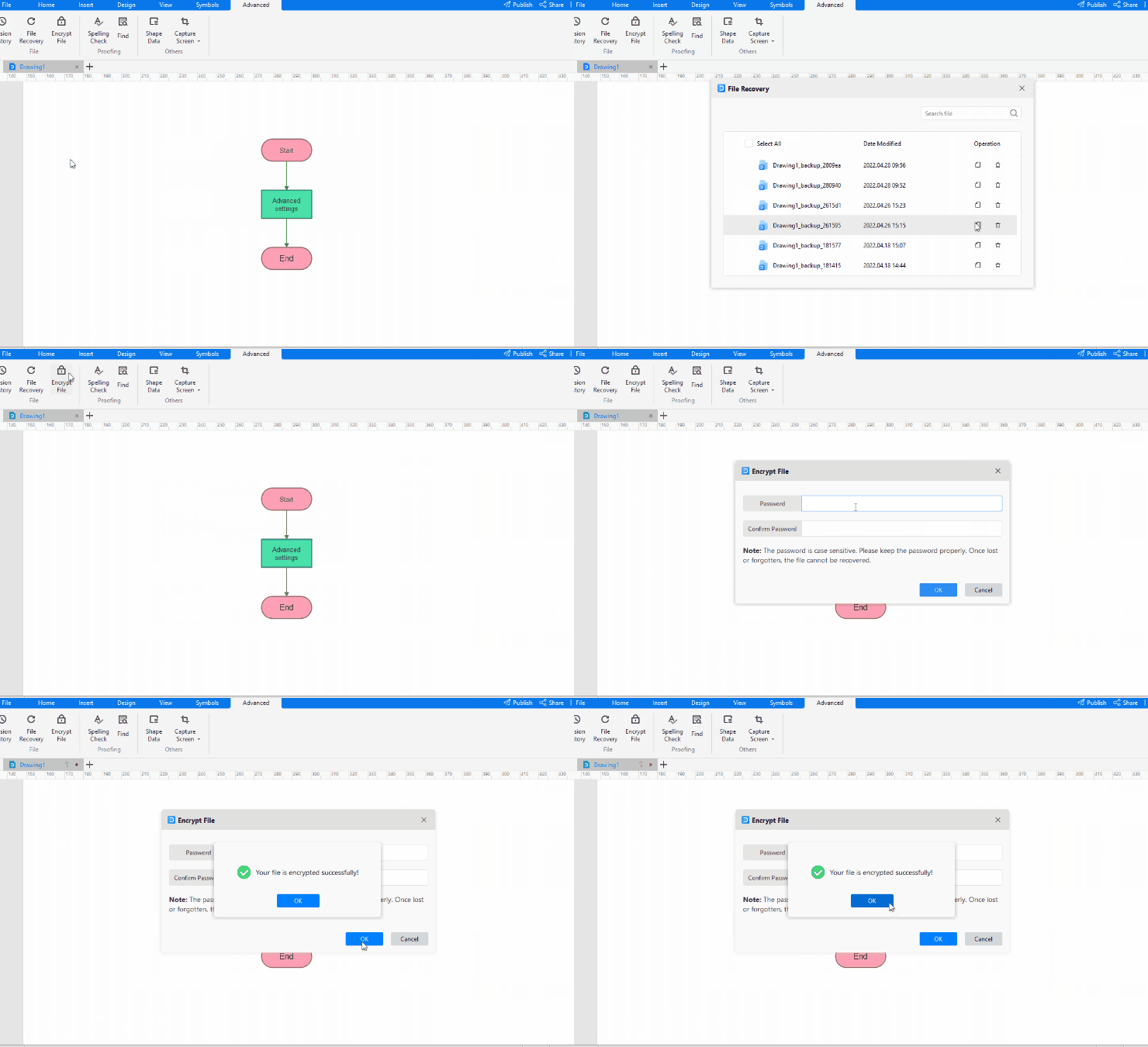
4. Newly add the "Advance" tab that contains commands like recovering files, encrypting files, and viewing data properties.
5. All right side panels are hidden, and you need to find specific options to open them.
-
Click Home > Fill Options/Line Options/Shading Options, and you will see the Style panel.
-
Click View > Slideshow to open the Slideshow panel.
-
Click Advance > Shape Data to open the Data Properties panel.
-
Click Advance > Version History to open the Version History panel.
-
Find the layer menu on the footer of the workspace.
6. Optimize the symbol library categories to make it easier to find symbols.
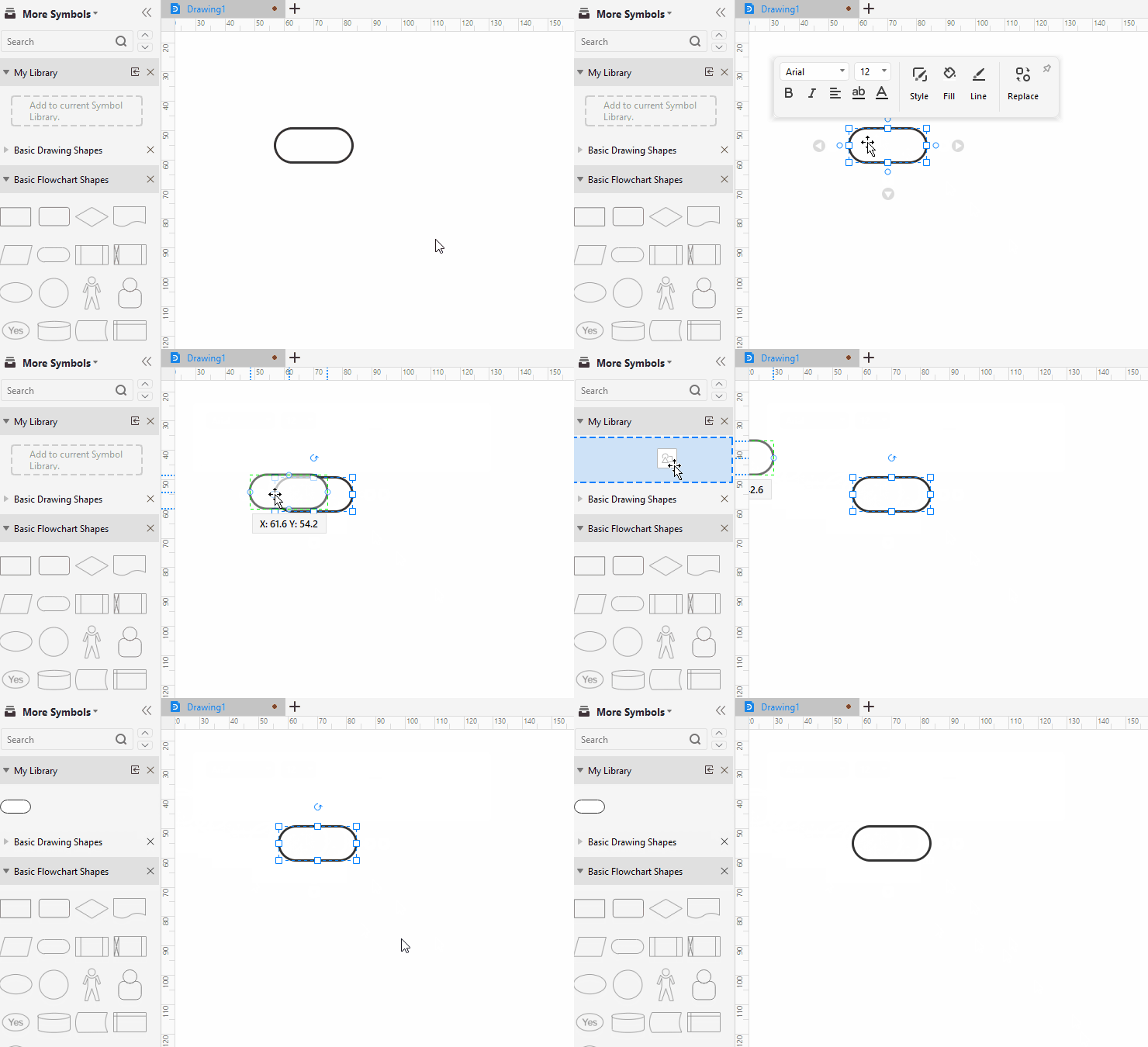
7. Support dragging symbols on the canvas and dropping them into custom symbol libraries.
8. The files to be recovered are categorized according to the original files, making it easier to find them.
EdrawMax V11.5.6 - Apr 01, 2022
1. Support showing the dimensions and position of a shape when dragging the shape on the canvas.
2. Support adding a watermark on the top layer of the diagram.
3. Support adding a current date line on a Gantt chart.
4. Fixed some other known issues.
EdrawMax V11.5.5 - Mar 03, 2022
1. New Feature: add the floating table toolbar to edit tables quickly.
2. New Feature: support dragging a flowchart symbol and dropping it between the other two symbols that you want to connect to. The connectors will be auto-created.
3. New Feature: support deleting a flowchart symbol and keeping other symbols auto-connected.
4. Share: optimize the sharing function and support sharing with QR codes, setting an expiration date, etc.
5. Cloud Storage: basic account users have 100MB of free cloud storage and unlimited cloud documents that don't go over the storage limit.
6. Fixed some other known issues.
EdrawMax V11.5.2 - Jan 06, 2022
1. New Feature: add a quick entry to create 15 kinds of commonly-used diagrams quickly.
2. New Feature: support automatically switching between light mode and dark mode according to time.
3. New Feature: support selecting multiple symbols once in the symbol libraries.
4. New Feature: support dragging and adding symbols in connectors when making flowcharts.
5. New Feature: support inserting dates and adjusting date formats.
6.
New Feature: support changing file storage locations of "File Recovery," "Symbol Library," and
"Personal Templates."7. Adjust shortcut keys of some functionalities.
8. Automatically pop up the File Recovery window for select and open autosave files after exiting EdrawMax abnormally and reopening it.
9. Backgrounds of diagrams and symbols become transparent when copied and pasted on MS PowerPoint.
10. Fixed some other known issues.
EdrawMax V11.5.0 - Nov 19, 2021
1. Greatly improve the opening speed for the software.
2. EdrawMax Template Community: brand new UI, powerful full-text search, and build connections with creators.
3. New Feature: the dark mode is coming!
4. New Feature: add new 100+ high-quality templates.
5. New Feature: update libraries for icons and clipart.
6. New Feature: support visualizing roadmaps, project timelines, user researchers, risk management, and course learning.
7. New Feature: update symbols of org charts, project timelines, calendars, Gantt charts, lists, and matrices.
8. New Feature: support inserting images in org chart symbols directly.
9. New Feature: support drawing junctions in electrical diagrams.
10. New Feature: support pressing the F4 key to repeat a command many times.
11. Fixed some other known issues.
EdrawMax V11.1.2 - Sep 23, 2021
1. Optimize connection line style setting logic to support setting default connection line styles.
2. Optimize text style setting logic to support setting default text styles.
3. New Feature: support setting up styles of chart axis labels and legend labels.
4. New Feature: support adding multiple text columns in Gantt chart.
5. New Feature: support removing the background when exporting to images.
6. New Feature: add network proxy settings to make EdrawMax visit the Internet in special network proxy.
7. Fixed some other known issues.
EdrawMax V11.1.0 - Aug 13, 2021
1. Add "Historical Versions" for viewing and restoring previous versions of files in your Edraw account (sign-in required).
2. Enhance file recovery function to effectively secure files.
3. New Feature: double-click on the vector text and edit.
4. New Feature: right-click on the desktop and create a new EdrawMax file.
5. New Feature: support to center and print documents.
6. New Feature: export PDF documents only with selected shapes.
7. New Feature: support to zoom the canvas on the focus mode.
8. New Feature: wrap the text in the shapes of organization charts.
9. New Feature: optimize the process of saving cloud documents and visualize the process of uploading documents.
10. New Feature: support to find the text and highlight it in specific locations.
11. More Supports: Integrate Customer Service Chatbot in the Help menu.
12. More Supports: add "Account Center" on the home page, where users can see version information, check for updates, etc.
13. Fixed some other known issues.
EdrawMax V11.0.0 - July 9, 2021
1. Brand new UI for Home Page and add the Recommended tab and Recent tab to quickly get started.
2. New Feature: support converting your diagrams into personal templates.
3. New Feature: add focus mode to help you focus on diagramming in EdrawMax.
4. New Feature: support to change the style of your diagram with the auto-formatting tool and replace the colors in batch.
5. New Feature: support to add exception days in Gantt charts.
6. More Supports: add a new help center to provide the entrance for what's new, diagram tips, video tutorials, etc.
7. Fixed some known crashes and other problems.
EdrawMax V10.5.5 - May 6, 2021
1. Decrease web page load times of the cloud document and template community.
2. New Feature: insert text and choose whether to keep source formatting or keep text only.
3. New Feature: open multiple EdrawMax documents at once.
4. New Feature: right-click on the tab and open the menu to achieve multiple operations.
5. New Feature: add the smart connection mode for creating flowcharts and connecting symbols. (Navigate to [File] > [Option] > [General])
6. New Feature: support to add the main title and snap& glue separators on swimlane diagrams.
7. New Feature: move the wall and show the dimension in real-time.
8. New Feature: auto-calculate the area of the space (the symbol) in floor plans.
9. New Feature: hold down the Alt key and avoid selecting the underlying symbols of the diagram.
10. New Feature: drag the taskbar or completion bar from the right side of the Gantt chart and display data in real-time.
11. Redesign the space setting option in the right Organizational Chart pane and add shortcuts for creating org charts.
12. Optimize the display of the label at the bottom of the chart, which can automatically match the text direction according to the width.
13. Add the hover effect in the pre-made template gallery.
14. Fix some bugs and crash issues that might happen in certain situations.
15. Corrections and improvements in many small details.
EdrawMax V10.5.4 - Mar 31, 2021
1. New Feature: automatically zoom in the canvas when you edit the text as the zoom level is less than 100%. (Navigate to [File] > [Option] > [General])
2. New Feature: automatically resize the height of the symbol or text block when you are typing text. (Navigate to [File] > [Option] > [General])
3. Gantt Chart: you can adjust the row height now.
4. Mind Map: you can preview the themes when the cursor is over the theme thumbnail.
5. Mind Map: you can add subtopic by the Tab key.
6. Fix some bugs and crash issues that might happen in certain situations.
7. Corrections and improvements in many small details.
EdrawMax V10.5.3 - Feb 4, 2021
1. New Feature: you can share diagrams with others via links; anyone with the link can view or be allowed to edit the diagram online.
2. New Feature: remember the export resolution of the previous image to avoid repeated operations.
3. New Feature: quickly switch the bottom color bar mode, and you can instantly change the color of fill, line, and text.
4. Connector: you can use freeform connentors and draw any type of connector as you like.
5. Mind Map: update the pre-made mind map theme.
6. Floor Plan: show connection points when you attach one wall to the other walls.
7. Gantt Chart: change the style of priority in Gantt charts.
8. Menu: optimize the Home menu layout and change the positions of some buttons.
9. Select Object: optimize the highlighting effect when you select one page or change the theme.
10. Fix some bugs and crash issues that might happen in certain situations.
11. Corrections and improvements in many small details.
EdrawMax V10.5.2 - Jan 21, 2021
1. Cloud Document: you can view browsing history of your cloud documents.
2. Text Block: remove sample text in blank text blocks.
3. Add prompts for the wrong operation of connection lines.
4. Fix some bugs and crash issues that might happen in certain situations.
5. Corrections and improvements in many small details.
EdrawMax V10.5.0 - Dec 17, 2020
1. Beginner's Guide: learn how to use EdrawMax quickly with the built-in user guide.
Presentation: add the Presentation pane on the right side, and you can create or add slides as you like.
4. Timeline: quickly insert different types of timelines from the Insert tab.
5. Press Space bar + left or right mouse click, and you can drag the canvas freely.
6. Add the formula editor (EdrawMath) under the Insert tab.
7. Theme & Style: add new themes and change fill colors at the bottom of the interface.
8. Org Chart: find buttons and options for making org charts in the Organizational Chart pane.
9. Fix some bugs and crash issues that might happen in certain situations.
10. Corrections and improvements in many small details.
EdrawMax V10.1.5 - Nov 6, 2020
1. You can see the Timeline pane when you use timeline shapes.
2. The connectors between shapes will be split into 2 new lines when you insert another shape.
3. Fix some bugs and crash issues that might happen in certain situations.
4. Corrections and improvements in many small details.
EdrawMax V10.1.4 - Oct 20, 2020
1. You can have access to the template gallery to get inspired in EdrawMax.
2. You can register/sign in to an Edraw account and save the drawing files in the personal cloud.
3. Add a user guide for beginners to learn how to use EdrawMax instantly.
4. Add operation tips when you start to make flowcharts, mind maps, org charts, swimlane diagrams, or use smart shapes.
5. Symbol Library: now you can import symbols of the VSSX file format.
6. Theme & Style: Add new themes and change fill colors at the bottom of the interface.
7. Theme & Style: When you modify the quick style of the whole diagram, the font size of the text will be unaffected if you have changed the size before.
8. Theme & Style: Change the style of the connection point.
9. Pin context menus on the interface.
10. Double-click on the blank area to add a text box on the canvas.
11. Add the formula editor under the Insert tab.
12. Copy and paste any content between the desktop and online version of EdrawMax.
13. Export shape data from the Data Properties pane.
14. Zoom the canvas from 10% to 1000%
15. Gantt Chart: Add the functions of displaying delay tasks and critical paths.
16. Gantt Chart: Show or hide all subtasks.
17. Fix some bugs and crash issues that might happen in certain situations.
18. Corrections and improvements in many small details.
EdrawMax V10.0.6 - Aug 31, 2020
1.
Password Protection: add a password to your file with
Encrypt File; modify and remove the password easily.
2. Custom Symbol Library: build your own symbol library by importing the new symbols or add the existing symbols directly. You can search symbols on your own symbol library now.
3. Symbol Library: add the feature of "Always open this library for new file" to pin your commonly-used symbol libraries on the top positions of the library pane.
4. Symbol Library: Switch among different documents without changing the collapsed/open states of the symbol libraries in each document.
5. Swinlane Diagram: Add a new swimlane that will snap and glue to another lane automatically; change the colors of the titles, lanes and the borders in a swinlane diagram.
6. Insert Image: Select multiple pictures/images and insert them into a file.
7. Container: See the border of a container turns green when you want to add shapes into the container.
8. Image Container: Add Image Container under General symbol library. This kind of symbol allows you to drag images into it, which will be easy for you to create relationship diagrams and family trees.
9. Chart & Graph: Use the Rotate feature on the Chart pane to rotate the text on the horizontal (category) axis by any degree.
10. Theme: Add 10 different theme colors.
11. Print: Fix the issue that starting the software is very slow when you can't connect to a network printer.
12. Circular Diagram: Able to see the floating buttons and menus on each layer of a circular shape.
13. Fix some bugs and crash issues that might happen in certain situations.
14. Corrections and improvements in many small details.
EdrawMax V10.0.5 - Jul 30, 2020
1. You can insert images and clip art into mind map symbols, and change the shape of the symbol.
2. You can rearrange order of your document tabs (Drag and drop a tab to a different location).
3. You can see a prompt when exporting a file.
4. When you select 5 different symbols (wall, swimlane, entity, table unit in UML diagram, matrix in container), the related task pane will appear.
5. Fix some bugs and crash issues that might happen in certain situations.
6. Corrections and improvements in many small details.
EdrawMax V10.0.4 - Jun 3, 2020
1. Support to customize keyboard shortcuts.
2. Add Genogram and its templates under Science and Education section.
3. Show Recently Used Colors in color swatches panel.
4. Show Recently Used Font in font panel.
5. Support to import and export data in CSV format for tables.
6. Improve search accuracy in symbol libraries.
7. Add the option of Show Symbol Names.
8. Fix the hyperlink display issue in Gantt charts.
9. Corrections and improvements in many small details.
EdrawMax V10.0.2 - April 27, 2020
1. Speed up searching from the symbols library.
2. Now you can customize the shapes and branches of mind maps.
3. Now you can curve text around a circle.
4. Fix some bugs.
5. Add new templates for the circuit diagram, the chemical chart, etc.
EdrawMax V10.0.0 - April 13, 2020
1. The newest UI is a pretty drastic change compared with its past versions.
2. The new floating button makes it easier to create flowcharts.
3. Add new features of forms - import/export Excel files seamlessly.
4. Now you can create smart shapes as you like.
5. Floor plan - the new feature makes it more flexible to connect wall.
6. Mind map - brand new themes, icons, and process steps.
7. Now you can create a container (a special shape that visually groups together logically-related shapes on the page).
8. Now you can export your document into multiple PDF files (by page ranges defined).
9. Add new types of diagrams - analysis canvas, funnel diagrams, roadmaps, customer journey maps, calendar plans, goal setting worksheets, and so on.
10. Add new UI color themes - freely change the default blue color of the UI to another colors like purple or gray.
11. Optimize the functionality of connector lines so that you can connect the different shapes from any point on the outline of any shapes.
12. Add the shortcut "F8" - press "F8" to switch to continuous drawing mode when using the basic tools (shape, connetor, and text).
13. Add new feature - format painter for text.
14. Add reminders when you forget to save the modified files.
15. You can choose to zoom in/out centering on the mouse position.
16. Optimize the function of exporting images - you can remove margins.
17. Optimize the function of the library - you can fold/unfold more than one library at the same time.
18. Speed up searching, opening, saving, and copying files.
19. Improve the compatibility with Visio files.
20. Improve the quality when you click "Fit to Drawing" of a floor plan.
21. You can customize and save the quick access toolbar.
22. Improved the shape data accuracy.
23. Improve the quality of printing on A4 paper.
EdrawMax V9.4 - March 16, 2019
1. Improved the compatibility with Visio .vsdx files.
2. Fixed some bugs.
EdrawMax V9.3 - Oct 22, 2018
1. Improved the quality of exported Word, PPT, and Excel.
2. Improved the software UI appearance.
3. Improved the quality of exported PDF.
4. Added more cliparts for education.
5. Solved the problem of image inversion when printing.
6. Solved the problem of network printing crash.
7. Improved the template icons.
EdrawMax V9.2 - Jan 2, 2018
1. Added the Pan/Hand tool. Simply hold down the right mouse button to pan your canvas freely.
2. Added inserting QR code function.
3. Added screen capture feature. The captured image can be inserted in your drawing right away.
4. Added the feature of setting default font. You can choose "Use default font instead of theme font" in the Option menu.
5. Improved the effect of PDF and Word export, solved the text misaligned issue.
6. Added lauguage changing feature. Now you can change the UI language directly from Option menu.
7. Added and improved more wireframe symbol libraries including website wireframe elements, wireframe icons, iOS icons and Andriod wireframe icons. Added more wireframe templates.
8. Added Genogram symbols and templates.
9. Added plenty of science diagram examples and templates for K-12 education.
10. Added cliparts for Internet of Things, Smart Home, Big Data, Artificial Intelligence, etc.
EdrawMax V9.0 - Sep 26, 2017
1. Added exquisite templates for arrow diagram, block diagram, 3D diagram, circle diagram, list diagram, pyramid diagram, venn diagram, timeline and presentation.
2. Added exquisite templates for business diagram, fishbone diagram, matrix diagram and marketing diagram.
3. Added symbols and templates for enterprise architecture diagram design.
4. Improved templates for business card and holiday card.
5. Added templates for flowchart, mind map, floor plan, seating plan, fire escape plan, etc.
6. Added templates for flyer, poster, picture collage, book cover, annual report, banner, etc.
7. Added symbol library and templates for Graphic Organizer design.
8. Added cliparts for business scene, festival, food, beverage, landscape, trees, sport elements, fitness,fashion items, biotechnology, etc.
EdrawMax V8.7 - May 20, 2017
1. Added the HTML5 style share feature.
2. Added the multiple pages HTML export.
3. Added the deactivate feature.
4. Fixed the bug to print the curver text.
5. Support to create theme connector style.
EdrawMax V8.6 - Feb 22, 2017
1. Added the free Edraw Online File Viewer lets users open Edraw files on any device, using your favorite browser. No installation required.
2. Added the function to crop a picture with a shape.
3. Added the cuvel text and text on path feature.
4. Added the share feature to share the diagram to facebook, twite and other social platform.
5. Added the float menu for every shape.
6. Added the pixel unit.
7. Improved the text box, lines, arrow shapes, callouts and basic charts.
8. Added infographic charts, world maps and map points.
9. Added certificate shapes and gift voucher shapes.
EdrawMax V8.4 - Aug 18, 2016
1. Added the SVG format importing.
2. Added the property sheet excel data exporting.
3. Improved the chart symbols.
4. Fixed the text editing issue in the Mac OS X.
EdrawMax V8.3 - Jun 20, 2016
1. Compatible with the 4K Resolution and HD displays.
2. Added the grid spacing and grid subdivision settings.
3. Added the default date option in timeline and calendar.
EdrawMax V8.2 - May 18, 2016
1. Added the default unit and currecy setting for the Gantt Chart.
2. Improved the certification and business promotaion symbols.
3. Fixed the texture print issue.
EdrawMax V8.0 - Mar 14, 2016
1. Edraw Team Cloud and Personal Cloud are available now. With it, you can sync diagrams to cloud server as easily as to your hard drive.
2. Easy to collaborate on files through Team Cloud. Supports real-time updating and document sharing. Adds real-time comment about the diagrams.
3. Upgrades to cross-platform diagram program, supporting to run on MAC system as well.
4. Improves text editing effect for Russian, Korean, Arabic, Thai, Turkish, Vietnamese, and many other languages in the world.
5. Adds Infographics design elements and templates, including infographic libraries for food, business, medical, education, music, environment, transportation, architecture, tourism, news, and technology.
6. Adds Greeting Cards. Easy to design Business Card, Greeting Card, Post Card, Invitation Card, Birthday Card, Christmas Card, Valentine's Card, New Year's Card and other holiday cards with built-in elements.
7. Templates and examples have been significantly refined and improved.
8. Adds some new libraries to the General category, such as Common Shapes, 2D Block Shapes and Icons. Improves Callout Shapes, Arrows Shapes and 3D Block Shapes.
9. Increased 4300 new symbols and elements. Contains over 12600 symbols in total.
10. Smarter and easier layout of Organization Chart. Modify all org chart shapes once through Define Field and Display Options.
11. Layers function enables to create multi-layer drawings.
12. Geometry and Boolean operation for shapes.
13. Easier preview and print of large-size drawings.
14. Preview of shape libraries before opening them.
15. Be able to open multiple libraries all at once.
16. Preset connector styles allow to set default connector style much easier.
EdrawMax V7.9 - Dec 15, 2014
1. Added the new presentation templates such as Business Plan, Newsletter, Brochure, Banner, Label, Leaflet, Flyer and Certificate.
2. Added the new business card templates such as Greeting Card, Invitation Card, and Postcard.
3. Added the new business form templates such as Expense Report, Inventory List and Quote Form.
4. Added the new floor plan templates such as Security and Access Plan, HVAC, Reflected Ceiling Plan and Plumbing and Piping Plan.
5. Support to insert big size image.
6. Added lot's new symbols for P&ID and PFD.
7. Added lot's new symbols for electrical diagram.
EdrawMax V7.8 - Dec 15, 2014
1. Set the default theme from Edraw Flat to General type.
2. Improved the data importing function in the Org Chart.
3. Added the Behind on Local Control Panel option in the PID.
4. Added the Close button in the Library panel.
5. Added the help link for the different drawing types in the Start Page.
EdrawMax V7.7 - Jul 7, 2014
1. Added the Fire and Emergency Plan, Wardrobe Elevation templates in the Floor Plan.
2. Added the iPhone UI design, Windows UI design in the Wireframe.
3. Added the Presentation drawing type.
4. Added the Insert Shape From Library feature for Mind Map drawing type.
5. Added the flat style symbol and examples.
6. Added the VSDX format import and export feature.
7. Updated a lot of new examples and symbols.
8. Improved the theme style.
9. Improved the interface UI.
EdrawMax V7.6 - Feb 23, 2014
1. Added the dimension for the Floor Plan symbols.
2. Added the feature of exporting read-only pdf file.
3. Improved the Text IME..
4. Fixed the property setting in the gauge chart type.
EdrawMax V7.5 - Jan 18, 2014
1. Added the scatter plot, gauge chart and comparison chart types in the chart templates.
2. Added the status chart, quality function deployment, house of quality diagram types in the project management templates.
3. Added the feature of creating a chart from data file.
4. Added the Insert Note feature for shape.
5. Added the Insert Attachment feature for shape.
6. Improved the full screen preview function.
7. Added the Replace Shape feature.
8. Added the Map Click Event feature.
9. Added the Insert Page Number feature.
10. Added the Duplicate Page and Duplicate Background features.
11. Added some examples for network diagram, flowchart and charts.
EdrawMax V7.3 - Dec 5, 2013
1. Added a new file format *.eddx which is more suitable for handling a large number of pictures. EDDX has a smaller file size and better compression ratio.
2. Supported to export vector PDF file with hyperlink.
3. Fixed some bugs while exporting PDF files.
EdrawMax V7.2 - Nov 1, 2013
1. Added the Column, Bar, Pie, Doughnut, Line, Area, Scatter, Spider Charts drawing types. See chart examples.
2. Exported to MS Word, PowerPoint, Excel in vector format.
3. Exported to PDF format in vector format. See Vector PDF Format.
4. Improved the SVG format.
5. Supported to export PS, EPS format.
6. Text editing needs not to switch to 100% view now.
7. Added the Duplicate This Page function.
8. Added the Website Wireframe drawing type.
9. Improved the Electrical symbols.
10. Improved the Floor Plan symbols.
11. Added two theme styles.
12. More than one hundred new examples available.
13. Fixed a crash bug in the mind map drawing type.
EdrawMax V7 - April 25, 2013
1. Improved the Gantt chart drawing type.
2. Supported to create Gantt chart from Excel file or text data.
3. Mind Map can export to Gantt chart with one click.
4. Gantt chart can convert to Timeline or Mind Map drawing type.
EdrawMax V6.8 - Jan 8, 2013
1. Added the Image Shapes and Position Adjustment in the Mind Map drawing type.
2. Added the floating mind map topics.
3. Added the Drill function for Mind Map topics.
4. Supported to add multiple main topics in a Mind Map page.
EdrawMax V6.7 - Sep 28, 2012
1. Added the Elevation diagram drawing types.
2. Added the Pyramid Chart, PEST Chart, Five Forces Model, Six Sigma Matrix, Value Chain and Venn chart drawing types.
3. Fixed the bugs in creating org chart from Excel data.
4. Improved the floor plan, timeline and SWOT diagram.
EdrawMax V6.6 - Aug 1, 2012
1. Organizational chart can be created from data now.
2. Organizational chart can export data into Excel, CSV and Text files.
3. Added Rack Diagram drawing type in Network Diagram category.
4. Added Process Flow Diagram and P&ID Drawing types.
5. Added Relations Diagram and Concept Map drawing types.
6. Added Arrows Diagram, Business Matrix, Circle-Spoke Diagram and Process Steps drawing types.
7. Added an action button in mind map shape to insert subtopic quickly.
8. Improved the connection points tool.
9. Added Select All Connectors and Select All Shapes item in the Right Click menu.
10. Improved the texture images.
11. Improved the hyperlink function. Can navigate a hyperlink only by clicking now .
12. Added more relative setting options in the Shape Right Click menu.
13. Removed the Shape Format context menu and improved the Home menu.
EdrawMax V6.5.2 - July 1, 2012
1. Released the freeware Edraw Viewer to help share files with others.
2. Added the slide show play function.
3. Added the Set Default Theme item at the right click menu.
4. Added the Line Weight, Line Style, Line Arrow set button at the Right click menu.
5. Added the Fit to Drawing, Center Drawing function at the right click menu.
6. Improved the audit flowchart symbols.
EdrawMax V6.5 - Jun 18, 2012
1. Flowcharting supports the auto connection feature, you can quickly add connected shapes to your diagram with consistent spacing, evenly aligned.
2. Support more organizational chart layout mode. Now you can draw multiple org chart departments on a page.
3. Support the image style Mind Map main topic.
4. Improved the dimension symbols.
5. Improved the smart connector route algorithm.
6. Improved the Walls, Shell and Structure in the floor plan. Now the floor plan shapes are smarter and easier to glue and align.
7. Fixed the Visio import error.
EdrawMax V6.3.2 - Feb 20, 2012
1. Added the smart drawing guide for mind map diagram type. You needn't to draw connectors for every topic now.
2. Added the smart drawing guide for the organizational chart diagram type.
3. Fixed the view focus issue while clicking the Color panel.
4. Improved the BPMN 2 library.
5. Integrated the MS Office into Edraw program. Easy to share diagram and data with Word, Excel and PowerPoint.
6. Added the data export feature for mind map diagram.
7. Added eight types of arrangement mode for the mind map diagram.
8. Added the file recover panel for possible exception error.
9. Automatically compress the size of image while replacing the photo in the organizational chart.
10. Improved the Background, Arrow, Basic Drawing Shapes, Borders types in the General Library.
11. Improved the image quality of full screen preview.
12. Fixed the text background color bug in the Visio import diagrams.
EdrawMax V6.1 - Oct 1, 2011
1. Added the Calendar Mark and Gantt Chart in the Project Management library.
2. Improved the Laboratory Equipment Shapes in the Scientific Illustration library.
3. Improved the snap and glue arithmetic.
4. Added subway diagram shapes in the Geo Map library.
5. Fixed the possible exception while dragging shapes continually.
EdrawMax V6.0 - Aug 8, 2011
1. Added the Circular Diagram, List and Process types in the Business Diagram Library.
2. Added the Windows UI Design type in the Software Library.
3. Added the Matrix type in the Project Management Library.
4. Added the guideline for Left Align, Right Align and Equal Interval while moving the shapes.
5. Provided the new White Theme as the default Edraw 6 theme.
6. Added the Mathematics Diagram, Optics Diagram, Chemistry Equation Diagram, Laboratory Equipment Diagram, Molecular Model Diagram, Mathematics types in the Science Library.
7. Improved the Symbols in the Mind Map Library.
8. Improved the Background, Arrow, Basic Drawing Shapes, Borders types in the General Library.
9. Support the hyperlink function while exporting to the PDF Format.
10. Added more examples and symbols.
11. Added the quick color bar in the bottom of the document.
EdrawMax V5.7 - Mar 2, 2011
1. Added the line theme.
2. Added some new symbols and examples for IEDF2 Flowchart.
3. Added the Metric Unit and U.S. Unit options while creating a new document.
4. Improved the default theme and shape effect.
5. Improved the font search function.
6. Improved the PDF export quality.
7. Fixed the possible bug while importing the Visio XML File.
EdrawMax V5.6 - Oct 2, 2010
1. Added the text replace feature. Text Tool > Text Replace.
2. Improved the Visio file import.
3. Fixed the bug that fail to load fill styles in the old Edraw files.
4. Fixed the bug while setting the text bullet feature.
EdrawMax V5.4 - Sep 13, 2010
1. Improved the file archive speed. Now the library loading speed is ten times faster than previous versions.
2. Moved the Choose Drawing Type panel to the Ribbon 2010 File menu.
3. Fixed the painting problem where some icons can't show in the library panel.
4. Implemented "disable spell check" feature.
5. Fixed problem with cropping view in the zoom view.
6. Added the action button to replace photo in a shape.
7. Added the action button to navigate hyperlink in a shape.
8. Added the action button to execute the shape action with one click.
9. Saved the drawing type in the config file for future use.
10. Fixed the crash error while linking a file embedded with OLE objects.
EdrawMax V5.3 - July 15, 2010
1. Added float action buttons to implement shape actions more easily.
2. Added toggle connected shapes feature which allows you to hide all the connected shapes.
3. Faster shape operating speed.
EdrawMax V5.2 - Jun 14, 2010
1. Removed the Edraw Slide Show export functions and we will add new flash file export in the next version.
2. Added shape replacement function in the library panel.
3. Fixed some connection line errors while expanding page automatically.
4. Improved the property sheet of shapes.
EdrawMax V5.1 - Dec 1, 2009
1. Fixed a bug while typing Asian text.
2. Added the one-click hyperlink navigate mode.
3. Improved the PNG Export quality of all shapes.
4. Fixed the refresh bug while changing the style of connectors.
5. Fixed the bold text print error of table objects.
6. Fixed the snap to error.
EdrawMax V5.0 - Oct 15, 2009
1. Automatically resize the page as you draw.
2. Added the Zoom & Pan window to navigate the drawing.
3. The table feature has been significantly enhanced. It is now much easier to create commonly used tables.
4. Improved performance while drawing.
5. Added some templates to draw Business Process Modeling Notation Diagram, 3D Network Diagram, Family Tree, Timeline, PERT Chart, Business Cards, Flyer Design, Invoice Making, Fax Cover Design, Sales & Budgets Forms. new function Improved some templates such as NS Diagram, Mind Mapping, Directional Map, Charts and Graphs, Value Stream Mapping, TQM diagram, Cause-Effect diagram.
6. Added lots of examples such as Grid Matrix, Process Flow Chain, Venn Diagram, Process Steps, Cycle and SWOT Diagram.
7. Added the Fit to Drawing option in the Page Size dialog.
8. Added page margin for every page.
9. Added the ability to save multiple selected objects as the library element.
10. Added the Manage Panel to organize multiple documents as a project.
11. Added the Property Panel for symbols to add customize data.
12. Added the hyperlink while creating SVG graphics.
13. Faster speed while editing text.
14. Fixed the shadow region of group object.
15. Replaced Photo, which will keep the aspect rate of the image in the Organizational Chart template.
16. Support to export the active page as an OLE object.
17. Fixed the shadow region of connectors.
EdrawMax V4.7 - Aug 24, 2009
1. Added the ability to print and export large sized PDF files.
2. Added new white theme interface.
3. Added examples category in the Getting Started panel.
4. Added the ability to create templates from some images in a folder.
5. Added transparent property for the image object.
6. Added four sets of standard Cisco icons.
7. Added the ability to import binary Visio file(*.vsd). The batch convert is also available.
8. Added Property Panel for exporting the shape's properties and print.
9. Added the spelling check function when typing text.
10. Hide the connection points automatically when the view state isn't in connected state.
11. Faster speed while opening templates.
12. Faster template opening speed.
13. Fixed problem with blur shadow.
14. Improvements in the menu icons.
15. Fixed problem of printing picture watermark.
EdrawMax V4.6 - Mar 20, 2009
1. Added the ORM diagram in the Edraw UML Diagram.
2. Faster text drawing speed and blur shadow render speed.
3. Avoided the window flicker when switch among the different galleries.
4. Improved the EMF and WMF image render quality.
5. Improved the SVG export quality.
6. Fixed the bug which the text style can't get it back via Undo action when text style once been set.
7. Fixed the bug which adds the unnecessary shape while closing the context menu.
8. Improved the Text Format Preview function.
EdrawMax V4.5 - Feb 18, 2009
1. Added the ability to export SVG format.
2. Added shortcut key to zoom the page view. Now users can zoom in or zoom out with the middle mouse button while holding the Ctrl key.
3. Improved the display effect of radial fill.
4. Fixed the occasional crash bug when some connection lines crossed.
5. Allowed users to use Edraw full version without the administrator privilege but they have activated Edraw copy as administrator.
6. Added the update reminder while launching software.
7. Now you can enter multiple lines of text when creating beautiful Vector Text.
8. Added the shortcut keys for the Add Page, Rename Page, Resort Page and Remove Page.
9. Fixed the occasional crash bug when some connection lines crossed.
10. Fixed the crash bug while editing vertex of some special text path shape.
EdrawMax V4.3 - Dec 15, 2008
1. Improved the drawing speed, scroll speed and blur speed.
2. Fixed the text excursion when printing big size document.
3. Fixed the Word export error.
4. Improved the Cisco Network Symbols.
EdrawMax V4.1 - Dec 15, 2008
1. Added the Recent Templates category in the Start Page.
2. Added the mind map symbols for the Mind Map drawings.
3. Added the width property for the Walls and Doors template.
4. Improved the PDF export quality.
5. Fixed the update issue in the Vista OS.
6. Fixed the dynamical align function while selecting multiple shapes.
7. Improved the Paste Special function.
8. Improved some operation details of connector.
9. Fixed some small bugs.
EdrawMax V4.0 - Dec 15, 2008
1. The UI is MS Office 2007 style-like. Full ribbon features.
2. Added Themes, Color Themes, Effects and Fonts. It is easy to change the whole diagram by changing the active theme. With the new Theme features, you can format the colors and effects in an entire diagram with a single click.
3. Real-time previews. When you scroll over the various galleries in Edraw, you'll see your drawings and various objects change to display what they'll look like if you decide to apply those settings. Just click on the thumbnail in the gallery to actually accept the changes. This makes it a lot faster to see, for example, how changing a color scheme will affect your drawings.
4. Quick layouts and quick styles. These provide quick formatting options for the object in question, and make it easy to create good-looking slides with just a few clicks.
5. Put Edraw graphics into Word, Excel, PowerPoint with one-click buttons.
6. Text objects supported line space, bullet, Indent, back color, superscript, subscript and more.
7. Shadows in general are so much nicer compared with those in previous versions. We can actually control the transparency, amount of blur and color now.
8. Shape and text presets make it really easy to apply a preset look to an object or text.
9. It's quicker to zoom in and out now using the zoom slider in the southeast corner of the screen.
10. Table support.
11. Recolor picture, Light and Contrast, transparent PNG support.
12. Opened the Shape Sheet for senior users to create more complicated shapes.
13. More than 2000 clip arts.
14. Improved Insert Hyperlink function.
15. Improved Print function. Support more page sizes such as A0 and A1. You can also print the large-size graphics in separate pages.
16. Persistent undo and redo functions.
17. High quality graphic export.
Edraw V3.3 - Nov 8, 2007
1. Added the fashion design library at the EdrawMax.
2. Added business scene symbols at all the Edraw products .
3. Added professional symbols at all the Edraw products.
4. Added office device symbols at all the Edraw products.
5. Added occupation symbols at all the Edraw products.
6. Fixed some small bugs.
Edraw V3.2 - Oct 2, 2007
1. Added the clip art library at the EdrawMax.
2. Added the presentation symbols at all the Edraw version.
3. Added the value stream mapping.
4. Removed the page size limitation.
5. Added the reminder when the user saves the multiple select object.
6. Fixed the error when replace photo in Windows 2000.
7. Improved the printing compatibility.
Edraw V3.1 - July 11, 2007
1. Added some templates for drawing building plan (home plan, office layout), web diagrams, workflow, Mind Map and Program structure diagram.
2. Added the drawing toolbar for the designers to draw basic symbols.
3. Edraw can be seamlessly embedded into other programs supporting the OLE object.
4. Provided the high-quality PDF file export.
5. Added horizontal extended text edit mode.
6. Supported FTP file transfers. Now you can open a file from a remote FTP site and save it back, too.
7. Supported the MathType formula editor.
8. Now a symbol with multiple texts can have different text styles.
9. Added a function to lock the style of shapes.
10. The automated online help is available when a user failed to activate the Edraw copy.
11. Fixed the bug that can't open the local file links in the HTML file.
12. Fixed the bug that the program may crash when creating a page with the inch unit in some scene.
13. Improved the Snap to Grid function.
14. Fixed the bug that the program may crash when operating the two sub-objects in different group objects.
15. Fixed some small bugs.
Edraw V2.6 - Apr 21, 2007
1. Added the properties for the flowchart shapes.
2. Added digital sign for the setup program.
3. Fixed the bug - some of the connectors on the page go crazy.
4. Improved the drawing speed.
5. Improved the grid, ruler, snap & glue.
6. Fixed the display bug of the round-corner rectangle.
7. Fixed some small bugs.
Edraw V2.5 - Mar 13, 2007
1. Added the default setting for font and font size in the "options" property sheet.
2. Save As function for JPEG produces a file in GIF format instead of JPEG.
3. Modify the page name in the page setup dialog directly.
4. After Adding an own library with some pictures, the icons displayed in the library panes are not correct.
5. When copy/pasting an object, the font size is not pasted correctly.
6. Trying to rearrange the pages in a specific way effects that page-name and content doesn't fit anymore.
7. Supports UNICODE.
8. Fixed some small bugs.
Edraw V2.4 - Feb 17, 2007
1. Added some libraries for software diagram. Such as UML diagrams, directional maps, charts and graphics.
2. Added the high-resolution image export. Now Edraw can save the high quality image for printing directly.
3. Added the HTML export with hyperlink.
4. Added event handle for some special shapes.
5. Added "Invert the Arrow Orientation" item in the menu.
6. Fixed the bug - Crash when you double click the object which is inserted in other application program.
7. Fixed some small bugs.
Edraw V2.3 - Feb 17, 2007
1. Added some libraries for network diagram. Such as Cisco design icons, physical network devices and network platform shapes.
2. Added the hyperlink. Now you can link to page, link to shape, link to file or Internet in your drawing.
3. Improved the whole efficiency.
4. Added library gallery pane. Now you can choose the type of drawing.
5. Added progress bar for the file reading.
6. Fixed the bug that flipping the group shapes.
7. Fixed the R6034 bug - Crash when double click Edraw file directly in explore.
8. Fixed some small bugs.
Edraw V2.1 - Oct 10, 2006
1. Supported OLE automation. Work easily with other programs, with one-click buttons to import word, excel, equation files. Insert your Edraw charts into other document in just minutes.
2. Added predefined style pane and color schemes. Now you can change the shapes easily.
3. A document with multiple pages.
4. More business template shapes. Support live update.
5. Offered more exporting formats, you can save your drawing into emf, wmf, bmp, jpg, gif, tif, pdf, svg, html. You can also import the formats into Edraw.
6. Supported sub-shape operator. You can group some shapes as a shape. You can also ungroup them any time. More importantly, now you can operate the sub-shapes in a group object directly. No other software can do this.
7. Improved the smart connector. Added lots of arrows and connectors.
8. Better interface for drawing.
Edraw V2.0 - July 20, 2006
1. Designed the new graphic engineer.
2. Supported Unicode.
3. Supported the script for shapes.
Edraw 1.6.8 - Jun 4, 2005
1. Released Edraw Flowchart Software with the library of flowcharts and network diagrams.