UML Activity Diagrams, Free Examples and Software Download

UML Activity Diagrams
UML Activity D iagrams is a special case of a statechart diagram in which all of the states are action states and the transitions are triggered by the completion of actions in the source state. Use an activity diagram to describe the internal behavior of a method and represent a flow driven by internally generated actions.
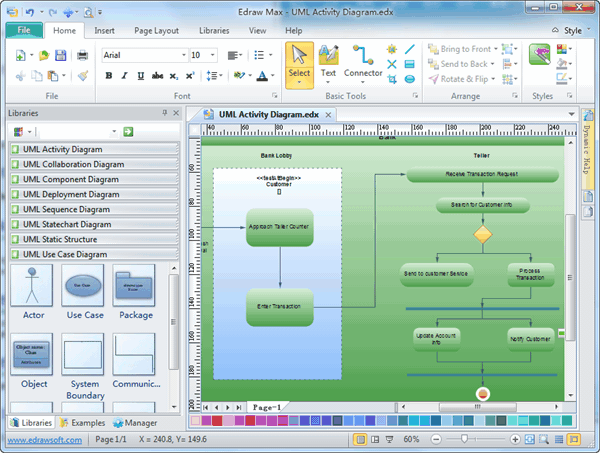
Free Download UML Diagram Software and View All Examples. In EdrawMax , the UML Activity Diagrams template and shapes are in the Software folder.
EdrawMax
All-in-One Diagram Software
- Superior file compatibility: Import and export drawings to various file formats, such as Visio
- Cross-platform supported (Windows, Mac, Linux, Web)
 Security Verified | Switch to Mac >> Security Verified | Switch to Linux >> Security Verified | Switch to Windows >>
UML Activity Diagram Symbols
Edraw is an ideal software to draw UML activity diagrams.
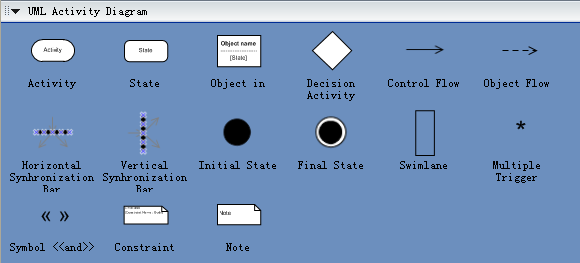
Examples of UML Activity Diagrams

How to Draw UML Activity Diagrams
1. Identify the scope of the activity diagram
Begin by identifying what you are modeling. Is it a single use case? A portion of a use case? A business process that includes several use cases? A single method of a class? Once you identify the scope of your diagram, you should add a label at the top, using a note, indicating an appropriate title for the diagram and a unique identifier for it. You may also want to include the date and even the names of the authors of the diagram.
2. Add start and end points
Every activity diagram has a starting point and an ending point, so you might as well add them right away. In UML Distilled (see Resources), Fowler and Scott make ending points optional. Sometimes an activity is simply a dead end but, if this is the case, then there is no harm in indicating the only transition is to an ending point. In this way, when someone else reads your diagram, he or she knows you have considered how to exit these activities.
3. Add activities
If you are modeling a use case, introduce an activity for each major step initiated by an actor (this activity would include the initial step, plus any steps describing the response of the system to the initial step). If you are modeling a high-level business process, introduce an activity for each major process, often a use case or a package of use cases. Finally, if you are modeling a method, then it is common to have an activity for this step in the code.
4. Add transitions from the activities
My style is always to exit an activity, even if it is simply to an ending point. Whenever there is more than one transition out of an activity, you must label each transition appropriately.
5. Add decision points
Sometimes the logic of what you are modeling calls for a decision to be made. Perhaps something needs to be inspected or compared to something else. What is important to note is that the use of decision points is optional. For example, in Figure 1, I could just as easily have modeled the accepted and rejected transitions straight out of the "Enroll in University" activity.
6. Identify opportunities for parallel activities
Two activities can occur in parallel when no direct relationship exists between them and they must both finish before a third activity can. In Figure 1 you see it is possible to attend the overview or enroll in seminars in either order, but both activities must occur before you can end the overall process.
More Related

